How to Receive Crypto on Trezor Wallet (2026 Guide)Β 

Home / Blog / Article
Facebook Twitter LinkedIn
Copied! Paste in ChatGPT πŸš€
How to Receive Crypto on Trezor Wallet

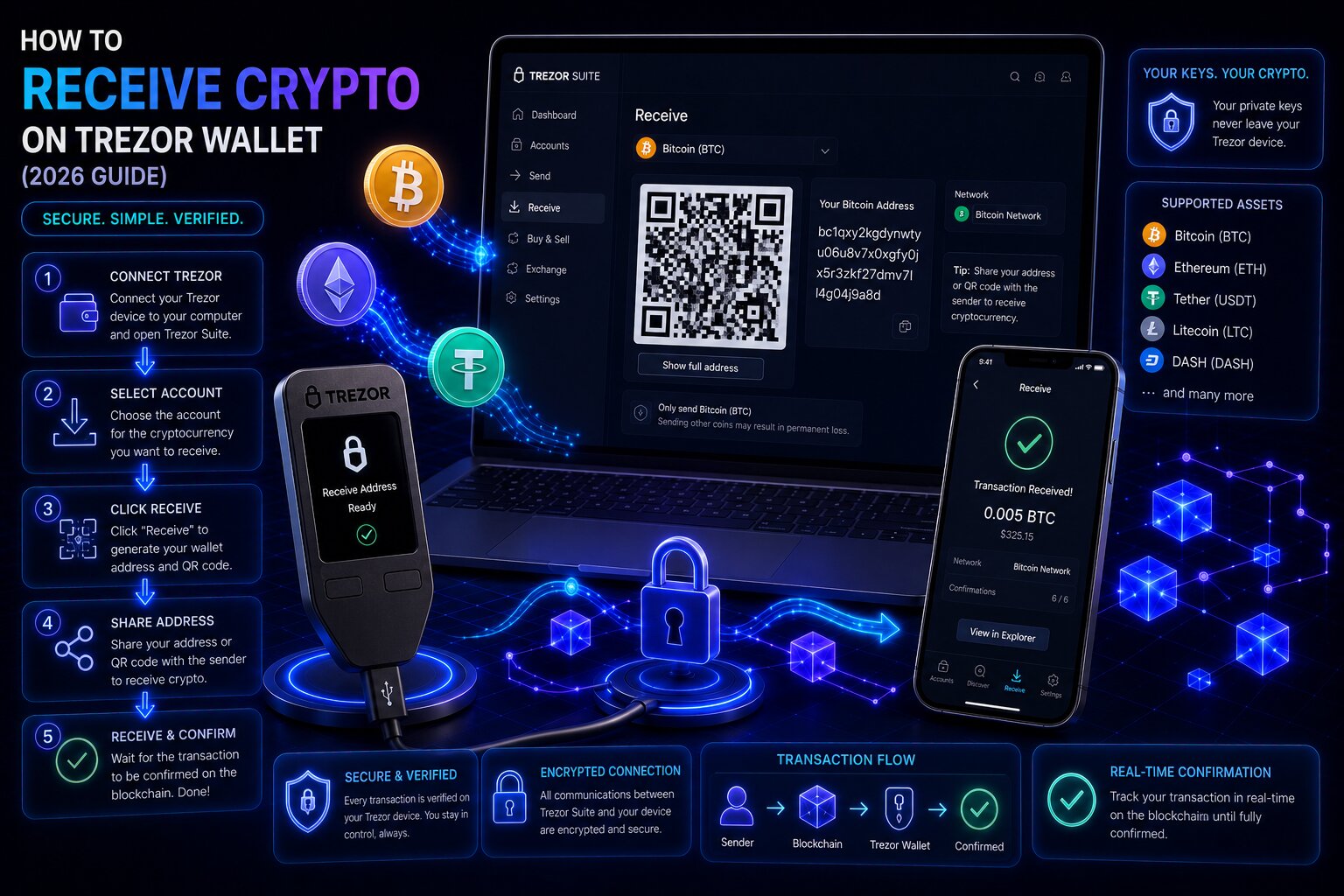
Receiving crypto on Trezor Wallet generates a deposit address through the companion application and verifies it against the hardware device screen before sharing it with the sender. The address displayed on the device screen is cryptographically derived from the private key inside the Secure Element – it cannot be altered by software running on the connected computer.

Receive StepPlatformCritical Action
Select accountWallet interfaceMatch account to the asset and network being sent
Generate addressWallet interfaceClick Receive β†’ Show full address
Verify addressHardware device screenCompare device display against wallet interface
Share addressAfter device confirmationCopy, share, or QR code scan
Monitor arrivalWallet dashboardWait for required confirmations before spending
  • Bitcoin generates a fresh address for every new receive transaction β€” the HD wallet derives each from the same seed without reusing previous addresses.
  • Ethereum, Solana, XRP, and most non-Bitcoin chains use a single fixed address per account β€” the same address receives all assets on that network.
  • ERC-20 tokens arrive automatically at the Ethereum account address β€” no separate address setup is required.
  • XRP and XLM require a destination tag when receiving from centralized exchanges β€” missing the tag routes funds to the exchange’s general pool, requiring manual recovery.

Key Terms for Receiving Crypto on Trezor Wallet

TermDefinition
HD WalletHierarchical Deterministic wallet β€” derives all addresses from a single seed phrase using BIP-32 derivation
Fresh AddressA new, previously unused Bitcoin address generated from the HD wallet for each incoming transaction
Address Gap LimitBIP-44 rule: up to 20 unused addresses per account can be pre-generated before at least one must be used
Taproot (P2TR)Bitcoin address format starting with bc1p β€” most efficient fee structure and strongest privacy
Bech32 (SegWit)Native SegWit address format starting with bc1q β€” lower fees than legacy formats
P2SH-P2WPKHLegacy SegWit address starting with 3 β€” transition format between P2PKH and Bech32
P2PKH (Legacy)Original Bitcoin address format starting with 1 β€” highest fees, widest compatibility
Destination TagA numeric identifier required by some exchanges alongside the XRP or XLM address for deposit attribution
Address ReuseUsing the same Bitcoin receive address for multiple transactions β€” valid but reduces privacy
Network ConfirmationA block added to the chain after a transaction β€” each confirmation reduces the probability of reversal

What does receiving crypto on Trezor Wallet involve?

Receiving crypto on Trezor Wallet is the process of generating a deposit address through the companion application, verifying it on the hardware device screen to confirm it has not been manipulated, and sharing the verified address with the sender. The cold storage device never needs to be connected at the moment of receipt β€” funds arrive at the blockchain address regardless of whether the hardware signer is plugged in.

  • Crypto assets exist on the blockchain associated with the address β€” the Trezor device does not need to be powered on or connected to receive funds.
  • The wallet interface generates addresses by reading the extended public key (xpub) from the hardware signer β€” it can display addresses without the device connected, but verification requires the device.
  • Address verification on the hardware screen protects against man-in-the-middle attacks where malicious software substitutes a different address in the wallet interface β€” the device screen renders from cryptographic derivation, not from the computer display.

Why does Trezor require address verification on the device screen before receiving?

Address verification on Trezor protects against two distinct attack categories: malware that substitutes addresses in the wallet interface, and phishing sites that display attacker-controlled addresses disguised as Trezor deposit screens.

  • The hardware device derives receive addresses independently of the connected computer β€” the address on the device screen is always a valid address belonging to the wallet.
  • If the address displayed in the companion application does not match the device screen β€” the computer is infected with address-substitution malware and no addresses from that machine should be trusted until the malware is removed.
  • Trezor Suite Lite on Android allows address verification with a connected device without requiring the desktop application β€” useful for verifying addresses on mobile before sharing.

How do you receive crypto on Trezor Wallet β€” step by step?

The receive flow is identical across all supported assets β€” the account selection step is where asset-specific choices occur.

How do you receive Bitcoin on Trezor Wallet β€” step by step?

Steps β€” Bitcoin receive:

  1. Connect the Trezor device via USB and unlock with the PIN Code.
  2. Open the companion application β†’ Accounts β†’ select the Bitcoin account (specify Taproot, SegWit, or Legacy SegWit depending on sender compatibility).
  3. Click the Receive button in the account view.
  4. Click Show full address β€” the wallet interface displays the receive address partially, prompting device verification.
  5. The hardware device screen displays the full Bitcoin address β€” compare every character against the address shown in the wallet interface.
  6. Press the confirmation button on the device to authenticate the address.
  7. The wallet interface now shows the full verified address with Copy, Share, and QR Code options.
  8. Share the address with the sender β€” or display the QR code for scanning.
  9. Monitor the incoming transaction in the wallet dashboard β€” the unconfirmed transaction appears immediately after broadcast.
  10. Wait for 3-6 confirmations (~30-60 minutes at normal network conditions) before treating the received funds as final.

Always verify the receive address on the hardware device screen before sharing it with anyone. An address visible in the wallet interface but not yet verified on the device may have been substituted by software running on the computer.

How do you receive Ethereum and ERC-20 tokens on Trezor Wallet?

Ethereum and all ERC-20 tokens share the same 0x address β€” receiving USDC, USDT, LINK, or any ERC-20 token requires no address configuration beyond the standard Ethereum receive flow.

Steps β€” Ethereum and ERC-20 receive:

  1. Connect and unlock the hardware signer.
  2. Wallet interface β†’ Accounts β†’ select the Ethereum account (or the specific EVM network account β€” Arbitrum, Base, Polygon, BNB Chain).
  3. Click Receive β†’ Show full address β†’ verify the 0x address on the device screen β†’ confirm.
  4. Share the verified Ethereum address with the sender β€” specify the correct network (Ethereum mainnet, Arbitrum, Base) to match the account selected.
  5. ERC-20 tokens appear automatically in the Ethereum account once received β€” no manual token addition is required for incoming tokens.
  6. ETH itself is required in the account for gas to spend received tokens in future transactions.
  • The same Ethereum address receives ETH and all ERC-20 tokens β€” this is different from Bitcoin’s fresh address model, where each transaction uses a new address.
  • Receiving USDC sent on the Polygon network into an Ethereum mainnet account will result in funds on the wrong chain β€” the account network selector must match the sender’s network.

After completing the standard Bitcoin and Ethereum receive flows, understanding address types helps choose the most efficient Bitcoin account for incoming transfers.

How do you receive XRP on Trezor Wallet β€” and what is the destination tag?

XRP uses a single fixed address per account β€” but centralized exchanges require a destination tag alongside the address to attribute the deposit to the correct user account.

Steps β€” XRP receive from exchange:

  1. Wallet interface β†’ Accounts β†’ select the XRP account.
  2. Click Receive β†’ Show full address β†’ verify the XRP address on the device screen.
  3. Note both the XRP address and the Destination Tag displayed β€” both are required for exchange deposits.
  4. On the exchange withdrawal page, enter the Trezor XRP address in the address field and the destination tag in the tag/memo field.
  5. Sending XRP to the Trezor address without a destination tag (or with the wrong tag) routes funds to the exchange’s master account pool β€” recovery requires contacting exchange support with transaction proof.
  • XRP support on Trezor is available on Safe 3, Safe 5, Safe 7, and Model T β€” Model One does not support XRP natively.
  • XLM (Stellar) and ATOM (Cosmos) use the same destination tag / memo architecture as XRP when receiving from centralized exchanges.

What are the Bitcoin address types on Trezor β€” Taproot, SegWit, and Legacy explained?

Trezor Wallet supports four Bitcoin address formats β€” each representing a different protocol version with different fee efficiency, privacy characteristics, and exchange compatibility.

Address TypeFormat PrefixFee EfficiencyPrivacyExchange CompatibilityDefault in 2026
Taproot (P2TR)bc1p…HighestBestMost exchangesYes
Native SegWit / Bech32 (P2WPKH)bc1q…HighGoodMost exchangesLegacy default
Legacy SegWit (P2SH-P2WPKH)3…MediumMediumWideTransitional
Legacy (P2PKH)1…LowestLowestUniversalOldest format
  • Taproot (bc1p) is the default new Bitcoin account type in Trezor Suite 2026 β€” it provides the lowest transaction fees and the strongest on-chain privacy through Schnorr signatures.
  • Native SegWit (bc1q) offers nearly identical fee efficiency to Taproot β€” use it when the sender’s platform does not yet support Taproot addresses.
  • Legacy addresses (starting with 1) carry the highest fees due to their larger transaction weight β€” use only when required by older exchanges or wallets that do not accept Bech32 or Taproot formats.

Which Bitcoin address type should you use on Trezor in 2026?

Use Taproot (bc1p) for all Bitcoin receives where the sending platform supports it β€” it provides the lowest fees and best privacy. Use Native SegWit (bc1q) as the fallback when a sender or exchange reports incompatibility with Taproot. Use Legacy formats only when no modern alternative is accepted.

  • Different account types in Trezor Suite maintain separate balance pools β€” Bitcoin held in a Taproot account cannot be spent alongside Bitcoin in a SegWit account in a single transaction.
  • Multiple Bitcoin account types can coexist in the wallet interface simultaneously β€” creating a Taproot account does not affect existing SegWit or Legacy accounts.

Why does Trezor show a different Bitcoin address each time – fresh address explained?

Trezor generates a new Bitcoin receive address for every incoming transaction because the HD wallet derives a sequential series of addresses from the master seed using BIP-32 and BIP-44 derivation paths β€” fresh address generation is automatic and deterministic.

  • Each fresh address is mathematically derived from the same master seed β€” all fresh addresses belong to the same account and all received funds are accessible through a single recovery.
  • The BIP-44 address gap limit restricts the companion application to generating up to 20 unused addresses per account before at least one must be used β€” after using one address, additional fresh addresses become available.
  • All fresh addresses in the same account share the same balance pool β€” Bitcoin sent to Address #1, Address #5, and Address #18 all appear as a single combined account balance.

Can you reuse a Trezor receive address – and what is the risk?

Reusing a Bitcoin receive address is technically valid β€” funds arrive correctly regardless of whether the address has received before. The risk is reduced privacy: address reuse links multiple transactions to the same entity on the public blockchain, enabling chain analysis to trace transaction patterns.

BehaviorAddress ReuseFresh Address Per Transaction
Funds received correctlyYesYes
Transaction privacyReduced β€” linked on-chainBetter β€” unlinkable payments
Chain analysis resistanceLowHigher
Sender knows payment historyYes β€” full history visibleNo β€” each address is independent
Recommended practiceNoYes
  • CoinJoin in Trezor Suite can improve Bitcoin transaction privacy retroactively β€” it mixes UTXOs with other users to obscure the transaction graph even for previously reused addresses.
  • Trezor Suite automatically presents a fresh address each time Receive is clicked β€” reuse only occurs if the user deliberately shares an old address.

Why does Ethereum always use the same address on Trezor?

Ethereum’s account model uses a single address per account β€” unlike Bitcoin’s UTXO model, which generates a new address for each incoming transaction. An Ethereum account maintains a persistent balance and nonce counter at one address, and all transactions reference that single address.

  • Ethereum’s account-based model makes address rotation impractical β€” the nonce counter is tied to the address, and a new address would start from nonce 0 with no transaction history.
  • Privacy on Ethereum is managed through mixing protocols and Layer 2 solutions β€” not through address rotation.
  • All ERC-20 tokens received at an Ethereum address accumulate in the same account β€” USDC, USDT, LINK, and ETH all appear together under the same 0x address in the wallet interface.

How many confirmations does Trezor need to receive Bitcoin safely?

Network confirmations quantify how deeply a transaction is buried in the blockchain β€” each additional block mined after the transaction reduces the probability of a reorganization reversing it.

NetworkRecommended ConfirmationsTime at Normal FeeWhen to Spend
Bitcoin3-6 confirmations30-60 minutesAfter 3-6 blocks
Ethereum12-35 (exchange-dependent)2-7 minutesAfter exchange credits
Arbitrum One1-2Under 1 minuteNear-instant
Base1-2Under 1 minuteNear-instant
Polygon5-10Under 1 minuteNear-instant
Solana1SecondsNear-instant
  • Technically, received Bitcoin can be spent after 0 confirmations (while still unconfirmed in the mempool) β€” Trezor Suite allows this but recommends waiting for 3-6 confirmations before treating funds as final.
  • Exchanges require specific confirmation counts before crediting deposits β€” Coinbase waits for 3 Bitcoin confirmations (~30 minutes), Kraken requires 6 (~60 minutes).
  • EVM Layer 2 networks (Arbitrum, Base, Polygon) achieve finality in seconds to minutes β€” received tokens on these networks are spendable almost immediately after the transaction broadcasts.

What causes wrong network errors when receiving on Trezor β€” and how do you prevent them?

Wrong network errors occur when the sender transmits assets on a different blockchain than the Trezor account selected β€” funds arrive on an unintended chain the selected account cannot access.

ScenarioResultRecovery
USDC sent on Ethereum β†’ Arbitrum account selectedUSDC on Ethereum β€” Arbitrum account shows zeroSwitch to Ethereum account to access
ETH sent via BNB Chain β†’ Ethereum account selectedETH-equivalent on BNB ChainCreate BNB account in Trezor Suite
BTC sent to ETH addressBroadcast fails β€” incompatible formatsRejected before confirmation
USDT (TRC-20 / Tron) sent to Ethereum addressFunds on Tron β€” inaccessible in Trezor Suite nativelyRequires third-party Tron wallet
XRP sent without destination tag to exchangeArrives in exchange general poolContact exchange support with tx hash

What happens if you receive the wrong cryptocurrency to a Trezor address?

Sending the wrong coin type to an address typically results in broadcast failure (if address formats are incompatible) or funds arriving on an accessible chain the user wasn’t monitoring. The most common wrong-network error involves EVM-compatible tokens sent on the wrong L2 network.

  • EVM-compatible addresses (Ethereum, Arbitrum, Base, Polygon, BNB Chain) all share the same 0x address format β€” funds sent on the wrong EVM network arrive at the same address on a different chain.
  • Creating the corresponding network account in Trezor Suite recovers funds sent to the correct address on the wrong EVM chain β€” the assets appear once the account is added.
  • Non-EVM assets (Tron TRC-20, Solana SPL from incompatible senders) sent to an Ethereum address are permanently inaccessible in Trezor Suite β€” recovery requires a third-party wallet supporting that network.

Security model for receiving on Trezor Wallet

  • The device screen is the only trusted verification surface β€” address verification cannot be skipped for high-value receives.
  • The companion application can display addresses without the device connected (using the cached extended public key) β€” but these unverified addresses should not be shared until device verification is completed.
  • Android users running Trezor Suite Lite can verify receive addresses with a connected device without the desktop application β€” providing mobile address verification capability.
  • Test receives β€” sending a small amount first β€” remain the safest practice when using a receive address for the first time, particularly for large inbound transfers from exchanges.

Common mistakes when receiving on Trezor Wallet

MistakeResultPrevention
Sharing address without device verificationMan-in-the-middle β€” funds to attacker’s addressAlways verify on device screen before sharing
Wrong EVM network selectedFunds on unintended chainVerify account name (Ethereum vs Arbitrum vs Base) matches sender’s network
ERC-20 token sent to wrong EVM chainTokens on wrong chainConfirm network with sender before providing address
XRP received without destination tagExchange pools funds β€” not creditedAlways provide both XRP address AND destination tag
Reusing Bitcoin addressReduced privacy β€” linked transactionsUse fresh address from Receive button each time
Not waiting for confirmationsSpending unconfirmed UTXO β€” reversibleWait for 3-6 BTC confirmations before spending

FAQ 

How do I receive crypto on my Trezor wallet?

Connect the Trezor device, open the companion application, select the correct account for the asset and network, click Receive β†’ Show full address, verify the address on the hardware device screen, press confirm, then share the verified address or QR code with the sender. Monitor the incoming transaction in the wallet dashboard β€” wait for 3-6 Bitcoin confirmations before treating funds as final.

How do I get my Trezor Bitcoin address?

Open Trezor Suite β†’ select the Bitcoin account (Taproot, SegWit, or Legacy) β†’ click Receive β†’ Show full address β†’ verify the address on the hardware device screen β†’ confirm. Trezor generates a fresh Bech32 or Taproot address for each new receive. All addresses shown belong to the same account and share the same balance pool derived from the master seed.

Why does my Trezor show a different address each time?

Trezor generates a fresh Bitcoin address for every new receive transaction using HD wallet (BIP-32/BIP-44) derivation β€” each address is mathematically derived from the master seed in sequence. Fresh address generation improves transaction privacy by preventing on-chain linking of multiple payments. Ethereum, Solana, and XRP always use the same fixed address per account β€” only Bitcoin rotates addresses.

Can I reuse a Trezor receive address?

Yes β€” Bitcoin funds arrive correctly at a reused address. However, address reuse reduces privacy by linking multiple transactions to the same entity on the public blockchain, enabling chain analysis to trace payment history. Trezor Suite automatically presents a fresh address each time Receive is clicked. Use CoinJoin in Trezor Suite to improve privacy on previously reused addresses retroactively.

How do I receive ERC-20 tokens on Trezor?

Select the Ethereum account in Trezor Suite β†’ Receive β†’ Show full address β†’ verify on device screen β†’ share the 0x address. All ERC-20 tokens (USDC, USDT, LINK, and others) are received at the Ethereum address automatically β€” no token-specific address setup is required. Tokens appear in the account once received. Ensure ETH is in the account to pay gas for future token transfers.

How many confirmations does Trezor need to receive Bitcoin?

Trezor Suite recommends 3-6 Bitcoin confirmations (~30-60 minutes at Normal fee) before treating received funds as final. Technically, unconfirmed Bitcoin can be spent immediately but carries reversal risk. Most exchanges require 3-6 confirmations before crediting deposits. EVM Layer 2 networks (Arbitrum, Base, Polygon) achieve finality in under one minute.

What is the Trezor receive address for Ethereum?

The Ethereum receive address is a fixed 0x address displayed in Trezor Suite under the Ethereum account β†’ Receive β†’ Show full address. This same address receives ETH and all ERC-20 tokens on Ethereum mainnet. The same address format is shared by Arbitrum, Base, Polygon, and BNB Chain accounts β€” but each network account maintains a separate balance. Verify the address on the hardware device screen before sharing.

How do I receive XRP on Trezor?

Select the XRP account in Trezor Suite β†’ Receive β†’ Show full address β†’ verify on device screen. Note both the XRP address and the Destination Tag displayed. When withdrawing XRP from a centralized exchange, enter both the Trezor XRP address and the destination tag in the exchange’s withdrawal form. Sending without the destination tag routes funds to the exchange’s master pool β€” recovery requires exchange support. XRP is supported on Safe 3, Safe 5, Safe 7, and Model T only.

Share:

Resend posts

Our insights? Click below to add us as your preferred source on Google
Follow trusted sources to improve your search experience

Send Us A Message