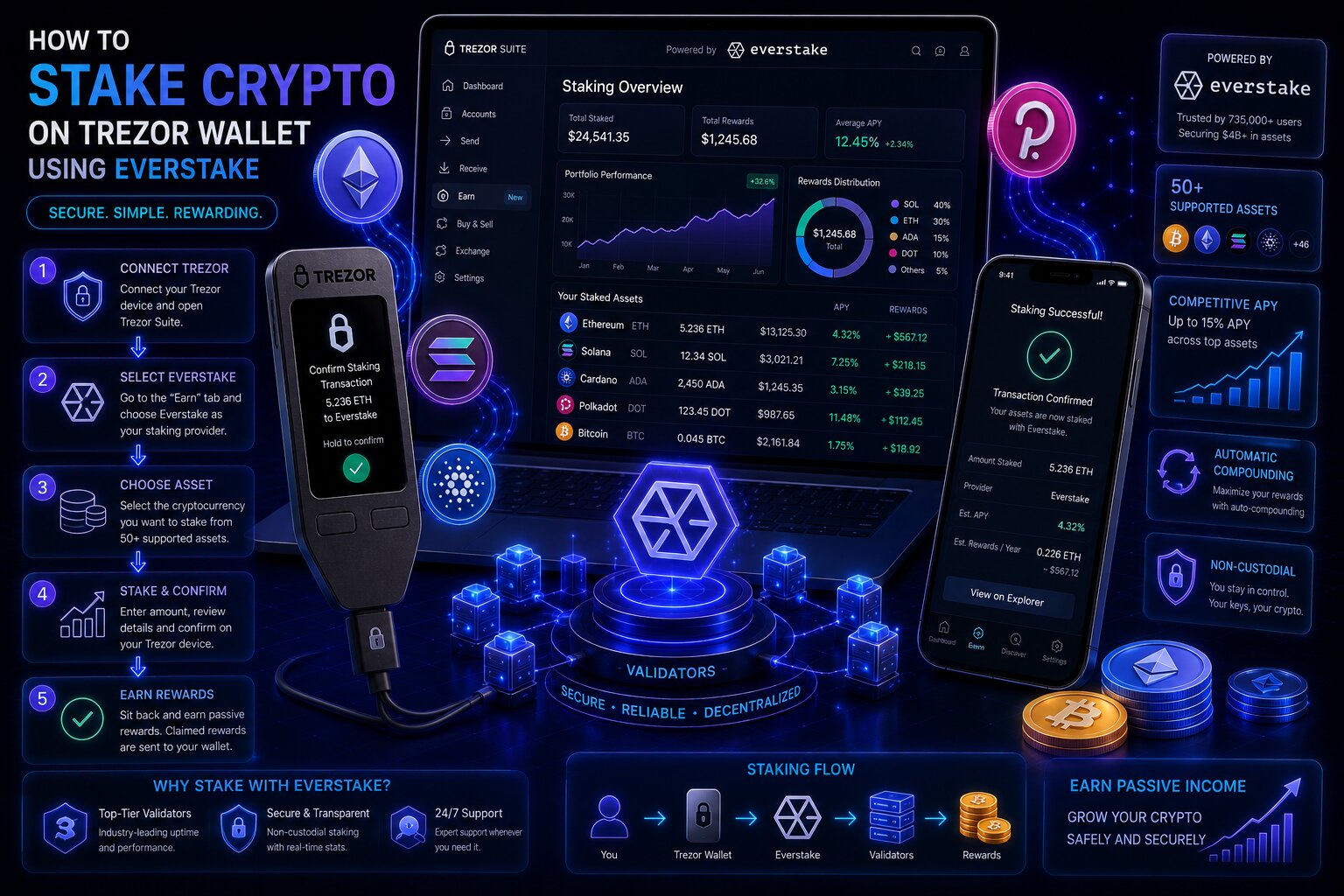
Staking on Trezor Wallet lets users earn Proof-of-Stake rewards while keeping private keys on a hardware device.
Trezor Suite natively supports ETH staking and ADA delegation through Everstake — a non-custodial validator service audited by ChainSecurity and Ackee. Private keys remain isolated throughout every staking operation.
Asset
Provider
Minimum
APY (May 2026)
Liquidity
ETH
Everstake (pooled)
0.1 ETH
~3.52–4%
Locked during staking
ADA
Everstake (delegation)
2 ADA + fee
~2–2.5%
Fully liquid
What Is Staking on Trezor Wallet?
Staking is the process of earning Proof-of-Stake network rewards by committing crypto assets to validator infrastructure while private keys remain secured on the hardware device. Trezor Suite provides integrated staking for ETH and ADA — both routed through Everstake’s validator infrastructure without transferring self-custody to any third party.
Ethereum staking rewards originate from Beacon Chain validator participation — distributed for block proposals, attestations, and sync committee duties. ADA delegation assigns voting weight to a Cardano stake pool operator, with epoch rewards (~120 hours) distributed automatically without moving or locking ADA.
Which Trezor Staking Method Fits Your Situation?
User Goal
Best Method
Highest APY (~3.52–4%)
ETH staking
Full liquidity during staking
ADA delegation — balance never locked
Lowest smart contract exposure
ADA delegation — no contract involved
Governance participation
ADA — DRep voting rights
SOL, DOT, ATOM, MATIC staking
Third-party dApps via WalletConnect
Which Trezor Models Support Integrated Staking?
Model
ETH Staking
ADA Staking
Notes
Safe 7
Yes
Yes
APY banner in ETH account
Safe 5
Yes
Yes
Full Suite-level support
Safe 3
Yes
Yes
Full Suite-level support
Model T
Yes
Yes
Full Suite-level support
Model One
No
No
Third-party staking only
How Do You Stake ETH on Trezor — Step by Step?
ETH staking routes assets to Everstake’s pooled staking smart contract on Ethereum — participating in Beacon Chain validation without running independent node infrastructure.
1
Open Staking tab
Connect and unlock, then Trezor Suite → Accounts → Ethereum #1 → Staking tab to see the APY estimate.
2
Start staking
Click Start staking, acknowledge that staked ETH is locked during the staking period, and grant consent for Everstake.
3
Enter amount
Enter the stake amount — minimum 0.1 ETH. Do not stake 100% of the balance; keep ETH for gas.
4
Confirm on device
Verify transaction details on the Trezor device screen and press confirm — ETH enters the Everstake pool.
Staked ETH cannot be traded, swapped, or sent during the staking period. Maintain a gas reserve in the Ethereum account for future transactions.
Why Is the Minimum 0.1 ETH — Not 32 ETH?
Solo Ethereum validator activation requires exactly 32 ETH — approximately $96,000 at $3,000 per ETH. Everstake’s pooled infrastructure combines deposits from all participants, operating validators on their behalf with withdrawal credentials configured to each user’s Trezor-controlled address, distributing rewards proportionally.
Unstaking ETH — Unstake and Claim
ETH withdrawal from the Everstake pool consists of two separate on-chain steps, both requiring hardware confirmation. Click Unstake and confirm, wait for the unstaking period, then click Claim and confirm — ETH and rewards return to the main account balance.
Scenario
Duration
Condition
Instant unstake
Minutes
Pool has simultaneous new entrants
Standard queue
Hours to days
Exit demand exceeds inflow
Network-wide exit queue
Days to weeks
Rare — protocol-level cap
How Do You Stake ADA on Trezor — Step by Step?
ADA staking delegates the account’s stake weight to Everstake’s Cardano stake pool — the ADA balance remains fully liquid and accessible throughout the entire delegation period.
1
Open Staking tab
Connect and unlock, then Trezor Suite → Accounts → Cardano account → Staking tab.
2
Delegate
Click Delegate and review the required 2 ADA staking key deposit plus network fee.
3
Review governance
Default assigns voting rights to Everstake’s DRep — change to any preferred DRep without affecting reward delegation.
4
Confirm on device
Confirm the delegation transaction on the Trezor device screen — rewards begin accruing from the next epoch (~120 hours).
Trezor Suite changed its ADA staking provider from 5binaries to Everstake in November 2025 (Suite 25.11.1). Previous 5binaries delegators should update via the Update provider prompt.
ETH vs ADA Staking — Which Is Better?
Criterion
ETH Staking
ADA Delegation
APY
~3.52–4%
~2–2.5%
Liquidity
Locked
Liquid
Smart contract risk
Present
None
Minimum
0.1 ETH
2 ADA
Governance
No
DRep voting
Unstaking complexity
2 steps
Instant
How Does Trezor Staking Compare to Liquid Staking?
Liquid staking platforms like Lido and Rocket Pool issue derivative tokens (stETH, rETH) that can be traded and used in DeFi while the underlying stake earns rewards. Trezor’s integrated staking via Everstake does not issue derivative tokens — it avoids peg risk but sacrifices DeFi composability.
Feature
Trezor + Everstake
Liquid Staking
Derivative token
No
stETH / rETH
DeFi composability
No
Yes
Peg risk
None
Present
Hardware signing
Yes
Via WalletConnect
What Other Crypto Can You Stake With Third-Party Wallets?
Asset
Method
Platform
SOL
WalletConnect dApp
Marinade Finance, Jito
DOT
Polkadot.js extension
Polkadot network
ATOM
Keplr or Leap
Cosmos Hub
MATIC
WalletConnect dApp
Polygon network
What Trezor Staking Does Not Support
Limitations to Know
Trezor does not operate validators directly — Everstake manages ETH and ADA infrastructure
Trezor does not guarantee staking rewards — APY figures are estimates
Trezor does not eliminate validator slashing risk entirely
Trezor does not support native SOL, DOT, ATOM, or MATIC staking in Suite
Trezor does not provide tax guidance on staking rewards
Common Mistakes When Staking on Trezor
Mistake
Result
Prevention
Staking 100% ETH balance
Transaction fails — no gas
Leave a gas reserve before staking
Not updating ADA provider
Rewards stop
Update via Staking dashboard prompt
Expecting instant ETH unstaking
Delays during low inflow
Plan for variable timeframes
Trading staked ETH
Blocked — cannot trade
Only stake long-term positions
Ignoring staking tax implications
Unexpected tax liability
Track reward receipt dates
Frequently Asked Questions
Yes. Trezor Suite natively supports ETH staking and ADA delegation through Everstake. ETH requires 0.1 ETH minimum (~3.52–4% APY). ADA requires 2 ADA plus fees (~2–2.5% APY). Model One requires third-party staking services.
Trezor Suite → Ethereum account → Staking tab → Start staking → enter amount (minimum 0.1 ETH) → confirm on device. ETH enters Everstake’s pooled validator contract and is locked until unstaked via the two-step process.
Approximately 3.52–4% APY as of May 2026, variable based on total Beacon Chain participation. Rewards are not guaranteed and decrease as total staked ETH network-wide increases.
Ethereum account → Staking tab → Unstake → confirm on device. After the unstaking period, click Claim → confirm again. Both are separate on-chain transactions requiring hardware confirmation.
Yes, via Everstake on Safe 3, Safe 5, Safe 7, and Model T. Minimum 2 ADA plus network fee. ADA stays liquid throughout delegation, with rewards distributed each Cardano epoch (~120 hours).
Self-custody is fully maintained — Everstake never receives signing authority. ETH staking introduces audited smart contract risk. ADA delegation carries no smart contract risk since assets never move.