How to Receive Crypto in Coinbase Wallet (2026 Guide)Β
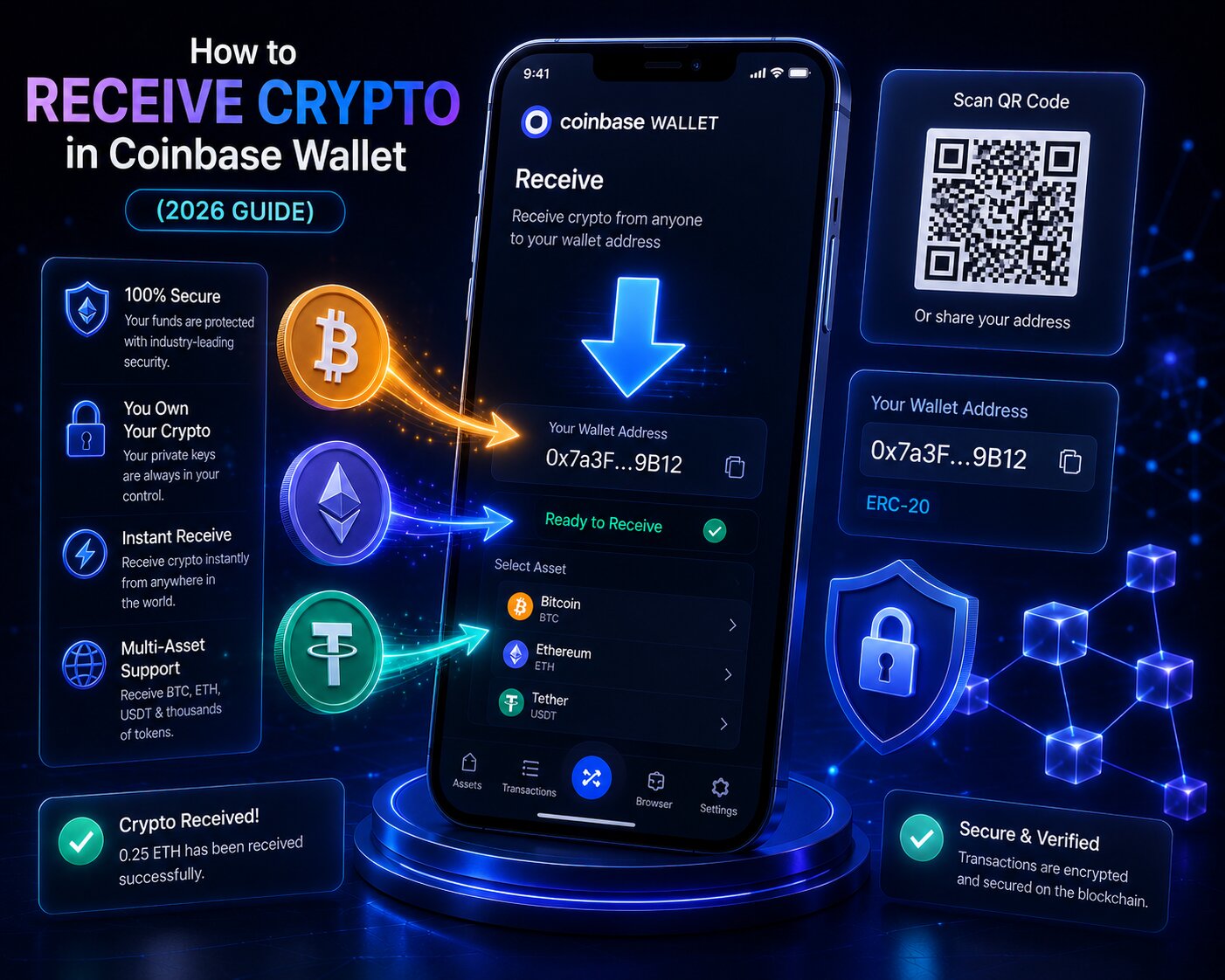
To receive Bitcoin, Ethereum, USDC, NFTs, or other crypto in Coinbase Wallet, open the Receive tab, select the correct Blockchain Network, then share the Public Address or QR Code with the sender. Coinbase Wallet is a self-custodial wallet – private keys are controlled by the user, and no KYC is required to accept inbound transfers.
| Receive Method | How It Works | Best For |
| Public Address | Copy alphanumeric string – share with sender | Remote wallet-to-wallet transfers |
| QR Code | Sender scans – no typing required | In-person transfers |
| cb.id Username | Human-readable handle – resolves to wallet address | Transfers between Coinbase Wallet users |
| ENS Address (.eth) | .eth name – resolves to Ethereum address | ETH and ERC-20 token receives |
| Shareable Link | URL-based – sender needs no wallet address | Recipients new to crypto |
- Coinbase Wallet supports 10,000+ tokens across Ethereum, Bitcoin, Solana, Base, Polygon, Avalanche, BNB Chain, and Stellar – each blockchain generates a unique receiving address.
- The Ethereum address in Coinbase Wallet accepts all EVM-compatible tokens simultaneously – ETH, USDC (ERC-20), USDT (ERC-20), and all other ERC-20 tokens use the same 0x address.
- Blockchain Network selection is the most critical step in every receive flow – an inbound transfer on the wrong network results in permanent loss that neither Coinbase Wallet nor any third party can reverse.
Key Terms for Receiving Crypto in Coinbase Wallet
| Term | Definition |
| Public Address | A public blockchain identifier that receives incoming crypto – safe to share, grants no spending capability |
| Blockchain Network | An independent transaction ledger – Ethereum, Base, Solana, and Polygon are separate networks |
| ERC-20 | Ethereum token standard – all tokens built on Ethereum follow this standard |
| BEP-20 | BNB Chain token standard – technically similar to ERC-20 but on a different blockchain |
| Gas Fee | Network processing fee paid to validators – not charged by Coinbase Wallet |
| TxID (Transaction Hash) | Unique identifier for every blockchain transaction – used to track confirmation status |
| Self-custodial Wallet | A wallet where the user controls the private keys – Coinbase Wallet is self-custodial |
| Mempool | Waiting area for unconfirmed transactions before validators include them in a block |
What is a Coinbase Wallet receive address and how is it generated?
A Coinbase Wallet receive address is a Public Address derived from the private key stored on the user’s device. Sharing it allows anyone to send funds β it grants zero ability to access or spend the wallet balance.
What is the difference between a Public Address, cb.id username, and ENS address?
| Identifier | Format | Networks Supported | Requires Registration | Safe to Share |
| Public Address | 0x… (ETH) / bc1… (BTC) | Chain-specific | No – auto-generated | Yes |
| cb.id Username | yourname.cb.id | All EVM-compatible chains | Yes – free claim | Yes |
| ENS Address | yourname.eth | Ethereum + ENS-compatible wallets | Yes = requires ETH gas | Yes |
| Web3 Username | @yourname | Supported Coinbase chains | Yes | Yes |
- A cb.id username resolves to the same Ethereum address as the Public Address – it is simply a human-readable shortcut that eliminates the need to share the full 0x string.
- An ENS address registered on the Ethereum Name Service works across any ENS-compatible wallet – not all wallets support cb.id resolution, so the Public Address remains the most universal fallback.
- All receive methods deposit to the same underlying wallet – funds arriving via Public Address, cb.id, or ENS appear in the same Coinbase Wallet account.
Why does each blockchain network generate a different receive address?
Each blockchain uses a different address encoding standard β sending ETH to a Solana address fails permanently because the two networks are architecturally incompatible.
| Blockchain | Address Format | Prefix | Reusable |
| Ethereum + all EVM chains | Hexadecimal | 0x (42 chars) | Yes β permanent |
| Bitcoin | Base58 / Bech32 | 1, 3, or bc1 | Yes β new per tx for privacy |
| Solana | Base58 | β (44 chars) | Yes β permanent |
| Stellar | Base58 | G (56 chars) | Yes β permanent |
- The Ethereum 0x address in Coinbase Wallet accepts tokens from all EVM-compatible chains β Polygon, Avalanche, Base, BNB Chain, Arbitrum, and Optimism all use the same address format.
- Bitcoin generates a fresh address after each transaction to improve on-chain privacy β all previous Bitcoin addresses remain permanently valid and credit to the same account.
Next: choosing the correct Blockchain Network before sharing any receive address prevents the most common and most costly receive error.
How do you choose the correct Blockchain Network in Coinbase Wallet?
Blockchain Network selection determines which chain processes the incoming transfer. Coinbase Wallet and Coinbase cannot recover funds sent on the wrong network β the blockchain is irreversible.
How does network selection work for USDC, USDT, and multi-chain tokens?
USDC and USDT exist simultaneously on multiple blockchains β each version is a separate token on a separate network and is incompatible with the others.
| Token | Network | Standard | Coinbase Wallet Address | Recovery if Wrong |
| USDC | Ethereum | ERC-20 | 0x address (ETH) | Permanent loss |
| USDC | Base | ERC-20 (Base) | Same 0x address β different chain | May recover by adding Base network |
| USDC | Polygon | ERC-20 (Polygon) | Same 0x address β different chain | May recover by adding Polygon |
| USDT | Ethereum | ERC-20 | 0x address (ETH) | Permanent loss if wrong chain |
| USDT | BNB Chain | BEP-20 | Same 0x address β different chain | If recipient only has ETH network |
| USDT | Tron | TRC-20 | T address β completely different | Permanent loss |
- Sending ERC-20 USDC from Binance on Ethereum to a Base-only USDC address creates a cross-network mismatch – the transaction settles on Ethereum instead of Base, and the funds appear only when the Ethereum network is added to Coinbase Wallet.
- ERC-20 and BEP-20 USDT share the same address format (0x) but operate on different blockchains – they look identical visually but are incompatible networks.
- Always confirm the network with the sender before generating and sharing a receive address for any multi-chain token.
How do you match the sender’s network to the correct Coinbase Wallet receive address?
Before sharing a receive address, confirm three things: the asset name, the blockchain network the sender will use, and whether Coinbase Wallet supports that specific network.
Network matching steps:
- Ask the sender which network they will use to send β for example, “I will send USDC on Base.”
- Open Coinbase Wallet β Receive β search for the asset.
- If the asset appears on multiple networks, select the network the sender specified.
- Share the Public Address or QR Code that corresponds to that specific network.
- After the sender initiates the transfer, verify arrival using the appropriate Block Explorer.
| Network | Block Explorer | What It Confirms |
| Ethereum | Etherscan (etherscan.io) | ERC-20 token transfers, ETH sends |
| Base | Basescan (basescan.org) | Base network transactions |
| Polygon | Polygonscan (polygonscan.com) | MATIC and Polygon token transfers |
| Solana | Solscan (solscan.io) | Solana wallet transfers |
| BNB Chain | BscScan (bscscan.com) | BEP-20 token transfers |
- Etherscan verifies all Ethereum transactions β paste the TxID to see confirmation count, destination address, and network.
- Basescan indexes Base blockchain activity β use it when receiving USDC, ETH, or other tokens on the Base network.
- Solscan tracks Solana wallet transfers β confirmation is near-instant on Solana, so any delay visible on Solscan indicates a network issue at the source.
How do you receive crypto in Coinbase Wallet mobile app – step by step?
To accept a crypto transfer in Coinbase Wallet on mobile, navigate to Receive, select the asset and network, and share the Public Address or QR Code. The entire process takes under 1 minute.
Steps:
- Open the Coinbase Wallet mobile app on iOS or Android.
- Tap Receive on the home screen or navigate to Payments tab β Receive.
- Search for and select the asset β ETH, BTC, USDC, SOL, or any supported token.
- If the asset exists on multiple networks, tap the network dropdown and select the correct Blockchain Network β confirm this matches what the sender plans to use.
- The Public Address and QR Code appear on screen.
- Share the address using the most appropriate method:
- Copy the address and paste it into a message or email to the sender.
- Display the QR Code for a nearby sender to scan directly.
- Share a QR Code screenshot via messaging app for remote senders.
- Share the cb.id username or ENS address if the sender uses a compatible wallet.
- The sender initiates the on-chain transfer from their wallet or exchange.
- Funds appear after blockchain confirmation β time varies by network.
How do you receive crypto using a cb.id username in Coinbase Wallet?
A cb.id username (for example, alice.cb.id) is a free human-readable identifier that Coinbase Wallet users can claim. Sharing it allows compatible senders to transfer funds without requiring the full 0x Public Address.
Steps β Claim and share cb.id username:
- Open Coinbase Wallet β tap Settings β tap Username.
- Search for and claim a cb.id handle β available on a first-come basis.
- Share the cb.id handle with the sender instead of the Public Address.
- The sender’s compatible wallet resolves the cb.id name to the correct Ethereum address automatically.
- Funds arrive at the linked Ethereum address in the wallet account.
- A cb.id username resolves to the Ethereum address in Coinbase Wallet and works across all EVM-compatible chains.
- Not all wallets support cb.id resolution β share the full Public Address as a universal fallback when the sender’s wallet compatibility is unknown.
How do you receive crypto in Coinbase Wallet Browser Extension – step by step?
The Browser Extension accepts inbound transfers through the same address system as the mobile app β the navigation path differs slightly since no QR Code scanner is built into desktop browsers.
Steps:
- Click the Coinbase Wallet extension icon in the browser toolbar and unlock with the password.
- Click the QR Code icon at the top-right of the extension home screen.
- Select the asset and Blockchain Network β the Public Address appears below the QR Code image.
- Copy the address and share it with the sender, or take a screenshot of the QR Code for digital sharing.
- Funds arrive after blockchain confirmation and appear automatically in the extension balance.
How does the Browser Extension receive flow differ from the mobile app?
| Feature | Mobile App | Browser Extension |
| QR Code scanner | Built-in camera | Display only |
| Receive button location | Payments tab or home screen | QR icon at top-right |
| cb.id and ENS support | Full | Full |
| Biometric auth | Face ID / fingerprint | Password only |
| Multiple network selection | Dropdown in Receive | Dropdown in Receive |
- Both the mobile app and Browser Extension share the same underlying wallet β an inbound transfer to either address appears in the same account regardless of which interface the user accesses.
How do you receive crypto from Coinbase exchange to Coinbase Wallet?
To move crypto from the Coinbase exchange into Coinbase Wallet, either link the two accounts for a direct transfer or use the standard blockchain send flow.
Coinbase Wallet receive address vs Coinbase exchange deposit address – what is the difference?
| Feature | Coinbase Wallet | Coinbase Exchange |
| Custody type | Self-custodial – user holds keys | Custodial β Coinbase holds keys |
| Address ownership | User-controlled | Coinbase-controlled |
| KYC required | No | Yes |
| Web3 / dApp access | Full | Limited |
| Recovery method | 12-word recovery phrase | Email and password |
| Account type | On-chain wallet | Exchange account |
- Coinbase Wallet and Coinbase exchange are completely separate products β funds held in one do not automatically appear in the other.
- The self-custodial architecture of Coinbase Wallet means Coinbase cannot freeze, reverse, or access wallet funds β unlike custodial exchange accounts where Coinbase controls the keys.
Steps β Direct transfer via linked account:
- Open Coinbase Wallet β tap Buy β tap Connect my Coinbase account.
- Log in with Coinbase exchange credentials to link the accounts.
- Select the asset and amount to transfer from the exchange to the wallet.
- Confirm β funds move directly without requiring a manual blockchain send.
Steps β Standard blockchain transfer:
- In Coinbase Wallet, tap Receive β select the asset β copy the Public Address.
- Log into the Coinbase exchange β navigate to Portfolio β asset β Send.
- Paste the Coinbase Wallet Public Address as the destination.
- Select the matching Blockchain Network β critical for USDC, USDT, and other multi-chain assets.
- Confirm β a Network Fee (gas fee) applies to the on-chain transaction.
How long does Coinbase Wallet take to receive crypto?
Confirmation time depends entirely on the Blockchain Network β the Coinbase Wallet app indexes the balance after the blockchain finalizes the transaction.
Transaction lifecycle for an inbound Coinbase Wallet transfer
| Stage | What Happens | Duration |
| 1. Sender initiates transfer | Wallet constructs and signs the transaction | Seconds |
| 2. Transaction enters mempool | Transaction waits for validator selection | Seconds to minutes |
| 3. Validators confirm | Transaction included in a block | Network-dependent |
| 4. Blockchain finalizes | Transaction permanently recorded on-chain | After required confirmations |
| 5. Coinbase Wallet indexes | App reads blockchain β balance updates | Automatic after finalization |
How long does each blockchain network take to confirm a Coinbase Wallet receives?
| Blockchain | Typical Confirmation Time | Block Explorer |
| Bitcoin | 10β60 minutes (1β6 confirmations) | blockchain.com / mempool.space |
| Ethereum | 10 seconds β 5 minutes | Etherscan (etherscan.io) |
| Solana | Seconds (near-instant finality) | Solscan (solscan.io) |
| Base | Seconds | Basescan (basescan.org) |
| Polygon | Seconds β 1 minute | Polygonscan (polygonscan.com) |
| BNB Chain | Seconds β 1 minute | BscScan (bscscan.com) |
| Stellar | Seconds | Stellar Explorer |
- Bitcoin requires the most time of any major asset β 1β6 block confirmations at approximately 10 minutes per block means most BTC receives take 10β60 minutes.
- Solana and Base transactions finalize in seconds β if a Solana receive is not appearing in Coinbase Wallet within 60 seconds of the sender confirming, check Solscan using the TxID.
- The Coinbase Wallet balance updates automatically after finalization β no manual refresh is usually needed, but pulling down on the home screen forces an immediate sync.
How do you verify a Coinbase Wallet receive address safely?
Verifying the receive address before sharing it prevents two common attacks β clipboard malware and fake QR code substitution β both of which can redirect incoming funds to an attacker.
Security checks before sharing a Coinbase Wallet receive address
| Security Step | Action | Protects Against |
| Verify first and last characters | Check the copied address matches what Coinbase Wallet shows | Clipboard malware substitution |
| Confirm network selection | Re-read the network name on the receive screen before copying | Network mismatch error |
| Verify ENS resolution | Check that the ENS address resolves to the expected 0x address | Misconfigured ENS pointer |
| Avoid QR code overlay attacks | Only display or screenshot QR codes from within the Coinbase Wallet app | Fake QR code overlays |
| Verify on Block Explorer | Paste the Public Address into Etherscan to confirm it shows no suspicious approvals | Phishing address verification |
- Clipboard malware monitors the device for copied crypto addresses and silently substitutes an attacker’s address β always verify the pasted address matches what was displayed in Coinbase Wallet before sharing.
- Coinbase Wallet QR Codes are generated inside the app by the wallet’s own cryptographic layer β only screenshot or share QR codes directly from the app, never from a third-party website.
- Sharing a Public Address publicly is safe β it allows anyone to send funds but grants zero ability to spend the wallet balance.
How do you receive NFTs in Coinbase Wallet?
NFTs are received at the same Ethereum Public Address used for ETH and ERC-20 tokens β no separate NFT address is needed. Coinbase Wallet automatically detects and displays received NFTs in the built-in gallery.
Which NFT standards and blockchains does Coinbase Wallet support?
| NFT Standard | Blockchain | Support | Block Explorer |
| ERC-721 | Ethereum | β Yes | Etherscan |
| ERC-1155 | Ethereum | β Yes | Etherscan |
| ERC-721 | Polygon | β Yes | Polygonscan |
| ERC-721 | Base | β Yes | Basescan |
| NFTs | Solana | β Yes | Solscan |
- An NFT sent to the Coinbase Wallet Ethereum address arrives at the same 0x address used for ETH β no separate NFT wallet address is required.
- The NFT gallery in Coinbase Wallet populates automatically after blockchain confirmation β no manual import step is needed for supported standards.
- NFTs on unsupported chains may not display in the gallery even if the address received them β use Etherscan, Polygonscan, or Basescan to verify the NFT arrived before assuming a receive failure.
What mistakes cause a failed Coinbase Wallet?
Five mistakes account for nearly all failed or delayed inbound transfers to Coinbase Wallet.
| Mistake | Consequence | Prevention |
| Wrong Blockchain Network | Funds arrive on different chain β not visible | Confirm network with sender before sharing address |
| Sending unsupported token | Token received but not displayed | Check supported assets β add custom token if needed |
| Copied wrong address | Funds sent to different wallet | Verify first and last characters after copying |
| Sending BEP-20 to ERC-20 address | Funds on BNB Chain not visible on Ethereum | Verify standard with sender β ERC-20 β BEP-20 |
| Network fee too low | Transaction stuck in mempool β never confirmed | Sender must use Medium or High fee tier |
- Wrong network selection is the most common and most costly mistake β Coinbase cannot recover funds sent on the wrong Blockchain Network.
- Sending BEP-20 (BNB Chain) USDT to an Ethereum ERC-20 USDC address sends the funds to BNB Chain β they become visible only after adding the BNB Chain network inside Coinbase Wallet.
- A Network Fee that is too low from the sender causes the transaction to remain stuck in the mempool indefinitely β the sender must resend with a higher gas fee using Replace-By-Fee (BTC) or fee bump (ETH).
Why is received crypto not showing in Coinbase Wallet – troubleshooting guide?
Missing received crypto has five primary causes – checking the TxID on the correct Block Explorer resolves most cases without contacting support.
What causes received crypto not to appear and how do you fix it?
| Cause | Fix |
| Wrong Blockchain Network used | Find TxID on Block Explorer β confirm which network received funds β add that network in Coinbase Wallet settings |
| Insufficient confirmations | Check TxID on Block Explorer β wait for confirmation count to reach exchange minimum |
| Custom token not in default list | Add token manually using contract address from Etherscan |
| App needs refresh | Pull down on home screen to trigger balance sync |
| Transaction not confirmed on-chain | TxID not found on Block Explorer β sender must resubmit with higher Network Fee |
Conditional logic:
- If the TxID is confirmed on Etherscan but Coinbase Wallet shows no balance β the wrong Blockchain Network was used β add that network in settings or switch the active network view.
- If the TxID shows 0 confirmations on the Block Explorer β the transaction is stuck in the mempool β the sender’s Network Fee was too low.
- If the token is a custom ERC-20 not in the default Coinbase Wallet list β add it manually using the contract address from Etherscan.
FAQ
How do I receive crypto in Coinbase Wallet?
Open Coinbase Wallet, tap Receive, select the asset and Blockchain Network, then share the Public Address or QR Code. Funds appear after blockchain confirmation β seconds for Solana and Base, 10β60 minutes for Bitcoin. No KYC is required to accept inbound transfers in Coinbase Wallet.
How do I find my Coinbase Wallet address?
Open Coinbase Wallet and tap the QR Code icon at the top-right of the home screen. Select the asset and network β the Public Address and QR Code appear immediately. On the Browser Extension, click the QR Code icon in the top-right corner. The Ethereum address works for all EVM-compatible tokens including USDC, USDT, and all ERC-20 assets.
Can I receive any crypto to my Coinbase Wallet address?
Coinbase Wallet supports 10,000+ tokens across Ethereum, Bitcoin, Solana, Base, Polygon, Avalanche, BNB Chain, and Stellar. Each blockchain requires its own address β the Ethereum 0x address accepts all ERC-20 and EVM-compatible tokens. Sending a token on the wrong Blockchain Network results in permanent loss that Coinbase cannot reverse.
How do I receive crypto from Coinbase to Coinbase Wallet?
Link your Coinbase exchange account inside Coinbase Wallet by tapping Buy β Connect my Coinbase account β then transfer directly without copying addresses. For a standard blockchain transfer, copy the Coinbase Wallet Public Address, go to Coinbase exchange Send, paste the address, select the matching Blockchain Network, and confirm. A Network Fee applies.
Why is my Coinbase Wallet not showing received crypto?
Check the TxID on the appropriate Block Explorer β Etherscan for Ethereum, Basescan for Base, Solscan for Solana. If confirmed on the wrong Blockchain Network, add that network in Coinbase Wallet settings. If the token is a custom ERC-20, add it manually via contract address. Pull down to refresh if the balance appears stale.
Is it safe to share my Coinbase Wallet address?
Yes. A Public Address, cb.id username, or ENS address allows anyone to send funds but grants zero ability to spend or access the wallet. Sharing these identifiers publicly is safe by design in all blockchain protocols. Never share the 12-word recovery phrase β it grants full wallet access to anyone who receives it.
Can I reuse the same Coinbase Wallet address?
Yes. The Ethereum address in Coinbase Wallet is permanent β reuse it indefinitely for ETH, ERC-20 tokens, and NFTs. Bitcoin may generate a new address per transaction for privacy, but all previous Bitcoin addresses remain permanently valid. Reusing an Ethereum address carries no security risk and is standard practice.
How do I receive an NFT in Coinbase Wallet?
Share the Ethereum Public Address with the NFT sender or marketplace. NFTs are received at the same 0x address used for ETH β no separate NFT address is needed. Coinbase Wallet supports ERC-721 and ERC-1155 on Ethereum, Polygon, and Base, plus Solana NFTs. Received NFTs appear automatically in the built-in gallery after Etherscan, Polygonscan, or Basescan confirms the transaction.