How to Send Crypto from Ledger Wallet (2026 Guide)

Home / Blog / Article
Facebook Twitter LinkedIn
Copied! Paste in ChatGPT πŸš€
How to Send Crypto from Ledger Wallet

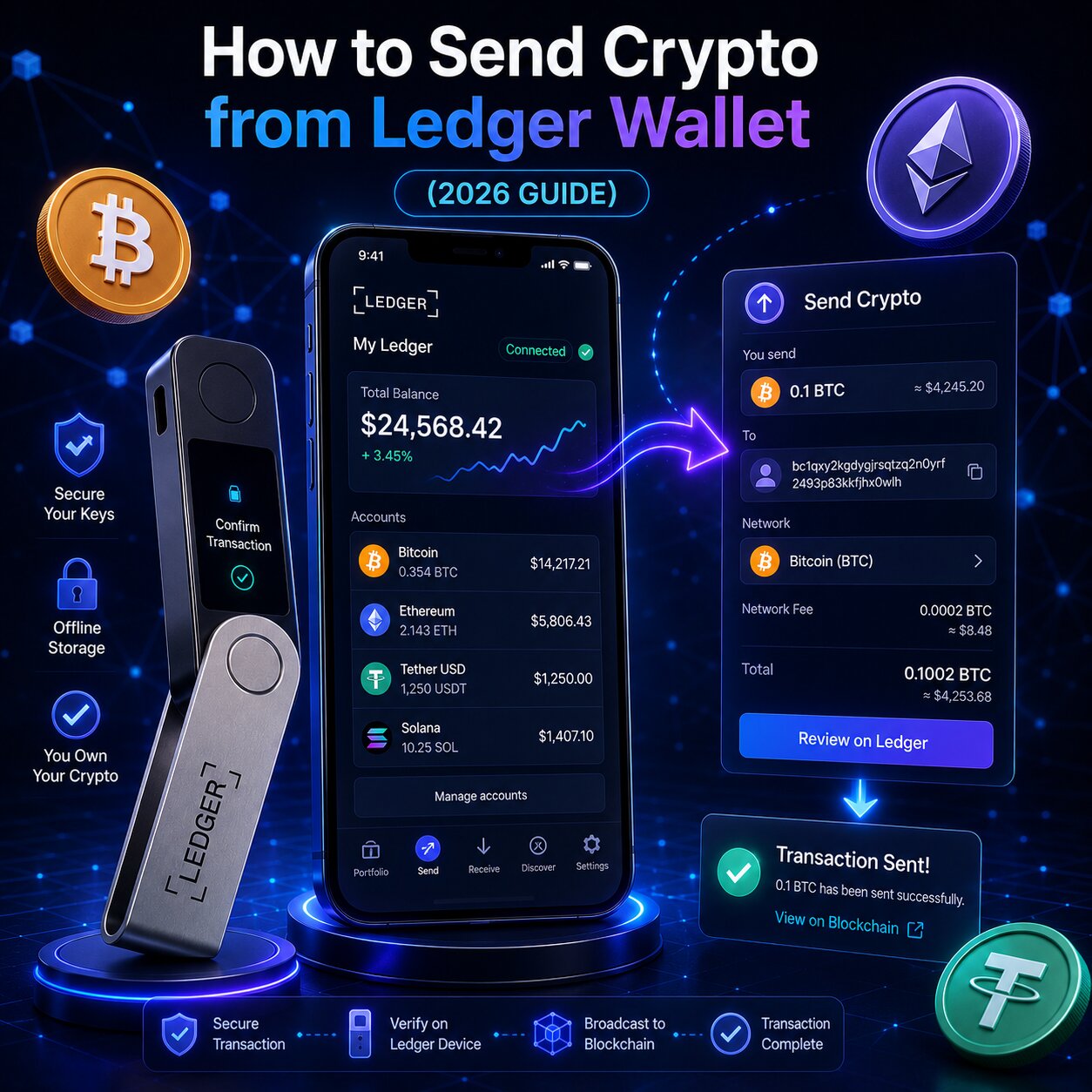
To send crypto from a Ledger hardware wallet, verify the recipient wallet address, choose the correct blockchain network, and approve the transaction directly on the Ledger device. The private key never leaves the Secure Element chip – only the signed transaction output reaches the blockchain.

Send ComponentRoleRisk if Wrong
Recipient AddressDestination wallet on the blockchainPermanent fund loss
Blockchain NetworkChain that routes the transactionPermanent fund loss
Asset App (on device)Signing capability for specific assetTransaction fails
Network FeePayment to blockchain validatorsTransaction gets stuck
Secure ScreenOn-device verification displayAttacker substitution undetected
  • Ledger is a non-custodial hardware wallet that stores signing keys offline for self-custody protection.
  • The Secure Element isolates private keys inside a tamper-resistant chip β€” Ledger signs transactions internally and only exports the signed output.
  • Every on-chain transaction requires Physical Confirmation directly on the hardware device – no software can authorize a send without that button press.
  • Cold storage architecture means private keys are never exposed to the internet, regardless of what software constructs the transaction.

What do you need before sending crypto from Ledger?

Three inputs must be verified before any Ledger send: the correct recipient wallet address, a matching blockchain network, and a sufficient native token balance to cover the gas fee. Missing any one of these causes the transaction to fail or results in permanent loss.

Why does Ledger require an Asset App open on the device before sending?

Each Asset App on the Ledger device contains the cryptographic logic for a specific blockchain, running in an isolated environment within the Secure Element. The Ledger Wallet app cannot construct a signed transaction for any asset unless the corresponding app is active on the hardware device.

Asset to SendApp Required on DeviceNetwork
Bitcoin (BTC)Bitcoin appBitcoin native
Ethereum (ETH)Ethereum appEthereum mainnet
USDT / USDC (ERC-20)Ethereum appEthereum
Solana (SOL)Solana appSolana native
BNB (BEP-20)Ethereum appBNB Chain
Cardano (ADA)Cardano appCardano native
  • Each Asset App runs in cryptographic isolation inside the Secure Element β€” one chain’s signing keys cannot access another’s, even if both apps are installed on the same device.
  • The Ledger Wallet app displays a prompt to open the correct app on the device if the wrong or no app is active β€” this must be resolved before the send flow proceeds.
  • Installing or removing Asset Apps is done through the My Ledger section without affecting funds β€” assets live on the blockchain, not on the device itself.

What blockchain network information is needed before sending from Ledger?

Before sending, confirm which blockchain network the recipient’s wallet or exchange supports for the specific asset. For assets like USDT and USDC that exist across multiple chains, a network mismatch results in permanent fund loss.

Common Network MismatchResult
USDT ERC-20 sent to TRC-20 addressPermanent loss
ETH sent to BNB Chain addressPermanent loss
USDC on Polygon sent to Ethereum depositExchange-dependent – may not credit
BTC sent to ETH addressPermanent loss
  • Always confirm the destination network with the recipient or the exchange deposit page before initiating a transfer.
  • Sending a small test transaction before transferring large amounts is the most reliable way to verify address and network compatibility.

Next: understanding how Ledger signs transactions explains why hardware-level sending is fundamentally different from software wallets.


How does Ledger transaction signing work?

Ledger signing works by sending unsigned transaction data from the Ledger Wallet app into the Secure Element chip. The chip signs the transaction using the stored private key and returns only the signed output β€” the signing key itself never leaves the hardware device.

What makes Ledger transaction signing different from a software wallet?

A software wallet stores private keys in device memory connected to the internet. Any malware with file system access can extract them. The Secure Element is a physically isolated chip β€” signing happens entirely within its boundary, with no path for external extraction.

Security FeatureLedger Hardware WalletSoftware Wallet
Key storageOffline Secure Element chipInternet-connected device memory
Transaction signingInside isolated chipOn exposed device memory
Malware key accessNot possiblePossible
On-device verificationHardware displayComputer screen – manipulable
Self-custodyFull – non-custodialVaries by wallet type
Physical approvalRequired – button pressNot required
  • The Secure Element carries EAL5+ certification for Nano S Plus and Nano X, and EAL6+ for Flex and Stax β€” the same standard used in biometric passports and bank cards.
  • Even if the connected computer is fully compromised, the attacker can only observe the unsigned transaction request β€” the signing key inside the chip remains inaccessible.
  • Self-custody through cold storage means no exchange, no bank, and no third party holds or controls the private keys β€” only the hardware device and its seed phrase backup.

Next: the step-by-step send process combines Ledger Wallet app input with hardware verification.


How do you send crypto from Ledger step by step?

To send crypto from Ledger, connect the device, open the correct Asset App, navigate to the Send function in Ledger Wallet app, enter the transfer details, and approve the transaction on the hardware display.

Steps:

  1. Connect the Ledger signer to the computer via USB-C cable and unlock it by entering the PIN.
  2. Open the correct Asset App on the device β€” for example, the Ethereum app for ETH or any ERC-20 token.
  3. Open the Ledger Wallet app on the computer and navigate to the Accounts tab.
  4. Select the account and asset to send, then click Send.
  5. Paste the destination wallet address into the recipient field β€” never type it manually to avoid character errors.
  6. Select the correct blockchain network from the dropdown if the asset supports multiple chains.
  7. Enter the amount β€” Ledger Wallet app shows both token amount and current fiat value.
  8. Choose the network fee tier β€” Low, Medium, or High β€” based on how urgently the transfer needs to confirm.
  9. Review the full transaction summary in the app β€” amount, destination address, network, and fee.
  10. Click Continue β€” the transaction details now appear on the hardware display of the Ledger signer.
  11. Verify every character of the destination address shown on the hardware display β€” this is the last opportunity to catch any substitution.
  12. Press both buttons simultaneously on the device to authorize the transaction β€” it broadcasts to the blockchain immediately.

 Always verify the destination address on the hardware display β€” not just on the computer screen. Clipboard Malware can replace a copied address between paste and approval without any visible indication on the computer.

How do you verify the recipient address on a Ledger device?

The hardware display shows the exact address the Secure Element will sign β€” generated inside the tamper-resistant chip, not from the connected computer. This makes it the only verification display that malware cannot manipulate.

  • The on-device display is physically driven by the Secure Element chip β€” any software running on the connected computer cannot alter what it shows.
  • Verify every character of the destination wallet β€” not just the first and last few β€” before pressing the confirmation buttons.
  • If the address shown on the hardware display does not match the intended destination, press the left button on the device to reject the transaction before any funds move.

Next: selecting the correct network fee determines how quickly the transaction confirms on-chain.


How do blockchain networks affect Ledger transfers?

Blockchain network selection routes the signed transaction to a specific chain. Every on-chain transaction is irreversible once confirmed β€” a wrong network selection delivers funds to an incompatible address permanently.

How do you send USDT from Ledger and which network has the lowest gas fee?

USDT is a multi-chain token available simultaneously on Ethereum, BNB Chain, and Tron. Each network version is incompatible with the others β€” selecting the wrong one results in permanent loss.

USDT NetworkStandardAvg Gas Fee (2026)SpeedRecipient Must Support
TRC-20 (Tron)TRC-20Very lowFastTron network
BEP-20 (BNB Chain)BEP-20Very low (~$0.01)FastBNB Chain
ERC-20 (Ethereum)ERC-20~$0.39–$0.671–5 minEthereum
  • TRC-20 USDT offers the lowest gas fee but requires the recipient exchange or wallet to explicitly support Tron network deposits.
  • Ledger Wallet app lists USDT as separate assets per network β€” selecting the wrong one sends the token on the wrong chain.
  • Always confirm the destination network with the recipient before initiating a USDT transfer β€” the cost of a network mismatch is permanent loss.

Can you send crypto from Ledger mobile app?

Yes. The Ledger Wallet app is available on iOS and Android. Ledger Nano X connects to the mobile app via Bluetooth β€” enabling sends directly from a smartphone. The Nano S Plus requires USB-C and connects only to desktop or Android devices.

Mobile Send FeatureLedger Nano XLedger Nano S Plus
iOS connectionBluetoothNot supported
Android connectionBluetooth + USB-CUSB-C only
Ledger Wallet mobile appFull send/receiveFull send/receive
Hardware verificationSecure Screen on deviceSecure Screen on device
  • Mobile sends via Ledger Wallet app follow the same verification flow as desktop β€” the hardware display shows transaction details regardless of the connected platform.
  • Bluetooth connection on the Nano X uses an encrypted channel β€” the security level is equivalent to USB-C for transaction authorization purposes.

Next: sending to exchanges adds destination tag requirements to the standard send flow.


How do you send crypto from Ledger to an exchange?

To send crypto from Ledger to a centralized exchange, copy the exchange’s deposit address, confirm the exact blockchain network shown on the exchange deposit page, and include any required destination tag or memo before authorizing the transfer on the device.

Steps:

  1. Log into the exchange and navigate to the deposit page for the asset being sent.
  2. Note the exact blockchain network specified on the deposit page β€” this must match exactly in Ledger Wallet app.
  3. Copy the deposit address from the exchange β€” do not retype it manually.
  4. If the exchange shows a destination tag, memo, or payment ID β€” note this value separately.
  5. In Ledger Wallet app, select the account and click Send.
  6. Paste the deposit address and select the matching blockchain network.
  7. Enter the send amount and select the network fee tier.
  8. If required, enter the destination tag or memo in the appropriate field.
  9. Click Continue and verify every detail on the hardware display.
  10. Press both buttons to authorize β€” the signed transaction broadcasts to the exchange’s deposit address.

Some blockchains require a destination tag or memo when sending to exchange addresses β€” XRP, Stellar, BNB Chain, and EOS commonly require this. Omitting it causes the exchange to receive funds that are not credited to any account.

What happens if you send crypto on the wrong network from Ledger?

Sending on the wrong network is an irreversible on-chain event. The transaction executes correctly from a technical standpoint β€” it just reaches the wrong destination. Ledger cannot intervene, and the exchange can only assist if they control the receiving wallet on that network.

ScenarioRecovery Possibility
Wrong network to own Ledger addressPossible – add that network to Ledger and access funds
Wrong network to exchange (same exchange controls both)Contact exchange support β€” may recover manually
Wrong network to exchange (exchange does not support network)Permanent loss
Wrong network to external walletDepends entirely on recipient’s ability to access that network
  • If funds are sent to a Ledger address on the wrong network, adding that network to the Ledger Wallet app and importing the same account may reveal the balance.
  • Exchange support teams can sometimes manually retrieve cross-network deposits, but this is not guaranteed and may involve a recovery fee.

Next: network fees determine both the cost and the speed of every Ledger transaction.


How do network fees affect Ledger transaction speed?

Network fees are paid to blockchain validators or miners for processing and confirming on-chain transactions. Ledger itself charges no sending fee β€” all costs go to the network. A higher fee results in faster confirmation; a fee that is too low risks the transaction remaining pending indefinitely.

What are the network fee options when sending from Ledger?

Fee TierConfirmation SpeedBest ForRisk
LowSlower β€” minutes to hoursNon-urgent transfers, low congestionMay remain stuck during high congestion
MediumStandard β€” minutesMost everyday transfersBalanced speed and cost
HighFastest β€” seconds to minutesUrgent or time-sensitive transfersHigher cost but reliable
  • Bitcoin gas fees are measured in satoshis per byte (sat/byte) β€” higher sat/byte rates incentivize miners to prioritize the transaction.
  • Ethereum gas fees use Gwei under the EIP-1559 dynamic pricing model β€” the base fee adjusts automatically based on network demand.
  • Solana and BNB Chain fees are consistently very low β€” fee tier selection matters most for Bitcoin and Ethereum transfers.

Does Ledger charge withdrawal fees?

Ledger charges no platform fee for sending, receiving, or managing assets. The only costs are blockchain network fees paid to validators β€” these are determined by the network, not Ledger. The Ledger Wallet app displays the exact fee amount before authorization.


How long does a Ledger send transaction take?

Transaction confirmation time is determined by the blockchain network’s block time, current congestion, and the gas fee selected. The Secure Element signing process adds no meaningful delay β€” the bottleneck is always the blockchain.

AssetNetworkAvg ConfirmationBlock TimeFinality
BTCBitcoin~60 minutes~10 min6 blocks
ETHEthereum15 sec – 5 min~12 sec12–15 blocks
USDCBaseSeconds – 1 min~2 secFast
SOLSolana~400 milliseconds~400msNear-instant
USDTTron (TRC-20)Seconds – 1 min~3 secFast
BNBBNB Chain~3 seconds~3 secFast

How do you track a Ledger transaction using Transaction Hash?

Every confirmed on-chain transaction receives a unique Transaction Hash β€” a permanent identifier on the blockchain. Ledger Wallet app displays it in the activity feed immediately after the signed transaction broadcasts.

Tracking steps:

  1. Open Ledger Wallet app and navigate to the account’s Transaction History.
  2. Tap the send transaction to open its detail view.
  3. Copy the Transaction Hash from the detail screen.
  4. Open the relevant blockchain explorer and paste the Transaction Hash to view real-time confirmation status.
BlockchainExplorerHash Format
Bitcoinmempool.space64 hex characters
Ethereumetherscan.io0x + 64 hex characters
BNB Chainbscscan.com0x + 64 hex characters
Solanasolscan.ioBase58 (~88 chars)
Trontronscan.org64 hex characters

What are the address verification risks when sending from Ledger?

Address Poisoning and Clipboard Malware are the two most common attack vectors targeting the address entry step of a Ledger transfer. Both aim to replace the legitimate destination address with an attacker’s address before the transaction is authorized. The hardware display is the only verification surface that defeats both attacks β€” it shows transaction data generated directly from the Secure Element, not from the connected computer.

How does Address Poisoning work against Ledger users?

Address Poisoning sends a near-zero value transaction from a wallet address that visually mimics a legitimate address the user has transacted with. When the user copies an address from their transaction history for the next transfer, they may select the poisoned address without noticing.

Attack StepWhat Happens
1Attacker identifies a frequently used destination in the target’s history
2Creates a wallet with matching first 4–6 and last 4–6 characters
3Sends a dust transaction to plant the fake address in history
4Target copies from history – sends large amount to attacker address
5Verifying on hardware display before approval catches the substitution
  • Always copy destination addresses directly from exchange deposit pages or official wallet interfaces β€” never from transaction history.
  • Verifying every character on the hardware display before authorization is the only reliable defense against a poisoned address in transaction history.

How does Clipboard Malware target the address paste step?

Clipboard Malware monitors the device clipboard for cryptocurrency address patterns and silently replaces any copied address with the attacker’s address at the moment of paste – before the user can see what was substituted.

  • The hardware display shows the destination address that the Secure Element will actually sign – if Clipboard Malware replaced the address during paste, the substitution is visible on the device screen before the buttons are pressed.
  • Pressing the left button on the Ledger device rejects the transaction immediately if the hardware display shows an address that does not match the intended destination.
  • Clearing the clipboard immediately after pasting a destination address removes the malware’s opportunity to operate during the window between copy and paste.

What causes common Ledger sending errors and how do you fix them?

Most Ledger send failures trace to four causes β€” incorrect Asset App state, insufficient gas fee, wrong blockchain network, or an invalid destination address. Each produces a distinct symptom with a specific fix.

ErrorSymptomFix
Wrong Asset App open“Please open [app] on your device” promptOpen the correct Asset App on the Ledger device
Gas fee too lowTransaction pending indefinitelySpeed up via fee bump (ETH) or Replace-By-Fee (BTC)
Wrong blockchain networkFunds not received by destinationPermanent loss β€” verify network before every transfer
Invalid destination addressTransaction rejected by networkCheck address format matches selected blockchain
Missing destination tagFunds received but not creditedContact exchange support – include tag on future sends

Conditional logic:

  • If the hardware display shows “Please open [asset] app” β€” navigate to the Asset App on the device and open it before retrying.
  • If Transaction Hash appears on the blockchain explorer as pending β€” the gas fee is too low, use the speed-up option in Ledger Wallet app.
  • If Transaction Hash does not appear on the explorer at all β€” the transaction failed before broadcast, retry with the correct Asset App open.
  • If funds are confirmed sent but the exchange shows no credit β€” check whether a destination tag or memo was required and contact exchange support.

How do you cancel a pending Ledger transaction?

True cancellation is not possible once a transaction is broadcast to the blockchain. However, for Bitcoin and Ethereum, the pending transaction can be replaced with a new one at a higher fee β€” effectively overwriting the low-fee version before it is confirmed.

  • For Bitcoin: Replace-By-Fee (BIP-125) rebroadcasts the pending transaction with a higher sat/byte rate, incentivizing miners to confirm the updated version instead.
  • For Ethereum: Ledger Wallet app offers a “Speed up” option on pending transactions β€” this increases the gas fee without canceling the original broadcast.
  • For Solana and BNB Chain: transactions typically confirm within seconds β€” pending status usually resolves on its own without intervention.

Can Ledger recover a transaction sent to the wrong address?

No. Ledger is a non-custodial hardware wallet β€” it does not hold or control any funds on the blockchain. Once a transaction confirms on-chain, it is permanent and irreversible. Ledger support cannot reverse, intercept, or recover any confirmed transaction, regardless of circumstances.

How do you send crypto with MetaMask and Ledger together?

Connecting Ledger to MetaMask allows the Ledger Secure Element to sign all MetaMask transactions β€” combining MetaMask’s full DeFi ecosystem access with hardware-level private key security. Every MetaMask transaction still requires Physical Confirmation on the hardware display before execution.

Send MethodLedger Wallet AppHardware SigningdApp Access
Ledger Wallet nativeRequiredSecure ElementPartner dApps + native
MetaMask + LedgerNot requiredSecure ElementFull DeFi ecosystem
WalletConnect + LedgerNot requiredSecure Element6,000+ dApps
  • Ledger with MetaMask requires Blind Signing to be enabled on the Ethereum app for most DeFi smart contract interactions β€” use a dedicated wallet with minimal funds to limit exposure.
  • The hardware display still shows transaction details before authorization even when MetaMask constructs the transaction β€” verifying the destination and amount on the device screen remains critical.
  • WalletConnect from the Ledger Wallet Discover section activates Clear Signing on supported dApps β€” this is the preferred method for DeFi interactions when available.

FAQ

How do I send crypto from my Ledger wallet?

Open Ledger Wallet app, connect the device, open the correct Asset App on the hardware device, navigate to Accounts and click Send, enter the destination address and amount, select the network fee tier, click Continue, verify all details on the hardware display, and press both buttons to authorize the on-chain transaction.

How do I send Bitcoin from Ledger?

Open the Bitcoin app on the Ledger device, go to Ledger Wallet app and select the Bitcoin account, click Send, paste the recipient’s Bitcoin address, choose the network fee tier in sat/byte, click Continue, verify the destination address and amount on the hardware display, and press both buttons. Bitcoin transactions take approximately 60 minutes across 6 block confirmations.

How do I send crypto from Ledger to an exchange?

On the exchange, open the deposit page for the asset, note the blockchain network, and copy the deposit address. In Ledger Wallet app, click Send, paste the address, select the matching network, enter the amount, and include any destination tag or memo if required. Verify the full deposit address on the hardware display before authorizing.

Do I need to verify the address on my Ledger device?

Yes β€” on-device address verification is mandatory, not optional. The hardware display shows the address the Secure Element will sign, making it the only display that cannot be altered by Clipboard Malware or Address Poisoning attacks. If the address shown on the device does not match the intended destination, press the left button to reject the transaction immediately.

How long does a Ledger send transaction take?

Bitcoin takes approximately 60 minutes with 6 confirmations. Ethereum takes 15 seconds to 5 minutes depending on gas fee and congestion. Solana confirms in approximately 400 milliseconds. BNB Chain and Tron confirm within seconds. Choosing a higher network fee tier directly reduces confirmation time for Bitcoin and Ethereum transfers.

Can I send crypto from Ledger without Ledger Wallet app?

Yes. Ledger can authorize transactions through MetaMask via USB-C, WalletConnect-compatible dApps via the Discover section, or Electrum for Bitcoin-specific transfers. Every method routes signing through the Secure Element and requires Physical Confirmation on the hardware display β€” the authorization security is identical regardless of which software constructs the transaction.

What happens if I send to the wrong address on Ledger?

Sending to a wrong destination address is permanent and irreversible on every blockchain. Ledger is a non-custodial self-custody device β€” it does not control funds on-chain and cannot reverse any confirmed transaction. This is why verifying every character of the destination address on the hardware display before authorization is the single most important step in every Ledger send.

How do I speed up a pending Ledger send transaction?

For Bitcoin: use Replace-By-Fee (BIP-125) to rebroadcast with a higher sat/byte rate if the original transaction was sent with RBF enabled. For Ethereum: use the Speed Up option in Ledger Wallet app to increase the gas fee on the pending transaction. For Solana and BNB Chain: transactions confirm within seconds under normal conditions β€” pending status typically resolves without intervention.

Share:

Resend posts

Our insights? Click below to add us as your preferred source on Google
Follow trusted sources to improve your search experience

Send Us A Message