How to Withdraw from Ledger Wallet to Bank Account (2026 Guide)

Home / Blog / Article
Facebook Twitter LinkedIn
Copied! Paste in ChatGPT πŸš€
How to Withdraw from Ledger Wallet to Bank Account

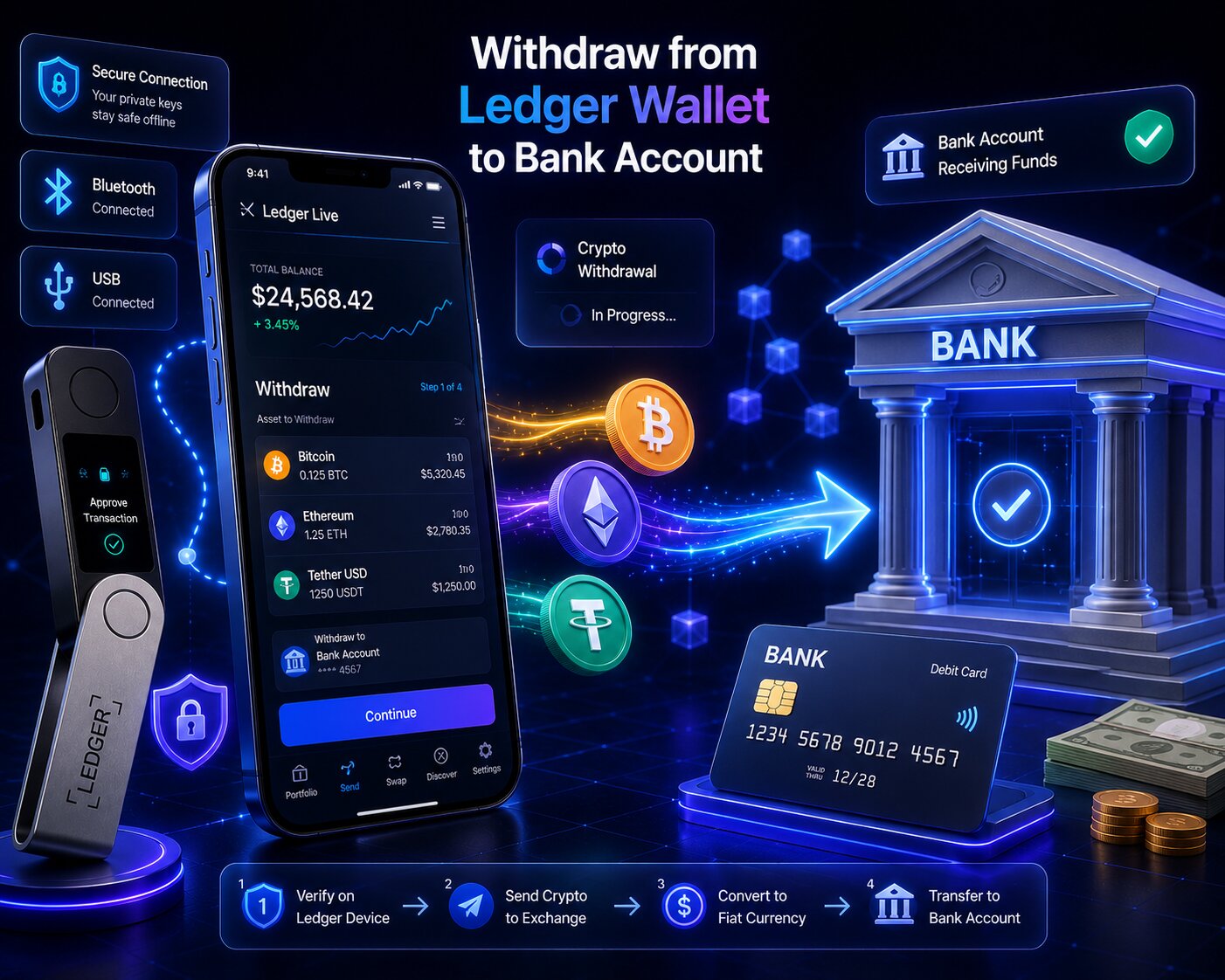
Ledger has no direct bank withdrawal feature. To convert crypto to Fiat Currency, users route funds through an Off-Ramp β€” either the built-in Sell tab (Coinify or MoonPay), a centralized exchange (CEX), or a crypto card for ATM withdrawals. Private keys stay offline in the Secure Element throughout every withdrawal method.

Withdrawal MethodOff-Ramp ProviderKYC RequiredBank Transfer TimeBest For
Built-in Sell tabCoinify or MoonPayYes – one-time1–3 business daysUsers wanting to stay in Ledger Wallet app
CEX routeCoinbase, Binance, KrakenYes – account-level1–5 business daysLargest amounts + best exchange rates
Crypto card (ATM)Ledger Card partnerYes – card applicationInstant at ATMSmall amounts, everyday spending
  • Ledger charges no platform fee for any withdrawal method – provider fees and network gas fees apply separately.
  • Physical Confirmation on the hardware device is required for every outbound transaction – including those initiated via the Sell tab.
  • Clear Signing is active during Sell tab transactions β€” the Secure Screen displays transaction details before any authorization.
  • KYC is mandatory for all regulated Off-Ramp providers – first-time verification is completed once per provider, not per transaction.

Can you withdraw directly from Ledger to a bank account?

No. Ledger is a non-custodial hardware wallet β€” it holds crypto, not Fiat Currency. A bank withdrawal requires an Off-Ramp to convert digital assets into local currency and route the proceeds through a payment rail like SEPA, ACH, or SWIFT.

Why does Ledger require an Off-Ramp to convert crypto to Fiat Currency?

Blockchain networks process crypto transactions. Banks process Fiat Currency transactions. These two systems are not directly compatible β€” an Off-Ramp bridges them by accepting crypto, converting it to fiat at the current market rate, and transferring the proceeds to a linked bank account.

ComponentRoleExample
Ledger walletHolds crypto β€” initiates outbound transactionSends BTC or ETH to Off-Ramp
Off-Ramp providerConverts crypto to Fiat CurrencyCoinify, MoonPay, Coinbase
Payment railTransfers fiat to bank accountSEPA, ACH, SWIFT
Bank accountReceives Fiat CurrencyUser’s local bank
  • The Sell tab in Ledger Wallet app connects directly to Coinify and MoonPay β€” completing the Off-Ramp process without leaving the app.
  • The CEX route requires an additional step: sending crypto from Ledger to an exchange first, then selling and withdrawing fiat from the exchange.
  • Both routes require KYC identity verification β€” regulated Off-Ramp providers are legally required to verify user identity before converting crypto to fiat.

What is the difference between withdrawing crypto and cashing out to Fiat Currency on Ledger?

Withdrawing crypto means sending digital assets to another wallet β€” only a network gas fee applies, no KYC required. Cashing out to Fiat Currency means selling crypto via an Off-Ramp β€” provider fees, KYC, and bank transfer delays all apply.

ActionFeeKYCTime
Crypto withdrawal (wallet to wallet)Gas fee onlyNoMinutes
Sell via Sell tab (Coinify/MoonPay)Gas fee + provider fee (1–4.5%)Yes1–3 business days
Sell via CEX (Coinbase/Binance)Gas fee + trading fee + bank feeYes1–5 business days
Crypto card ATMCard provider feeYes – card applicationInstant

What are the three Ledger withdrawal methods – fees, KYC, and speed compared?

Three Off-Ramp pathways exist for converting Ledger crypto to Fiat Currency. Each differs in cost, KYC burden, withdrawal speed, and the maximum amount supported.

Which Ledger withdrawal method is cheapest β€” and which is fastest?

MethodGas FeeProvider FeeKYCSpeedMax Amount
Sell tab β€” Coinify~$0.39–$0.67 (ETH)~1–3%One-time1–3 business daysRegional limits apply
Sell tab β€” MoonPay~$0.39–$0.67 (ETH)Up to 4.5% (min $3.99)One-time1–3 business daysRegional limits apply
CEX route (SEPA)~$0.39–$0.67Trading fee + ~€1 bank feeAccount-level1–2 business daysHigher β€” exchange-dependent
CEX route (ACH)~$0.39–$0.67Trading fee + $0 bank feeAccount-levelUp to 2 business daysHigher β€” exchange-dependent
CEX route (SWIFT)~$0.39–$0.67Trading fee + bank wire feeAccount-level1–5 business daysHighest
Crypto card ATMCard load feeATM operator feeCard applicationInstantATM withdrawal limits
  • The CEX route via SEPA is the fastest bank transfer method for European users β€” funds typically arrive in 1–2 business days with very low bank fees.
  • The Sell tab via Coinify or MoonPay is the most convenient β€” it requires no external exchange account and keeps the entire process inside Ledger Wallet app.
  • MoonPay charges up to 4.5% per transaction with a minimum fee of $3.99–$4.50 β€” higher than Coinify for small amounts but with broader regional availability.
  • Ledger charges $0 platform fee β€” all costs go to the Off-Ramp provider, the blockchain network, and the bank payment rail.

How do you sell crypto and withdraw using the Ledger Wallet Sell tab – step by step?

The Sell tab in Ledger Wallet app connects directly to Coinify and MoonPay β€” converting crypto to Fiat Currency and sending the proceeds to a linked bank account without leaving the app. Clear Signing is active throughout β€” the Secure Screen displays every transaction before Physical Confirmation.

How does the Sell tab in Ledger Wallet work with Coinify β€” step by step?

Steps – Sell tab via Coinify:

  1. Connect the Ledger signer via USB-C and unlock it by entering the PIN.
  2. Open Ledger Wallet app and navigate to the Buy / Sell tab.
  3. Select Sell and choose the asset to convert β€” BTC, ETH, SOL, USDT, USDC, DAI, or BUSD.
  4. Select Coinify as the Off-Ramp provider from the available options.
  5. Enter the amount to sell β€” Coinify displays the estimated fiat payout after fees.
  6. If this is the first time using Coinify, complete KYC verification: enter full name, residential address, upload a government-issued ID, and complete a facial scan. Coinify’s KYC process typically takes approximately 2 minutes.
  7. Enter the bank account IBAN or SWIFT details for the receiving account.
  8. Review the transaction in Ledger Wallet app β€” amount, fiat payout, Coinify fee, and gas fee are all displayed.
  9. The transaction details appear on the Secure Screen of the Ledger device β€” verify and press both buttons to authorize with Physical Confirmation.
  10. Coinify processes the conversion β€” fiat funds arrive in the linked bank account within 1–3 business days.

 Coinify only sends fiat to bank accounts that have been previously used to purchase crypto through Coinify. New Coinify users must complete a purchase before initiating a sell withdrawal.

How does MoonPay work as an Off-Ramp in Ledger Wallet app?

Steps – Sell tab via MoonPay:

  1. Open Ledger Wallet app β†’ navigate to Buy / Sell β†’ select Sell.
  2. Select the asset and enter the amount.
  3. Select MoonPay as the Off-Ramp provider.
  4. If first-time use, complete MoonPay KYC: passport or government ID, and address verification. MoonPay operates in over 160 countries and complies with international KYC and AML regulations.
  5. Enter the bank account details or card for fiat payout.
  6. Review the full transaction β€” MoonPay fee (up to 4.5%, min $3.99–$4.50) and gas fee are shown.
  7. Authorize with Physical Confirmation on the Ledger device β€” Clear Signing displays the exact sell transaction before approval.
  8. MoonPay processes the conversion β€” fiat arrives within 1–3 business days.

What KYC documents does each Ledger Off-Ramp provider require?

ProviderKYC DocumentsVerification TimeOperating Countries
CoinifyGovernment ID + facial scan + residential address~2 minutesEurope + select regions
MoonPayPassport or government ID + address verificationMinutes to hours160+ countries
Coinbase (CEX)Government ID + SSN (U.S.) or national ID + proof of address1–24 hours100+ countries
Binance (CEX)Government ID + proof of address + facial scan1–24 hours100+ countries
  • KYC is completed once per provider β€” subsequent withdrawals process at standard speed without re-verification.
  • Incomplete or rejected KYC blocks the withdrawal until documents are resubmitted and approved.
  • MoonPay and Coinify handle KYC independently from Ledger β€” Ledger does not store or process any identity documents.

Next: the CEX route provides the highest withdrawal limits and best exchange rates for large amounts.

How do you withdraw from Ledger via a CEX – step by step?

The CEX route sends crypto from the Ledger wallet to a centralized exchange deposit address, sells it for Fiat Currency on the exchange, then withdraws the fiat to a linked bank account via SEPA, ACH, or SWIFT.

How do you send crypto from Ledger to Coinbase or Binance for withdrawal?

Steps – CEX route:

  1. Log into the CEX (Coinbase, Binance, or Kraken) and navigate to the deposit page for the asset to sell.
  2. Note the blockchain network on the exchange deposit page and copy the deposit address.
  3. Open Ledger Wallet app β†’ select the account β†’ click Send.
  4. Paste the exchange deposit address β€” verify every character on the Secure Screen before Physical Confirmation.

  5. Select the same blockchain network shown on the exchange deposit page.
  6. Enter the amount, review the gas fee, and authorize with Physical Confirmation.
  7. Wait for blockchain confirmation β€” the crypto arrives in the exchange account within minutes to 60 minutes depending on the network.
  8. On the exchange, navigate to Sell or Convert β€” sell the crypto for the desired Fiat Currency.
  9. Navigate to Withdraw on the exchange β€” select Bank Transfer and enter the bank account details.
  10. Confirm the fiat withdrawal β€” funds arrive via SEPA, ACH, or SWIFT depending on the region and bank.

 Always verify the exchange deposit address on the Secure Screen before Physical Confirmation – address substitution attacks target this copy-paste step.

How do SEPA, ACH, or SWIFT determine bank withdrawal speed from a CEX?

The payment rail selected on the exchange determines how quickly fiat funds reach the bank account after the crypto is sold.

Payment RailRegionSpeedBank Fee
SEPA (Instant)EuropeInstant to 2 hoursVery low (~€1 or free)
SEPA (Standard)Europe1–2 business daysVery low
ACHUnited StatesUp to 2 business daysUsually free
SWIFTInternational1–5 business daysHigher β€” varies by bank
  • SEPA Instant is available on Coinbase, Kraken, and Binance for European users β€” fiat arrives in the bank account within hours rather than days.
  • ACH transfers are typically free on U.S. exchanges but take up to 2 business days to complete β€” the slowest domestic option in the United States.
  • SWIFT international transfers carry the highest bank fees and the longest processing time β€” use SEPA or ACH where available to reduce both cost and delay.

Next: understanding the complete fee structure prevents unexpected costs during withdrawal.

What fees apply when withdrawing from Ledger to a bank account?

Every Ledger withdrawal involves three potential fee layers β€” a network gas fee for the outbound blockchain transaction, a provider fee from the Off-Ramp or exchange, and a bank transfer fee from the payment rail. Ledger itself charges nothing.

Does Ledger charge fees for withdrawing or selling crypto?

No. Ledger charges $0 platform fee for all withdrawals. Users pay only the blockchain gas fee when sending crypto out of the Ledger wallet, plus whatever fees the Off-Ramp provider or exchange charges for the fiat conversion and bank transfer.

  • The network gas fee is paid to blockchain validators β€” not to Ledger or any Off-Ramp provider.
  • For Ethereum transactions in 2026, gas fees average approximately $0.39–$0.67 per transaction after the Dencun upgrade.
  • Bitcoin gas fees are measured in satoshis per byte β€” the amount varies with network congestion.

How do MoonPay and Coinify fees compare for Ledger fiat withdrawals?

Fee ComponentMoonPayCoinifyCEX (Coinbase)
Provider percentage feeUp to 4.5%~1–3%~0.5–1.5% trading fee
Minimum transaction fee$3.99–$4.50Varies by regionVaries
Bank transfer feeIncludedIncluded~€1 SEPA / Free ACH
Gas fee (paid by user)AdditionalAdditionalAdditional
Total cost estimate ($500 sell)~$22–$27~$5–$15~$5–$10 + gas
  • Coinify charges lower percentage fees than MoonPay for most sell amounts β€” making it the preferred Sell tab provider for cost-conscious users in supported regions.
  • The CEX route via Coinbase or Binance has the lowest total cost for larger sell amounts β€” exchange trading fees are typically 0.5–1.5% with very low bank transfer fees.
  • For small sell amounts under $100, all methods carry significant minimum fees relative to the transaction size β€” the CEX route minimizes proportional cost at any amount.

How long does a Ledger withdrawal to bank account take?

Total withdrawal time combines blockchain confirmation time, Off-Ramp processing time, and bank transfer time. The blockchain step takes minutes β€” the bank transfer step determines the total duration.

MethodBlockchain ConfirmationOff-Ramp ProcessingBank TransferTotal Time
Sell tab (Coinify/MoonPay)MinutesSame day1–3 business days1–4 days
CEX via SEPA InstantMinutesSame dayInstant to 2 hoursHours
CEX via SEPA StandardMinutesSame day1–2 business days1–3 days
CEX via ACHMinutesSame dayUp to 2 business days1–3 days
CEX via SWIFTMinutesSame day1–5 business days2–6 days
Crypto card ATMLoad time variesβ€”InstantMinutes

What causes a Ledger bank withdrawal to take longer than expected?

  • First-time KYC verification adds 2 minutes to 24 hours depending on the provider β€” Coinify typically completes in 2 minutes, Coinbase may take up to 24 hours for full verification.
  • Bank-level restrictions on crypto-related transfers can delay SWIFT or ACH settlements β€” some traditional banks flag inbound crypto proceeds for additional compliance review.
  • High blockchain network congestion slows the initial crypto send from Ledger to the exchange or Off-Ramp provider β€” using the Medium or High gas fee tier reduces this delay.
  • Withdrawal requests submitted after banking hours process on the next business day β€” SEPA Instant is the only rail that operates around the clock.

Conditional logic:

  • If the bank shows no incoming transfer after 3 business days β†’ contact the Off-Ramp provider with the Transaction Hash β€” they can trace the fiat settlement status.
  • If KYC is rejected β†’ resubmit documents with a clearer photo of the government ID β€” blurry or expired IDs are the most common rejection cause.
  • If the exchange shows funds received but fiat withdrawal is delayed β†’ check whether the bank account details were entered correctly on the exchange withdrawal form.

Can you withdraw from Ledger without KYC – and what are the alternatives?

KYC is required by law for all regulated Off-Ramp providers that convert crypto to Fiat Currency and send proceeds to a bank account. No Sell tab provider or major exchange offers bank withdrawals without identity verification in 2026.

What withdrawal options exist on Ledger with minimal or no KYC?

Several alternatives reduce or eliminate KYC while still allowing users to access the value of crypto holdings β€” though none deliver fiat directly to a bank account without verification.

AlternativeKYC RequiredFiat to BankBest Use Case
P2P trading (Binance P2P)Account-level onlyVia buyer’s bank transferUsers in regions with limited Off-Ramp access
Crypto card ATMCard applicationCash at ATMSmall amounts, immediate cash access
DEX swap to stablecoinNoneNo bank transferPreserve value without selling to fiat
Crypto payments (merchant)NoneNo bank transferSpending crypto directly
  • P2P trading on platforms like Binance P2P allows selling crypto to individual buyers who send fiat via local bank transfer – KYC is required for the P2P platform account, but the process is typically faster than full exchange verification.
  • The Ledger crypto card allows loading crypto and withdrawing local currencies at ATMs worldwide – useful for accessing small amounts of cash without a full bank withdrawal.
  • Converting to stablecoins (USDC, USDT) via the Swap function in Ledger Wallet app preserves the fiat value of holdings without triggering a taxable sale in some jurisdictions – though this does not produce a bank deposit.

How does the Ledger crypto card enable Fiat Currency withdrawals at ATMs?

The Ledger-partnered crypto card loads crypto holdings onto a Visa or Mastercard-branded card and automatically converts to local currency at the point of ATM withdrawal or merchant payment. Physical cash is accessible immediately β€” no bank account or SEPA/ACH transfer is required.

  • The crypto card converts holdings to Fiat Currency at the time of each ATM withdrawal or purchase – the conversion rate reflects the market rate at the moment of transaction.
  • ATM withdrawal limits apply depending on the card provider – typically $200–$500 per day for most tier-1 card accounts.
  • A card application and identity verification are required to activate the crypto card – KYC is still part of the card issuance process even though no bank transfer is involved.

FAQ 

How do I withdraw money from my Ledger wallet?

Ledger has no direct bank withdrawal. Use the built-in Sell tab (Coinify or MoonPay) to sell crypto and receive fiat in a linked bank account within 1–3 business days, or send crypto to a CEX (Coinbase, Binance), sell for fiat, and withdraw via SEPA, ACH, or SWIFT. All methods require KYC and Physical Confirmation on the Ledger device.

Can I withdraw directly from Ledger to a bank account?

No. Ledger is a non-custodial hardware wallet β€” it holds crypto, not Fiat Currency. A bank withdrawal requires an Off-Ramp intermediary: either the built-in Sell tab (Coinify or MoonPay) or a centralized exchange. The Off-Ramp converts crypto to fiat and routes the proceeds to a linked bank account via SEPA, ACH, or SWIFT.

What is the cheapest way to cash out from Ledger?

The CEX route via Coinbase or Binance offers the lowest total fees for larger amounts β€” exchange trading fees are 0.5–1.5% with free or near-free bank transfers via ACH or SEPA. For convenience, Coinify via the Sell tab charges approximately 1–3% β€” lower than MoonPay’s maximum of 4.5%. All methods require a one-time network gas fee for the outbound blockchain transaction.

How long does it take to withdraw from Ledger?

The Sell tab via Coinify or MoonPay takes 1–3 business days for bank transfer after the sell is processed. CEX via SEPA Instant arrives within hours. CEX via ACH takes up to 2 business days. CEX via SWIFT takes 1–5 business days. First-time KYC adds 2 minutes to 24 hours depending on the provider.

Do I need KYC to sell crypto on Ledger?

Yes. KYC is legally required by all regulated Off-Ramp providers that convert crypto to Fiat Currency for bank transfer. Coinify KYC takes approximately 2 minutes with a government ID and facial scan. MoonPay KYC requires a passport or government ID and operates in 160+ countries. KYC is completed once per provider β€” not per transaction.

How do I sell crypto on Ledger without an exchange?

Use the built-in Sell tab in Ledger Wallet app β€” select Sell, choose Coinify or MoonPay, enter the sell amount, complete one-time KYC, and link a bank account. The entire process stays within Ledger Wallet app without requiring a separate exchange account. Physical Confirmation on the Ledger device authorizes every sell transaction via Clear Signing.

What fees does Ledger charge for withdrawing?

Ledger charges $0. Users pay the blockchain gas fee (~$0.39–$0.67 for ETH in 2026), the Off-Ramp provider fee (Coinify ~1–3%, MoonPay up to 4.5%, CEX ~0.5–1.5%), and any bank transfer fee from the payment rail (SEPA ~€1 or free, ACH free, SWIFT varies). The minimum sell amount with most providers is approximately $20–$50.

Is it safe to sell crypto through Ledger Wallet app?

Yes. The Sell tab connects to vetted Off-Ramp partners (Coinify and MoonPay) while private keys remain offline in the Secure Element chip throughout. Clear Signing displays every sell transaction on the Secure Screen before Physical Confirmation β€” the same security layer that protects all Ledger transactions. KYC compliance ensures the Off-Ramp providers meet regulatory standards.

Share:

Resend posts

Our insights? Click below to add us as your preferred source on Google
Follow trusted sources to improve your search experience

Send Us A Message