How to Recover Your Coinbase Wallet (2026 Guide)

Home / Blog / Article
Facebook Twitter LinkedIn
Copied! Paste in ChatGPT πŸš€
How to Recover Your Coinbase Wallet

Coinbase Wallet recovery requires the 12-word Recovery Phrase or an encrypted cloud backup – there is no alternative. Coinbase is a Non-custodial Wallet β€” it stores no user credentials, cannot access the Recovery Phrase, and cannot restore access for any user under any circumstances.

Recovery MethodWhat You NeedWorks On
Recovery Phrase (12 words)Exact words in exact orderMobile app + Browser Extension
Cloud Backup (iCloud/Google Drive)Backup file + separate backup passwordMobile app only
Smart Wallet Passkey recoveryRecovery Phrase + network fee paymentSmart Wallet only
  • Coinbase Wallet is a Non-custodial Wallet β€” private keys are generated locally on the user’s device and never transmitted to Coinbase servers.
  • The Recovery Phrase is the sole cryptographic key that regenerates all wallet addresses – losing it without a backup means permanent, irrecoverable fund loss.
  • Coinbase support cannot restore access, reset passwords, or recover a lost Recovery Phrase – this is a fundamental property of non-custodial self-custody architecture.
  • No legitimate third-party service can recover a lost Seed Phrase β€” any service claiming otherwise is a Recovery Scam.

Recovery Scam Warning: Multiple fraudulent services impersonate Coinbase support with fake phone numbers and promises to recover lost Recovery Phrases. Coinbase will never call you, never ask for your Recovery Phrase, and no service of any kind can recover a lost 12-word phrase. Sharing the Recovery Phrase with anyone gives them complete, permanent control of all funds in the wallet.

What is Coinbase Wallet recovery and why does it depend entirely on the Recovery Phrase?

Coinbase Wallet recovery regenerates the wallet’s private keys from the 12-word Recovery Phrase β€” a BIP-39 standard mnemonic that encodes the master private key in human-readable words. Every wallet address across all supported blockchains derives from this single phrase.

  • The Recovery Phrase encodes the master private key using the BIP-39 standard β€” a fixed list of 2,048 English words used by all compatible wallets including MetaMask, Trust Wallet, and Ledger.
  • BIP-39 compatibility means a Coinbase Wallet Recovery Phrase restores the identical wallet and addresses in any BIP-39-compatible wallet β€” and vice versa.
  • The same Recovery Phrase generates the same wallet addresses deterministically β€” entering the same 12 words in the same order always produces the same result, regardless of device or time.

Why can Coinbase not recover your wallet or access your Recovery Phrase?

Coinbase Wallet is architecturally designed so that private keys and Recovery Phrases are generated on the user’s device and never transmitted to Coinbase’s servers. This is the technical foundation of non-custodial self-custody β€” the design intentionally prevents any external party, including Coinbase, from accessing or restoring a wallet.

  • Private keys are generated locally using cryptographic entropy from the user’s device β€” Coinbase has no input into and no record of this process.
  • The Recovery Phrase is shown to the user once during wallet creation β€” Coinbase stores no copy, encrypted or otherwise, on any server.
  • Even if Coinbase wanted to help restore a lost wallet, the technical capability does not exist β€” non-custodial architecture makes server-side recovery structurally impossible.

What is the difference between Coinbase and Coinbase Wallet for account recovery?

Coinbase exchange is a custodial platform β€” it holds user assets and can reset passwords via email. Coinbase Wallet is a Non-custodial Wallet β€” it holds no user assets and cannot reset anything.

FeatureCoinbase ExchangeCoinbase Wallet
Asset custodyCoinbase holds keysUser holds keys
Password resetYes  via emailNo β€” not applicable
Recovery without phraseYes β€” email/ID verificationNo β€” phrase is the only path
Support can restore accessYes β€” custodialNo β€” non-custodial
Recovery Phrase requiredNoYes β€” mandatory
  • Coinbase exchange recovery uses standard email and identity verification β€” entirely different from Coinbase Wallet’s cryptographic recovery flow.
  • Many users confuse the two products β€” Coinbase exchange password reset does not restore Coinbase Wallet access.
  • Coinbase Wallet can be used completely independently of a Coinbase exchange account β€” and recovery is completely independent.

How do you recover Coinbase Wallet using the Recovery Phrase – step by step?

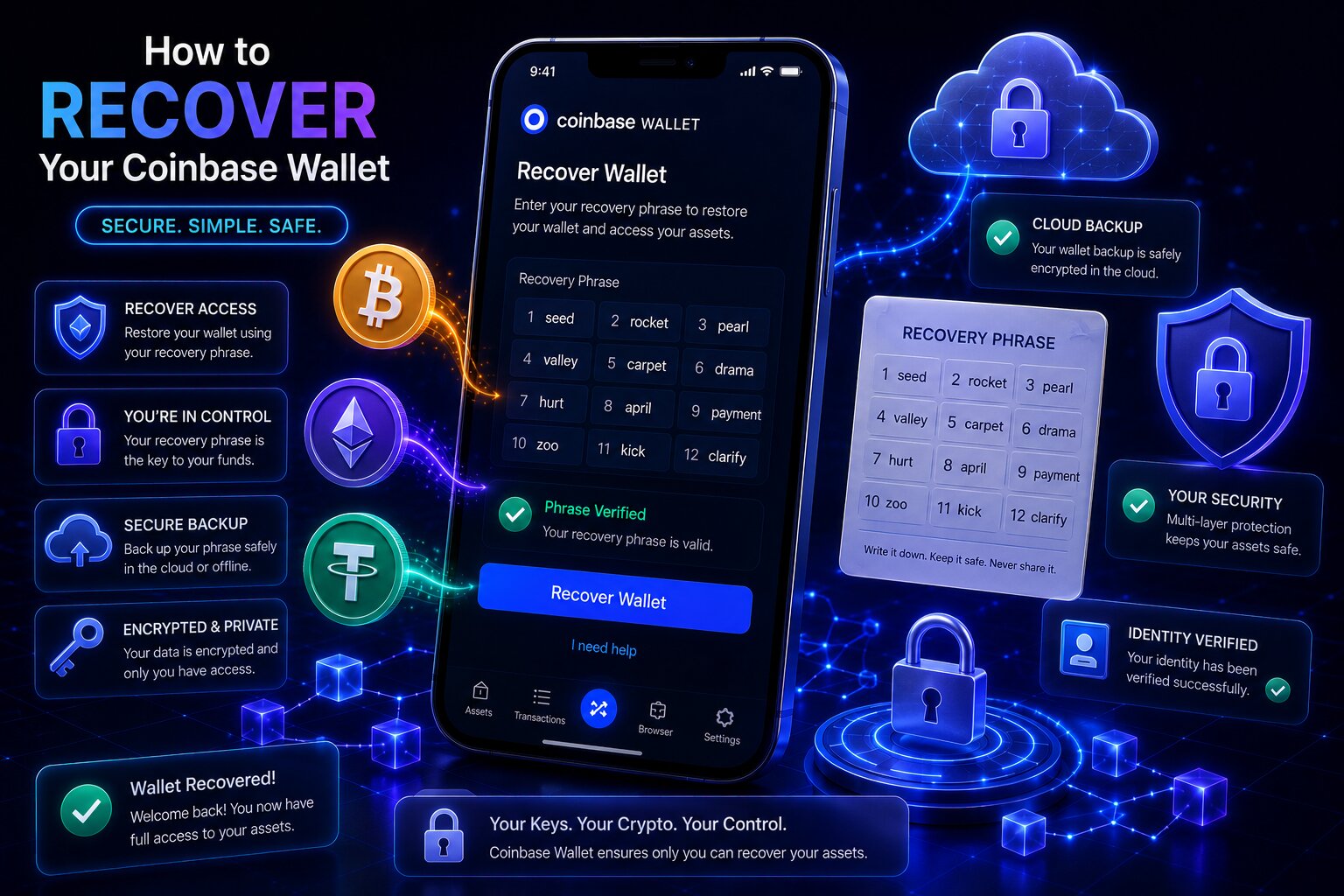
To recover Coinbase Wallet using the Recovery Phrase, install the app on the new device, select “I already have a wallet,” choose “Restore with Recovery Phrase,” enter all 12 words in exact order, and set up security.

Steps – Recovery Phrase restore:

  1. Download the Coinbase Wallet app from the official App Store (iOS) or Google Play Store (Android) β€” never from any other source.
  2. Open the app and tap I already have a wallet β€” do not tap “Create new wallet” as this generates a different wallet with a new phrase.
  3. Tap Restore with Recovery Phrase.
  4. Enter all 12 words carefully in the exact sequence they were originally generated β€” each word must be spelled correctly and entered in the original order.
  5. Tap Continue β€” the wallet validates the phrase against the BIP-39 word list and generates the wallet addresses.
  6. Set a username privacy preference if prompted.
  7. Set up security: choose Biometrics (Face ID or fingerprint) or a passcode β€” biometric authentication is recommended.
  8. The restored wallet appears immediately β€” all on-chain balances load after the app syncs with the blockchain.

Enter the Recovery Phrase only inside the official Coinbase Wallet app β€” never type it into any website, respond to any support request asking for it, or paste it into any messaging app. Sharing the Recovery Phrase with any party under any circumstances gives them permanent control of all funds.

What happens if you enter the Recovery Phrase in the wrong word order?

Entering the correct 12 words in the wrong sequence generates a completely different wallet β€” one with a different set of addresses and a zero balance. The original wallet remains intact on the blockchain β€” it is simply inaccessible until the correct sequence is entered.

  • The BIP-39 standard generates wallet addresses deterministically from the word sequence β€” every unique ordering of the same 12 words produces a unique, unrelated wallet.
  • A zero balance after entering the Recovery Phrase almost always means the words were entered in the wrong order β€” not that funds have been lost.
  • The solution is to re-enter the phrase in the correct sequence β€” if the original written backup shows the words numbered or in a clear sequence, follow that order precisely.
  • Misspelled words that do not appear in the BIP-39 2,048-word list prevent the restore from completing β€” the app rejects the entry before generating any wallet.

How do you recover Coinbase Wallet on a new phone using the Recovery Phrase?

Recovery on a new phone follows the identical steps as a fresh install. The Recovery Phrase transfers the wallet β€” not the app settings, previously added Custom Networks, or custom token lists.

What Transfers via Recovery PhraseWhat Does Not Transfer
All on-chain crypto balancesApp settings and preferences
All wallet addresses across supported chainsCustom network configurations
NFTs and tokens on supported chainsCustom token additions
Transaction history (via blockchain sync)Biometric auth settings
  • Custom Networks added manually must be re-added on the new device β€” they are stored locally and not encoded in the Recovery Phrase.
  • Transaction history appears after the app syncs with the blockchain β€” this may take a few minutes on first load.
  • Biometric authentication must be re-enabled on the new device after recovery.

How do you restore Coinbase Wallet from iCloud or Google Drive cloud backup?

Coinbase Wallet offers an optional encrypted cloud backup β€” storing an encrypted copy of the Recovery Phrase in iCloud (iOS) or Google Drive (Android). Restoring from cloud backup requires both the backup file and the separate password created when the backup was set up.

Steps β€” Cloud Backup restore:

  1. Download Coinbase Wallet from the official app store and open it.
  2. Tap I already have a wallet.
  3. Select Restore from iCloud (iOS) or Restore from Google Drive (Android) β€” the app locates the encrypted backup file in the linked cloud account.
  4. Enter the backup password β€” this is the separate password created when the cloud backup was set up, not the device PIN or Coinbase account password.
  5. The encrypted backup decrypts and the wallet restores automatically.
  6. Set up biometric authentication or passcode on the new device.

The cloud backup password is separate from the device passcode, Face ID, and Coinbase account password. It was created specifically for the backup during the initial setup. Coinbase does not store this password and cannot help retrieve it.

What password do you need to restore Coinbase Wallet from cloud backup?

The cloud backup requires a unique password that was created specifically when the iCloud or Google Drive backup was first enabled β€” not the device PIN, not the Coinbase exchange password, and not any biometric authentication.

  • Coinbase encrypts the backup file with the user-created password before uploading to iCloud or Google Drive β€” the cloud provider cannot decrypt it and Coinbase has no record of the password.
  • The backup password was set by the user during the backup setup β€” it should have been written down separately from the Recovery Phrase itself.
  • Entering the wrong backup password generates a decryption failure β€” the backup file cannot be opened without the exact password.

What happens if you forget the cloud backup password for Coinbase Wallet?

If the cloud backup password is forgotten and the Recovery Phrase is also unavailable, access to the wallet cannot be restored. The encrypted backup file in iCloud or Google Drive is inaccessible without the specific password β€” no decryption workaround exists.

SituationRecovery Possible
Have Recovery Phrase β€” no backup password neededRestore directly with phrase
Have backup password onlyRestore from cloud backup
Have neither Recovery Phrase nor backup passwordPermanent loss – no recovery path
Have backup password but forgot Recovery PhraseCloud backup decrypts to provide phrase
  • The cloud backup exists specifically to protect against losing the written Recovery Phrase β€” if both are lost, the wallet is permanently inaccessible.
  • A professional data recovery service may be able to attempt password brute-forcing on the encrypted backup file β€” only legitimate technical services with no upfront fee claims should be considered.
  • Coinbase support cannot help with forgotten backup passwords β€” they have no record of or access to user-created backup passwords.

How do you recover Coinbase Smart Wallet using a Passkey – step by step?

Coinbase Smart Wallet is a newer wallet type secured by a Passkey instead of a traditional Recovery Phrase. If the Passkey is lost or the device is changed, recovery uses a separately generated recovery phrase to authorize a new Passkey β€” and requires paying a network fee since the Smart Wallet is a smart contract.

When does Coinbase Smart Wallet require a Recovery Phrase to recover the Passkey?

Passkeys tied to iCloud Keychain or Google Password Manager sync automatically across devices β€” no recovery phrase is typically needed for these. Passkeys bound to a specific device (Chrome browser profile, Windows Hello, or hardware security key) are not recoverable if the device is lost β€” the recovery phrase is the only backup in these cases.

Passkey TypeSyncs Across DevicesRecovery Phrase Needed if Device Lost
iCloud KeychainYes β€” Apple devicesUsually not needed
Google Password ManagerYes β€” Android/ChromeUsually not needed
1Password / BitwardenYes β€” cross-platformUsually not needed
Chrome profile passkeyNo β€” device boundYes β€” required
Windows HelloNo β€” device boundYes β€” required
Hardware security keyNo β€” device boundYes β€” required

Steps β€” Smart Wallet Passkey recovery:

  1. Access the Smart Wallet β€” if not signed in, navigate to the Base wallet and select Connect β†’ Base β†’ Smart Wallet β†’ I already have a wallet, then sign in with an existing Passkey if available.
  2. Go to Settings β†’ select Sign out if currently signed in.
  3. Select Recover Passkey or navigate to the Account Recovery page.
  4. Enter the recovery phrase that was generated when the Smart Wallet was first set up.
  5. Set up a new Passkey when prompted.
  6. Pay the network fee β€” Smart Wallet Passkey changes are on-chain operations that require a gas fee since the Smart Wallet is itself a smart contract.
  7. Access is restored with the new Passkey.

Why does Coinbase Smart Wallet charge a network fee for Passkey recovery?

Coinbase Smart Wallet is a smart contract deployed on the Base blockchain β€” not a traditional externally owned account. Every signer change, including adding a new Passkey after recovery, is an on-chain transaction that modifies the smart contract’s state and therefore requires a network fee paid to blockchain validators.

  • The network fee for Smart Wallet Passkey changes reflects the gas cost of the on-chain transaction β€” it is paid to Base network validators, not to Coinbase.
  • Traditional Coinbase Wallet (non-Smart Wallet) recovery does not require a network fee β€” the Recovery Phrase simply regenerates the same private key locally.
  • The Smart Wallet recovery phrase must be generated before the device or Passkey is lost β€” it cannot be set up retroactively.

How do you find your Coinbase Wallet Recovery Phrase on an existing device?

If the Coinbase Wallet app is still installed and accessible on an existing device, the Recovery Phrase can be viewed directly in Settings. This is the most important action to take before switching devices or reinstalling the app.

Steps β€” View Recovery Phrase on existing device:

  1. Open the Coinbase Wallet app and ensure the correct wallet is selected.
  2. Tap Settings (gear icon or profile avatar) β†’ navigate to Security or Backups.
  3. Tap Recovery Phrase β€” the app prompts for the device PIN, passcode, or biometric authentication.
  4. Authenticate with PIN, Face ID, or fingerprint.
  5. The 12-word Recovery Phrase is displayed β€” write down every word in exact order on paper.
  6. Verify the written words by checking each one against the screen before closing.
  7. Store the paper backup in a secure offline location β€” never in a photo, notes app, cloud document, or email.

Viewing the Recovery Phrase in the app is a high-security action β€” ensure no camera is pointed at the screen, no screen recording is active, and no other person can see the display during this process.

How do you back up your Coinbase Wallet Recovery Phrase before it is lost?

Coinbase Wallet provides two backup methods: manual paper backup and encrypted cloud backup. Both should be completed β€” they protect against different failure scenarios.

Backup MethodProtection AgainstVulnerability
Manual paper backupDevice loss, app deletion, device failurePaper damage, theft, loss
iCloud / Google Drive encrypted backupPaper loss, home disasterForgotten backup password

Steps β€” Enable Cloud Backup:

  1. Open Coinbase Wallet β†’ tap Settings β†’ Backups.
  2. Select Back up with iCloud (iOS) or Back up with Google Drive (Android).
  3. Create a unique, strong password specifically for this backup β€” store it separately from the Recovery Phrase itself.
  4. Confirm the backup password β€” the encrypted backup uploads to the cloud account.
  5. Store the backup password in a password manager or secure offline document β€” not in the same location as the Recovery Phrase.

What happens if your Coinbase Wallet Recovery Phrase is compromised or stolen?

If the Recovery Phrase is seen, photographed, or accessed by an unauthorized party, the wallet is immediately at risk. The only response is to create a new wallet and transfer all assets out of the compromised wallet before the attacker moves them.

What should you do immediately if your Recovery Phrase is exposed?

StepActionWhy
1Create a new Coinbase Wallet β€” this generates a new Recovery PhraseNew wallet = new private keys the attacker does not have
2Immediately transfer all crypto from the compromised wallet to the new oneMove faster than the attacker β€” blockchain is first-come, first-served
3Transfer NFTs and tokens to the new wallet addressAny asset remaining in the compromised wallet is at risk
4Revoke any active token approvals from the compromised wallet via revoke.cashPrevents attacker from draining approved token balances
5Never use the compromised wallet againThe old Recovery Phrase cannot be changed β€” the wallet is permanently insecure
  • Speed is critical β€” an attacker with the Recovery Phrase can access and drain the wallet at any time.
  • Token approvals granted to DeFi protocols persist on-chain after wallet abandonment β€” revoke them via revoke.cash before transferring to reduce the risk window.
  • A Recovery Phrase cannot be changed once generated β€” the only solution to a compromised phrase is to abandon the wallet entirely and move all assets.

How do Recovery Scams target Coinbase Wallet users who have lost their phrase?

Recovery Scams target users in financial distress after losing a Recovery Phrase β€” offering fraudulent services that claim to recover lost crypto. No service of any kind can recover a lost BIP-39 Recovery Phrase β€” the cryptographic mathematics make this technically impossible.

What are the signs of a Coinbase Wallet Recovery Scam?

Recovery Scam Red FlagWhat It Means
Claims to recover a lost 12-word Recovery PhraseTechnically impossible β€” no service can do this
Asks for the Recovery Phrase to “verify” ownershipSharing the phrase gives attacker full wallet control
Provides a phone number for Coinbase wallet supportCoinbase has no wallet recovery phone line
Charges an upfront fee before recoveryScam β€” legitimate services charge only on success
Contacts the user via Telegram, Discord, or social mediaCoinbase support does not initiate contact this way
Claims to be a Coinbase employee offering recoveryCoinbase employees cannot recover wallet access
  • The cryptographic impossibility of Recovery Phrase recovery means any service claiming to do so is definitively fraudulent β€” there is no legitimate exception.
  • Recovery Scam services often request the Recovery Phrase under the pretense of “verification” β€” entering it into their system gives them complete wallet control, after which they drain all funds.
  • If the app is still installed on an old device and the wallet is accessible there, the Recovery Phrase can be viewed in Settings β€” this is the only legitimate path to securing the phrase.

FAQ 

How do I recover my Coinbase Wallet?

Recover Coinbase Wallet by opening the app, tapping “I already have a wallet,” selecting “Restore with Recovery Phrase,” and entering all 12 BIP-39 words in exact original order. Alternatively, restore from iCloud or Google Drive encrypted backup using the backup password created during setup. No other recovery method exists β€” Coinbase cannot restore access.

Can Coinbase recover my wallet without the phrase?

No. Coinbase Wallet is a Non-custodial Wallet β€” Coinbase has no access to private keys or Recovery Phrases. Without the 12-word Recovery Phrase or an encrypted cloud backup with its password, access cannot be restored by any party. Any service claiming otherwise is a Recovery Scam. Permanent fund loss occurs when both the phrase and cloud backup are unavailable.

How do I restore Coinbase Wallet from cloud backup?

Open Coinbase Wallet, tap “I already have a wallet,” select “Restore from iCloud” (iOS) or “Restore from Google Drive” (Android), then enter the backup password created when the cloud backup was first enabled. This password is separate from the device PIN and Coinbase account password. Coinbase does not store this password and cannot help retrieve it if forgotten.

What happens if I lose my Coinbase Wallet Recovery Phrase?

Losing the Recovery Phrase without an encrypted cloud backup results in permanent, irrecoverable loss of wallet access. Coinbase cannot restore access β€” this is a fundamental property of non-custodial self-custody. If the app is still installed on an existing device, the phrase can be viewed in Settings β†’ Security β†’ Recovery Phrase. Avoid all services that claim to recover lost phrases – they are Recovery Scams.

How do I find my Coinbase Wallet Recovery Phrase?

Open Coinbase Wallet on the device where it is still installed, tap Settings, navigate to Security or Backups, and tap Recovery Phrase. Authenticate with PIN, Face ID, or fingerprint to view the 12-word phrase. Write it down in exact order on paper and store it offline. Never photograph, screenshot, or share it digitally – Coinbase will never ask for it.

How do I recover Coinbase Wallet on a new phone?

Download Coinbase Wallet from the official app store on the new phone, tap “I already have a wallet,” and either enter the 12-word Recovery Phrase in exact order or restore from the iCloud or Google Drive cloud backup. Custom Networks, app settings, and custom token additions must be reconfigured manually – only on-chain balances and addresses transfer via the Recovery Phrase.

Can I recover Coinbase Wallet with just email and password?

No. Coinbase Wallet is a Non-custodial Wallet – email and password are not used for wallet access. The Recovery Phrase is the only authentication credential. Email and password recovery applies to the Coinbase exchange account – an entirely separate product. Coinbase Wallet can be used without any Coinbase account and cannot be recovered through account credentials.

What is the difference between Coinbase and Coinbase Wallet recovery?

Coinbase exchange is custodial – it holds user assets and can reset access via email and identity verification. Coinbase Wallet is non-custodial – users hold their own private keys and recovery requires the 12-word Recovery Phrase or an encrypted cloud backup. Coinbase exchange password reset does not restore Coinbase Wallet access – they are completely separate products with separate recovery flows.

Share:

Resend posts

Our insights? Click below to add us as your preferred source on Google
Follow trusted sources to improve your search experience

Send Us A Message