How to Send Crypto from Coinbase Wallet (2026 Guide)
Coinbase Wallet sends crypto via five Recipient Address types — wallet address, QR Code, ENS Address, cb.id username, and Wallet Username. Every send requires correct Blockchain Network selection and sufficient Network Fee balance. Wrong network → permanent loss.
| Send Method | Address Type | Best For |
| Wallet address | Full alphanumeric string | Any wallet, any chain |
| QR Code scan | Camera scans encoded address | In-person, eliminates typing errors |
| ENS Address (.eth) | Human-readable Ethereum name | ETH and ERC-20 sends |
| cb.id / Wallet Username | @username or cb.id handle | Coinbase Wallet users only |
| Shareable Link | URL-based send up to $500 | Recipients without a wallet address |
- Coinbase Wallet displays send amounts in USD in addition to token units. Users can view the approximate fiat value of cryptocurrency transfers before confirming transactions.
- Network fees are paid directly to blockchain validators, not to Coinbase. Validators process and confirm transactions on the blockchain network.
- Sending funds to the wrong recipient address causes permanent and irreversible loss. Blockchain transactions cannot be reversed after confirmation.
- Each transaction hash uniquely identifies a Coinbase Wallet transfer on-chain. Users can track transaction status and confirmations through blockchain explorers.
What information do you need before sending crypto from Coinbase Wallet?
Three inputs determine send success: correct Recipient Address, matching Blockchain Network, and sufficient Network Fee balance. Missing or wrong any one input causes transaction failure or permanent loss.
- The recipient address identifies the destination wallet on the blockchain. Transactions send cryptocurrency directly to this unique blockchain address.
- The selected blockchain network must match the network supported by the recipient’s wallet. Sending assets on the wrong network can result in inaccessible funds.
- Network fees must be paid with the native token of the blockchain. Ethereum requires ETH, Solana requires SOL, and BNB Chain requires BNB for transaction processing.
- Insufficient network fees cause the transaction to fail during broadcast. The blockchain rejects transactions that lack enough native token balance to cover validator fees.
What are the five ways to enter a Recipient Address in Coinbase Wallet?
| Method | How It Works | Error Risk | Best Use |
| Paste wallet address | Copy from source → paste in Send field | Medium – verify after paste | Remote sends |
| QR Code scan | Camera reads encoded address automatically | Lowest | In-person sends |
| ENS Address (.eth) | Type human-readable name – resolves to address | Low | ETH and ERC-20 sends |
| cb.id username | Type @username — resolves to Coinbase Wallet address | Low | Coinbase Wallet users |
| Wallet Username | Type username — resolves to registered address | Low | Coinbase Wallet users |
- QR codes eliminate manual wallet address entry errors. Scanning a QR code reduces the risk of typing incorrect blockchain addresses during transactions.
- ENS addresses automatically resolve .eth names into full Ethereum wallet addresses on-chain. This system simplifies Ethereum transactions and improves address readability.
- Clipboard hijacking malware replaces copied wallet addresses with attacker-controlled addresses during paste actions. Users may unknowingly send funds to the wrong destination.
- QR code scanning is safer than copy-paste for wallet addresses. Direct scanning reduces exposure to clipboard hijacking attacks and address manipulation malware.
Why does Blockchain Network selection determine whether a Coinbase Wallet send succeeds or fails?
Blockchain Network selection determines which chain processes the transaction. Sending on the wrong network routes funds to an incompatible address — resulting in permanent loss that no party can reverse.
| Asset | Supported Networks | Wrong Network Result |
| ETH | Ethereum, Base, Optimism, Arbitrum | Permanent loss |
| USDC | Ethereum, Base, Polygon, Avalanche, BNB Chain | Permanent loss |
| BTC | Bitcoin native chain only | Permanent loss |
| SOL | Solana native chain only | Permanent loss |
| USDT | Ethereum (ERC-20), BNB Chain (BEP-20), Tron (TRC-20) | Permanent loss |
- The blockchain network must exactly match the network supported by the recipient’s wallet. Sending assets on the wrong blockchain can make funds inaccessible.
- USDC on Ethereum is different from USDC on Polygon because each network uses separate smart contract addresses. Tokens with the same name can exist independently across multiple blockchains.
- Always confirm the recipient’s supported network before selecting the blockchain in Coinbase Wallet. Correct network selection prevents failed transfers and asset recovery issues.
How do you send crypto from Coinbase Wallet mobile app – step by step?
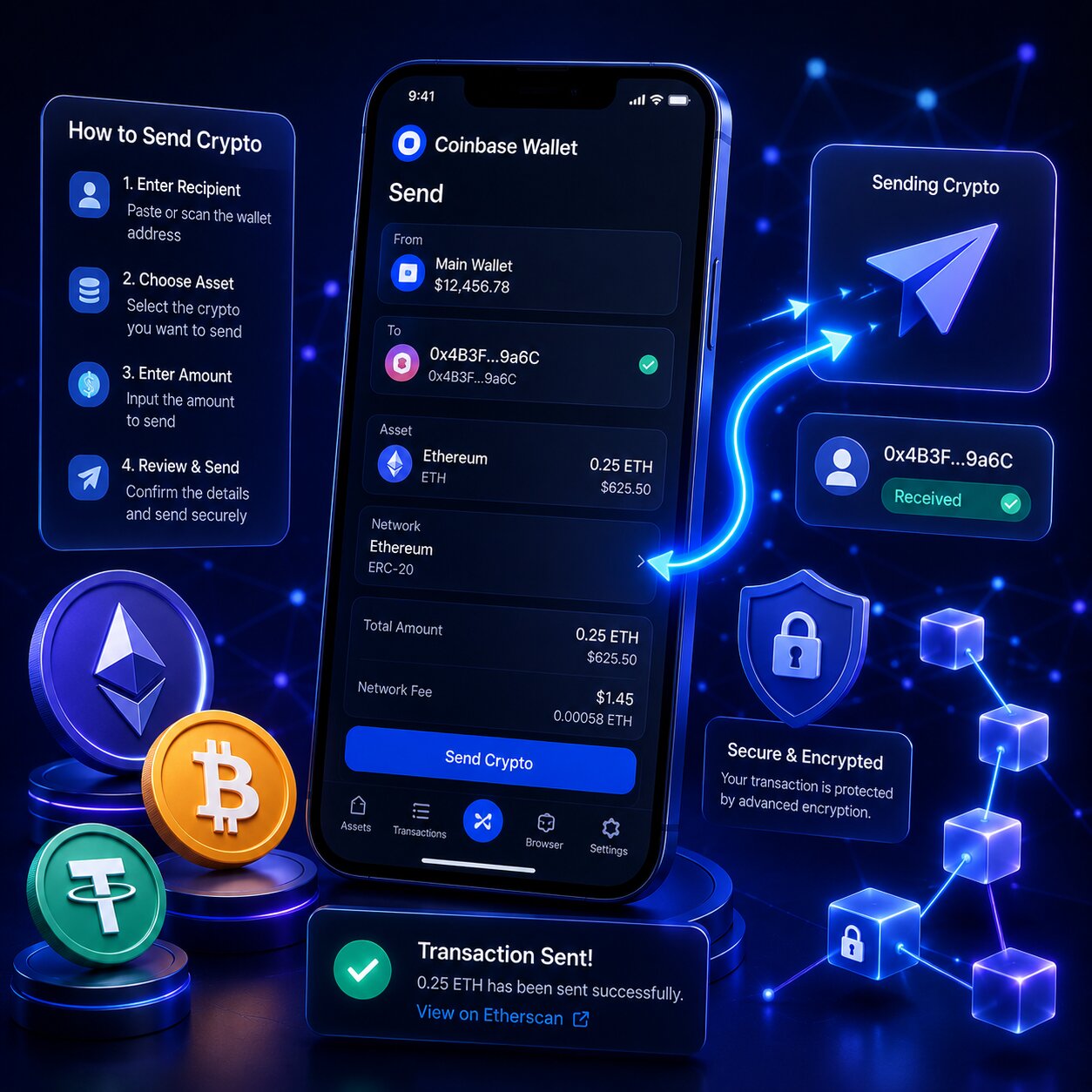
Coinbase Wallet mobile sends crypto via the Payments tab. The process takes under 2 minutes with Recipient Address and Network Fee balance ready.
Steps – Mobile App Send:
- Open Coinbase Wallet and tap the “Payments” tab on the main screen.
- Tap “Send” to start a new cryptocurrency transfer.
- Select the asset you want to send and enter the transfer amount. Coinbase Wallet displays values in both USD and token units.
- Enter the recipient address using one of the supported methods:
- Paste the wallet address and verify it carefully after pasting.
- Tap the QR code icon and scan the recipient’s wallet QR code.
- Enter an ENS address ending in .eth.
- Enter a cb.id or Wallet Username beginning with @.
- Select the correct blockchain network from the available network dropdown list.
- Review the transaction details carefully, including the amount, recipient address, and network fee.
- Tap “Confirm” to broadcast the transaction to the blockchain network.
- Wait for the transaction hash to appear in the activity feed. Tap the transaction hash to track confirmations and status on the blockchain explorer.
Note: After pasting a Recipient Address, verify the first 6 and last 6 characters. Clipboard Hijacking malware replaces copied addresses — QR Code scan eliminates this risk entirely.
How do you adjust the Network Fee when sending ETH from Coinbase Wallet?
Coinbase Wallet offers three Network Fee tiers for ETH transactions — Low, Medium, and High – based on EIP-1559 dynamic fee pricing. Lower fee = slower confirmation. Higher fee = faster confirmation.
| Fee Tier | Confirmation Speed | Best For |
| Low | Slower – minutes to hours in congestion | Non-urgent sends |
| Medium | Standard – minutes under normal conditions | Most sends |
| High | Fastest – prioritized by validators | Urgent or time-sensitive sends |
- EIP-1559 enables dynamic transaction fee adjustment on Ethereum and other EVM-compatible blockchains. The mechanism automatically adapts fees based on current network demand.
- Network fees fluctuate according to blockchain congestion levels. Higher transaction activity increases validator demand and raises transaction costs.
- Low network fees can cause transactions to remain pending during periods of heavy congestion. Validators prioritize transactions that offer higher fees.
- Coinbase Wallet displays estimated confirmation times for different fee tiers before transaction approval. Users can choose between slower lower-cost processing or faster higher-fee confirmation.
How do you verify a Coinbase Wallet send completed successfully using Transaction Hash?
A Transaction Hash is a unique identifier assigned to every confirmed blockchain transaction. Paste it into a Blockchain Explorer to verify confirmation status, recipient address, and amount transferred.
Verification steps:
- Open Coinbase Wallet and tap the activity feed to view recent transactions.
- Select the send transaction you want to verify.
- Copy the transaction hash, which appears as a long alphanumeric string.
- Open the correct blockchain explorer for the network used in the transaction:
- Ethereum uses etherscan.io
- Base uses basescan.org
- Solana uses solscan.io
- BNB Chain uses bscscan.com
- Paste the transaction hash into the explorer search bar to view the transaction details.
- Confirm that the transaction status shows “Success” on the blockchain explorer.
- Verify that the displayed recipient address matches the intended destination wallet address.
| Blockchain | Explorer | Transaction Hash Format |
| Ethereum | etherscan.io | 0x + 64 hex characters |
| Base | basescan.org | 0x + 64 hex characters |
| Solana | solscan.io | Base58 string (~88 chars) |
| BNB Chain | bscscan.com | 0x + 64 hex characters |
| Bitcoin | blockchain.com | 64 hex characters |
How do you send crypto from Coinbase Wallet Browser Extension – step by step?
The Browser Extension sends crypto from the extension popup — same fields as mobile but without the Payments tab structure. Available on Chrome, Brave, Firefox, and Edge.
Steps — Browser Extension Send:
- Click the Coinbase Wallet browser extension icon and unlock the wallet using your password.
- Click “Send” on the extension home screen to begin a new transaction.
- Select the cryptocurrency asset you want to send and enter the transfer amount.
- Enter the recipient address by pasting a wallet address, entering an ENS name, or using a supported wallet username.
- Select the correct blockchain network for the transaction.
- Review the displayed network fee and transaction details carefully before proceeding.
- Click “Confirm” to broadcast the transaction to the blockchain network.
- Wait for the transaction hash to appear in the activity history to track the transaction status and confirmations.
How does sending crypto from Coinbase Wallet Browser Extension differ from the mobile app?
| Feature | Mobile App | Browser Extension |
| Entry point | Payments tab → Send | Home screen → Send |
| QR Code scan | Built-in camera scanner | Not available – paste or type only |
| Network Fee adjustment | Low/Medium/High tiers | Low/Medium/High tiers |
| Ledger hardware wallet | Not supported | Supported – requires blind signing |
| Biometric confirmation | Face ID / fingerprint | Password only |
| USD amount display | Yes | Yes |
- The Coinbase Wallet browser extension does not support QR code scanning. Users must enter recipient addresses through copy-paste, ENS names, or supported wallet usernames.
- Ledger hardware wallet support is available only on the Coinbase Wallet browser extension. The mobile app currently does not support Ledger device integration.
- Both the mobile app and browser extension display transaction amounts in USD alongside token units. Users can review approximate fiat values before confirming transfers.
How do you send crypto using ENS Address and Wallet Username in Coinbase Wallet?
ENS Address and Wallet Username replace long alphanumeric Recipient Addresses with human-readable names. Coinbase Wallet resolves them to full addresses on-chain before sending.
- ENS addresses automatically resolve .eth names into full Ethereum wallet addresses. This system simplifies Ethereum transactions by replacing long wallet addresses with readable names.
- Wallet usernames resolve @handles into registered Coinbase Wallet addresses. Users can send cryptocurrency without manually entering a full blockchain address.
- cb.id is Coinbase’s human-readable address system for EVM-compatible blockchains. The system maps readable identities to wallet addresses across supported networks.
What is the difference between ENS Address, cb.id username, and Wallet Username in Coinbase Wallet?
| Identifier | Format | Resolves To | Compatible Networks |
| ENS Address | yourname.eth | Ethereum wallet address | Ethereum + EVM chains |
| cb.id username | yourname.cb.id | Coinbase Wallet address | EVM-compatible chains |
| Wallet Username | @yourname | Coinbase Wallet address | Supported Coinbase Wallet chains |
Example – Sending ETH via ENS:
- Open Coinbase Wallet and tap “Send.”
- Select ETH as the asset you want to transfer and enter the amount.
- In the recipient address field, type vitalik.eth instead of a full wallet address.
- Coinbase Wallet will automatically resolve the ENS name into the corresponding full Ethereum 0x wallet address.
- Verify that the resolved wallet address matches the intended recipient before confirming the transaction.
- Tap “Confirm” to send the transaction on the Ethereum network.
What is the Coinbase Wallet Shareable Link send feature and how does it work?
Shareable Link sends up to $500 in crypto via a URL — no recipient wallet address required. The recipient claims funds by opening the link. Unclaimed funds return automatically after 5 days.
- Shareable Links allow users to send up to $500 in cryptocurrency without requiring the recipient’s wallet address. The transfer is accessed through a secure claim URL.
- Anyone with access to the link can claim the funds. Users should share the link only with the intended recipient to prevent unauthorized access.
- Unclaimed funds automatically return to the sender’s Coinbase Wallet after 5 days. The system reverses unclaimed transfers without manual action.
- Legitimate Coinbase Wallet claim links begin with wallet.coinbase.com or go.cb-w.com/claim. Users should avoid unofficial or modified URLs to reduce phishing risks.
How do you send crypto via Shareable Link in Coinbase Wallet – step by step?
Steps — Create Shareable Link:
- Open Coinbase Wallet and tap the “Payments” tab, then select “Send.”
- Choose the cryptocurrency asset you want to send and enter an amount up to $500.
- Tap “Send with a shareable link” to create a claimable payment link.
- Review the transaction details carefully and tap “Create” to generate the link.
- Coinbase Wallet immediately deducts the funds from your wallet balance after link creation.
- Copy the generated shareable link and send it to the intended recipient through a secure messaging app or communication channel.
Steps — Recipient Claims:
- Open the received shareable link in a browser or supported app.
- If the recipient does not already have Coinbase Wallet, the system prompts them to download the app or create a wallet.
- Tap “Claim now” to accept the transfer and receive the funds in the Coinbase Wallet balance.
What happens to unclaimed Shareable Link funds in Coinbase Wallet?
Unclaimed Shareable Link funds automatically return to the sender’s Coinbase Wallet after 5 days without requiring manual action. To cancel the transfer before the 5-day period ends, open the “Transactions” tab, locate the shareable link transaction, tap “See claim link,” and select “Cancel.”
| Shareable Link Status | Timeframe | Outcome |
| Claimed by recipient | Immediately | Funds transferred — irreversible |
| Unclaimed | After 5 days | Auto-returned to sender wallet |
| Manually cancelled | Before 5 days | Returned to sender immediately |
- A shared link can be claimed by anyone who receives the URL. Users should handle Shareable Links securely and send them only to the intended recipient.
- The cancel option remains available in the Transactions tab until the funds are claimed. Senders can revoke the transfer before the recipient completes the claim process.
- Recipients do not pay a network fee when claiming Shareable Link funds. Coinbase Wallet processes the claim without charging the recipient blockchain transaction costs.
How do you speed up a pending send using Replace-By-Fee (RBF) in Coinbase Wallet?
Replace-By-Fee (RBF / BIP-125) replaces a pending transaction with a new one at a higher Network Fee – accelerating confirmation by incentivizing miners to prioritize the updated transaction.
Definition: Replace-By-Fee is a Bitcoin protocol feature (BIP-125) that allows a pending transaction to be rebroadcast with a higher fee, replacing the low-fee version in the mempool.
Function:
- Replace-By-Fee rebroadcasts a pending Bitcoin transaction with a higher network fee. The updated transaction replaces the original unconfirmed version on the network.
- Higher fees incentivize Bitcoin miners to prioritize the updated transaction. Miners usually confirm transactions that offer higher rewards first during network congestion.
- Coinbase Wallet supports BIP-125 Replace-By-Fee for Bitcoin transactions. Users can increase transaction fees to accelerate confirmation times for eligible pending BTC transfers.
Which Coinbase Wallet sends support Replace-By-Fee and which does not?
| Asset | RBF Supported | Speed-Up Method |
| Bitcoin (BTC) | Yes – BIP-125 | Use RBF in Coinbase Wallet activity |
| Ethereum (ETH) | Yes – via fee bump | Increase gas in pending tx settings |
| ERC-20 tokens | Yes – via ETH gas bump | Same as ETH |
| Solana (SOL) | No RBF | Transactions confirm in ~400ms — no need |
| Coinbase Shareable Link | No RBF | Cancel and resend with higher amount |
- Bitcoin Replace-By-Fee requires the original transaction to include the RBF flag during initial submission. Transactions without RBF enabled cannot be fee-bumped later.
- Ethereum fee bumping increases the gas price on a pending transaction to prioritize confirmation. Validators usually process higher-fee transactions more quickly during congestion.
- Solana does not require Replace-By-Fee mechanisms because block times average around 400 milliseconds. Most Solana transactions achieve near-instant confirmation under normal network
Conditional logic:
- If a Bitcoin transaction remains pending for more than 30 minutes, use Replace-By-Fee to rebroadcast it with a higher network fee. Higher fees improve miner prioritization during congestion.
- If an Ethereum transaction remains pending, increase the gas fee through the pending transaction settings. Validators prioritize transactions with higher gas prices.
- If a Solana transaction appears pending, wait briefly before taking action. Solana transactions usually confirm within seconds under normal network conditions.
What are the risks of sending crypto from Coinbase Wallet – Clipboard Hijacking explained?
The primary send risk is Clipboard Hijacking — malware that silently replaces a copied Recipient Address with an attacker’s address during paste. Wrong network selection is the second most common cause of permanent loss.
How does Clipboard Hijacking steal funds during a Coinbase Wallet send?
Definition: Clipboard Hijacking is malware that monitors the device clipboard and replaces cryptocurrency addresses with an attacker’s address at the moment of paste.
Attack flow:
| Step | What Happens |
| 1 | User copies recipient’s wallet address |
| 2 | Malware detects crypto address format in clipboard |
| 3 | Malware replaces copied address with attacker’s address |
| 4 | User pastes — sees similar-looking address — does not verify |
| 5 | User confirms send — funds sent to attacker permanently |
- Clipboard hijacking malware targets the paste action during recipient address entry. Malicious software can replace the copied wallet address before the transaction is confirmed.
- Attacker wallet addresses often visually resemble the original address. Many malicious addresses match the first and last characters to avoid detection.
- QR code scanning bypasses the clipboard entirely. Direct QR scans eliminate clipboard hijacking risks during wallet address entry.
- Always verify the first 6 and last 6 characters of the pasted address before confirming a transaction. Manual verification reduces the risk of sending funds to an attacker-controlled wallet.
What common send errors cause Coinbase Wallet transactions to fail?
| Error | Cause | Fix |
| “No compatible assets” | Recipient Address type doesn’t match asset/chain | Verify correct Blockchain Network and address format |
| Transaction pending indefinitely | Network Fee too low for current congestion | Use RBF (BTC) or increase gas (ETH) |
| Insufficient funds | Network Fee not covered by native token balance | Add ETH/SOL/BNB for gas before sending |
| Wrong network selected | Asset sent on incompatible chain | Permanent loss – verify network before confirming |
| Invalid address format | Typing error or wrong chain address | Check address format matches target Blockchain Network |
Conditional logic:
Coinbase Wallet shares only the public wallet address during dApp connections. The connection process does not expose private keys or Seed Phrases.
WalletConnect supports more than 6,000 decentralized applications across 150+ blockchain networks. The protocol enables secure wallet connections between mobile wallets and dApps.
Private keys remain stored on the user’s device during all connection methods. Wallet connections never transmit private keys to dApps or external servers.
Token approvals remain active on-chain even after disconnecting the wallet. Users must manually revoke approvals to remove smart contract spending permissions.
FAQ
How do I send crypto from Coinbase Wallet?
Open Coinbase Wallet and tap “Payments” followed by “Send.” Select the asset you want to transfer, enter the amount, and input the recipient address using a wallet address, QR code, ENS name, or username. Select the correct blockchain network, review the network fee, and tap “Confirm” to send the transaction. After submission, verify the transfer status using the transaction hash on the relevant blockchain explorer.
How do I send crypto from Coinbase Wallet to another wallet?
Tap Send in Coinbase Wallet, select the asset, enter the recipient’s wallet address or scan their QR Code, select the matching Blockchain Network, review the Network Fee, and confirm. Always verify the first and last 6 characters of the pasted address to prevent Clipboard Hijacking. Send a small test amount first for large transfers.
Can I send crypto from Coinbase Wallet to Coinbase?
Yes. Send from Coinbase Wallet to your Coinbase exchange account by tapping Send, entering your Coinbase deposit address for the specific asset, selecting the matching Blockchain Network, and confirming. Alternatively, link your Coinbase account in Coinbase Wallet for direct transfers without manual address entry.
How do I send crypto using an ENS address in Coinbase Wallet?
Tap Send, select an ETH or ERC-20 asset, type the recipient’s ENS address (e.g. name.eth) in the address field, and Coinbase Wallet automatically resolves it to the full Ethereum address. Verify the resolved address before confirming. ENS only works on Ethereum and EVM-compatible Blockchain Networks.
What is the Shareable Link send feature in Coinbase Wallet?
Shareable Link allows users to send up to $500 in cryptocurrency through a URL without requiring the recipient’s wallet address. Open Coinbase Wallet, tap “Send,” select the asset and amount, and choose “Send with a shareable link” to create the transfer link. Share the generated URL with the recipient. If the funds remain unclaimed for 5 days, Coinbase Wallet automatically returns the cryptocurrency to the sender. Legitimate links begin with wallet.coinbase.com or go.cb-w.com/claim.
How do I lower gas fees when sending from Coinbase Wallet?
Select the Low fee tier in the Network Fee adjustment screen before confirming – available for ETH and EVM-compatible chain sends. For lower fees overall, send during off-peak network hours. Alternatively, use Blockchain Networks with lower base fees – Base, Polygon, or BNB Chain – when the asset supports multiple chains.
Why is my Coinbase Wallet send failing?
Most failures are caused by insufficient Network Fee balance, wrong Blockchain Network selection, or an incompatible Recipient Address format. Check that native token balance covers the fee (ETH for Ethereum, SOL for Solana), verify the network matches the recipient’s wallet, and confirm the address format is correct for the selected chain.
Can I speed up a pending BTC send from Coinbase Wallet?
Yes. Coinbase Wallet supports Replace-By-Fee (BIP-125) for Bitcoin transactions. Open the activity feed, tap the pending BTC transaction, and select the option to increase the Network Fee. The updated transaction rebroadcasts with a higher fee – miners prioritize it over the original low-fee version.