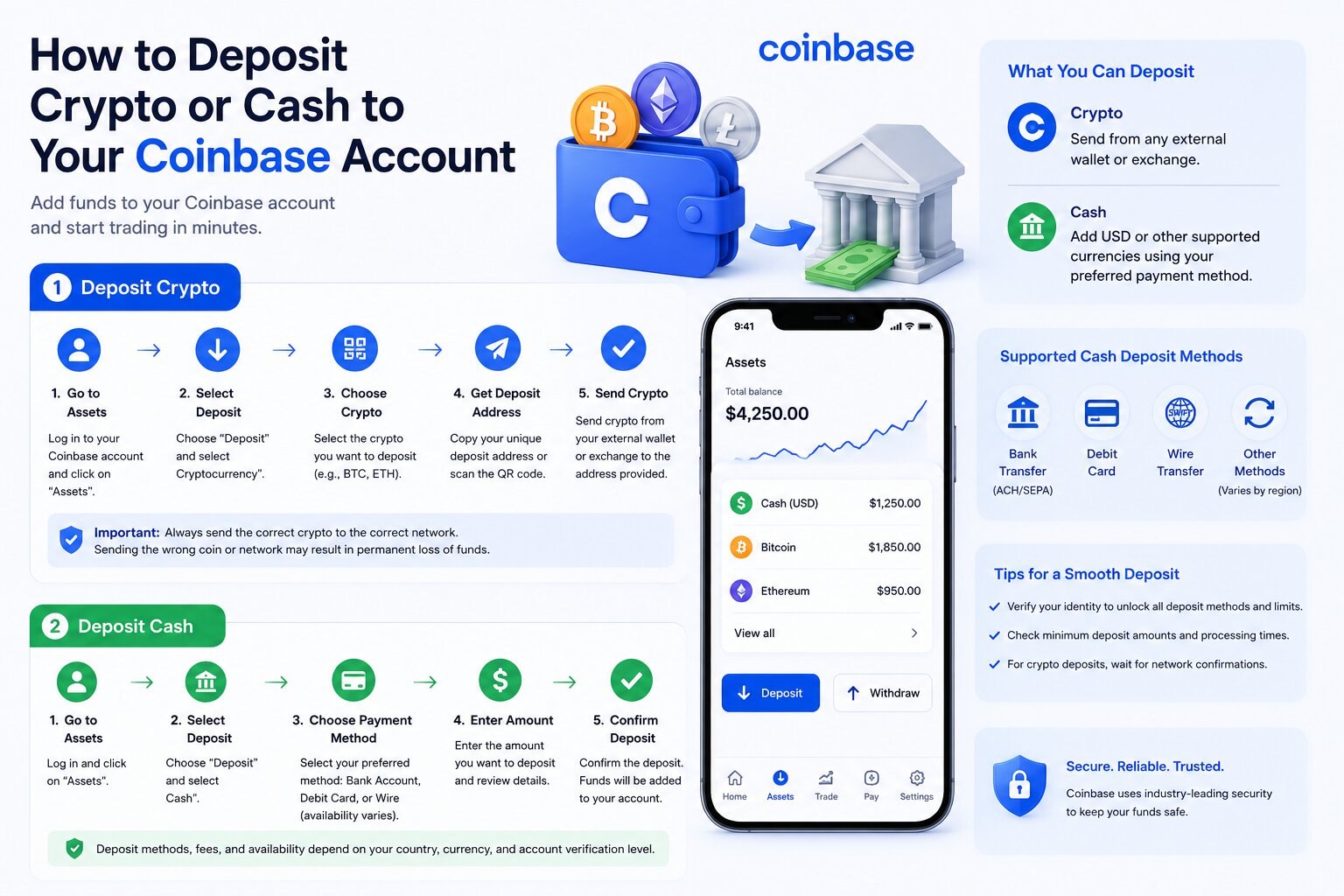
How to Deposit Crypto or Cash to Your Coinbase Account
A Coinbase deposit is the process of adding cryptocurrency or fiat currency to your Coinbase account. You can deposit crypto from an external wallet or exchange, or transfer cash using supported banking and payment methods.
Crypto deposits move digital assets on a blockchain. Fiat deposits transfer traditional currencies, such as USD or EUR, through banks or payment providers. Each method has different processing times, fees, and availability.
The deposit methods available on Coinbase depend on your country, local regulations, supported currencies, and account verification status. Some users can fund their account through ACH transfers, while others may use SEPA transfers, wire transfers, debit cards, or regional payment methods.
Understanding how each deposit method works helps reduce delays, avoid transfer errors, and improve account security.
The following sections explain how to deposit cryptocurrency and cash into Coinbase, choose the correct payment method, and complete deposits successfully.
How Do You Deposit Funds Into Coinbase?
You can deposit funds into Coinbase by transferring cryptocurrency from another wallet or by adding fiat currency through a supported payment method. The correct option depends on the assets you want to fund and the payment services available in your region.
Deposit Cryptocurrency Into Coinbase Using a Deposit Address
Depositing cryptocurrency requires a compatible Coinbase deposit address and the correct blockchain network.
Each supported cryptocurrency has its own deposit address inside your Coinbase account.
To locate it:
- Sign in to Coinbase.
- Select Assets.
- Choose the cryptocurrency you want to receive.
- Select Receive.
- Copy the generated wallet address or scan the displayed QR code.
Coinbase creates addresses for supported digital assets. Some assets may also require additional information, such as a destination tag or memo.
Selecting the Correct Blockchain Network
Always choose the blockchain network supported by the receiving Coinbase address.
For example:
- Bitcoin (BTC) must use the Bitcoin network.
- Ethereum (ETH) can use the Ethereum network.
- Polygon-based assets require the Polygon network.
- Solana assets require the Solana network.
- Base assets require the Base network.
Sending assets through an unsupported blockchain can delay the transaction or make recovery impossible.
Copying or Scanning the Wallet Address
You can copy the wallet address manually or scan the QR code using another wallet application.
Before sending funds:
- Verify every character of the address.
- Confirm the cryptocurrency matches the selected asset.
- Ensure the network is identical on both sending and receiving platforms.
Sending From an External Wallet or Exchange
After copying the address:
- Open your external wallet or exchange.
- Choose Withdraw or Send.
- Paste the Coinbase deposit address.
- Select the correct blockchain network.
- Enter the transfer amount.
- Review the transaction.
- Confirm the transfer.
The blockchain processes the transaction before Coinbase credits the funds to your account.
Deposit Fiat Currency Into Coinbase
Fiat deposits allow you to add traditional currency to your Coinbase balance for buying cryptocurrencies or other supported services.
Available methods vary by country.
Bank Account Deposits
Many regions allow direct bank transfers.
Typical supported options include:
- ACH transfers (United States)
- SEPA transfers (European Economic Area)
- Faster Payments (United Kingdom)
- Local bank transfers in supported countries
Bank transfers often provide higher deposit limits than card payments.
Debit Card Deposits
Eligible users can fund their Coinbase account using a verified debit card.
Debit card deposits usually process faster than bank transfers but may involve higher fees and lower transaction limits.
Credit card funding is not available in every region.
ACH Transfers
ACH transfers are available for eligible U.S. customers.
Characteristics include:
- Low or no bank transfer fees in many cases
- Processing time of several business days
- Higher funding limits than debit cards for many verified users
Funds may become available for trading before they can be withdrawn, depending on Coinbase policies.
SEPA Transfers
Customers in supported European countries can deposit euros through SEPA bank transfers.
SEPA transfers generally offer:
- Low banking costs
- Reliable processing
- Support for EUR deposits
Processing usually depends on participating financial institutions and banking schedules.
Wire Transfers
Wire transfers support larger deposits in eligible regions.
They generally provide:
- Higher transfer limits
- Business-day processing
- Availability for larger account funding
Some banks charge outgoing or incoming wire fees.
Other Regional Payment Methods
Coinbase also supports additional payment methods in selected countries.
Depending on your location, available options may include:
- Faster Payments
- Local instant bank transfers
- Regional banking networks
- Other regulated payment providers
The Coinbase Help Center lists currently supported payment methods by country.
Choose the Correct Deposit Method
The best deposit method depends on processing speed, cost, availability, and funding limits.
Speed
Processing times vary.
General expectations include:
| Deposit Method | Typical Speed |
| Crypto transfer | Minutes to about an hour after required confirmations |
| Debit card | Often near instant |
| ACH transfer | Several business days |
| SEPA transfer | Usually one to three business days |
| Wire transfer | Often same day or next business day after processing |
Actual times depend on banks, blockchain activity, and compliance reviews.
Availability
Not every payment option is available worldwide.
Availability depends on:
- Country of residence
- Supported fiat currency
- Local regulations
- Coinbase account type
- Identity verification status
Fees
Crypto deposits generally do not include a Coinbase deposit fee. However, blockchain validators charge network fees that the sender pays.
Bank transfers may have low or no Coinbase fees, while debit card funding can involve higher processing costs.
Third-party financial institutions may also charge service fees.
Deposit Limits
Each payment method has different limits.
Limits depend on:
- Verification level
- Payment method
- Account history
- Country
- Regulatory requirements
You can review your current deposit limits in your Coinbase account settings.
The next section explains how to deposit cryptocurrency into Coinbase step by step, including wallet addresses, supported blockchain networks, confirmations, and transaction tracking.
How Do You Deposit Crypto Into Coinbase?
You deposit cryptocurrency into Coinbase by generating a deposit address, selecting the correct blockchain network, sending funds from another wallet or exchange, and waiting for the required blockchain confirmations.
Find Your Coinbase Deposit Address
Every supported cryptocurrency has a dedicated receiving address.
To find it:
- Log in to Coinbase.
- Open Assets.
- Select the cryptocurrency you want to receive.
- Choose Receive.
- Copy the wallet address or use the QR code.
Coinbase generates addresses for supported assets. Some cryptocurrencies also require a memo or destination tag.
Select the Correct Cryptocurrency
Always select the exact cryptocurrency you plan to receive.
Examples include:
- Bitcoin (BTC)
- Ethereum (ETH)
- Solana (SOL)
- Polygon (POL)
- USD Coin (USDC)
Sending a different asset to the wrong address can result in an unsuccessful deposit or permanent loss.
Choose the Correct Blockchain Network
The blockchain network must match on both the sending platform and Coinbase.
Supported networks vary by asset and may include:
ERC-20
ERC-20 tokens operate on the Ethereum blockchain.
Use the Ethereum network only when Coinbase supports the token on Ethereum.
Bitcoin
Bitcoin transfers must use the native Bitcoin blockchain.
Do not send BTC through incompatible wrapped-token networks unless Coinbase specifically supports them.
Solana
Solana assets require the Solana blockchain.
Transactions usually complete after the network reaches the required confirmations.
Polygon
Polygon supports many Ethereum-compatible assets with lower transaction fees.
Confirm that Coinbase accepts the asset through Polygon before sending.
Base
Base is Coinbase’s Ethereum Layer 2 network.
Supported assets can often be transferred using Base with lower network costs than Ethereum mainnet.
Other Supported Networks
Coinbase periodically expands network support.
Always verify supported networks inside your Coinbase account before initiating a transfer.
The next section explains how to copy your wallet address safely, send funds from another wallet or exchange, monitor confirmations, and verify your completed deposit.
Copy Your Wallet Address
Copy the wallet address directly from Coinbase to reduce the risk of typing errors.
To copy your address:
- Open the Receive page for the selected cryptocurrency.
- Click Copy Address or scan the QR code.
- Compare the first and last characters of the copied address with the one displayed in Coinbase.
- Paste the address into the sending wallet or exchange.
Avoid entering wallet addresses manually. Copying the address directly helps prevent mistakes that could send funds to the wrong destination.
Send Crypto From Another Wallet or Exchange
After copying the deposit address, initiate the transfer from your external wallet or exchange.
Follow these steps:
- Open the wallet or exchange holding your cryptocurrency.
- Select Send or Withdraw.
- Paste your Coinbase deposit address.
- Select the same blockchain network shown by Coinbase.
- Enter the amount to transfer.
- Review the address, network, and amount.
- Confirm the transaction.
Many wallets display a network warning before sending. Review it carefully to ensure the selected blockchain matches the Coinbase deposit address.
Track Blockchain Confirmations
Every cryptocurrency transaction requires blockchain confirmations before Coinbase credits the deposit.
A blockchain confirmation is a new block added after your transaction. Additional confirmations increase confidence that the transaction is permanently recorded.
The required number of confirmations varies by blockchain and digital asset. Bitcoin, Ethereum, Solana, Base, and Polygon each have their own confirmation requirements.
You can monitor confirmations through:
- Coinbase transaction details
- A blockchain explorer
- The sending wallet or exchange
The deposit becomes available after Coinbase receives the required confirmations.
Verify Your Deposit Status
After the blockchain confirms the transaction, verify that Coinbase has credited your account.
To check your deposit:
- Sign in to Coinbase.
- Open Assets.
- Select the deposited cryptocurrency.
- View your transaction history.
- Check whether the transaction status shows Completed.
If the transaction remains pending, compare the blockchain confirmations with Coinbase’s requirements before contacting support.
The next section explains how to fund your Coinbase account with traditional currencies such as USD or EUR.
How Do You Deposit Cash Into Coinbase?
You can deposit cash into Coinbase by linking an eligible payment method, completing identity verification, and initiating a bank or card deposit.
Available payment methods depend on your country and supported fiat currency.
Link a Payment Method
Before depositing fiat currency, connect a supported payment method to your Coinbase account.
Bank Account
Bank accounts generally support larger deposits and lower transaction costs.
To link a bank account:
- Sign in to Coinbase.
- Open Settings.
- Select Payment Methods.
- Choose Add a Payment Method.
- Select Bank Account.
- Complete the verification process.
Verification methods vary by country and financial institution.
Debit Card
Eligible users can also link a debit card.
To add a debit card:
- Open Payment Methods.
- Select Debit Card.
- Enter the requested card information.
- Complete any verification requested by Coinbase.
Debit cards typically support faster deposits but often have lower limits than bank transfers.
Complete Identity Verification (KYC)
Coinbase requires identity verification for most fiat deposits to comply with financial regulations.
The Know Your Customer (KYC) process may require:
- Government-issued identification
- Legal name
- Residential address
- Date of birth
- Selfie verification in supported regions
Verification limits, required documents, and review times vary by jurisdiction.
Completing verification usually increases available deposit limits and unlocks additional payment methods.
Initiate a Fiat Deposit
After linking a payment method:
- Sign in to Coinbase.
- Select Assets or Cash Balance.
- Choose Add Cash or Deposit Cash.
- Select the payment method.
- Enter the deposit amount.
- Review the transaction details.
- Confirm the deposit.
Coinbase displays the expected processing time before you submit the transaction.
Check Processing Times
Processing time depends on the payment method.
General expectations include:
| Payment Method | Typical Processing Time |
| Debit Card | Often near instant |
| ACH Transfer | Several business days |
| SEPA Transfer | Usually one to three business days |
| Wire Transfer | Often same day or next business day after processing |
Processing may take longer during weekends, public holidays, or periods of increased banking activity.
Understand Holding Periods Before Trading or Withdrawing
Some deposits become available for trading before they become available for withdrawal.
Holding periods help Coinbase manage payment settlement and reduce fraud risk.
The holding period depends on factors such as:
- Payment method
- Country
- Account history
- Risk assessment
- Regulatory requirements
You can review any applicable hold directly in your Coinbase account after completing a deposit.
The next section compares Coinbase’s supported deposit methods, including availability, processing times, fees, and typical funding limits.
Which Deposit Methods Does Coinbase Support?
Coinbase supports both cryptocurrency and fiat deposit methods. Available options vary by country, currency, and account verification level.
| Deposit Method | Availability | Typical Processing Time | Fees | Limits |
| ACH Transfer | Eligible U.S. customers | Several business days | Coinbase may not charge a deposit fee; bank policies may vary | Varies by verified account |
| SEPA Transfer | Supported European countries | Usually one to three business days | Generally low; banking fees may apply | Varies by account and region |
| Wire Transfer | Eligible regions | Often same day or next business day after processing | Bank or intermediary fees may apply | Typically higher than ACH or card limits |
| Debit Card | Supported countries | Often near instant | Card processing fees may apply | Usually lower than bank transfer limits |
| Bank Transfer | Supported countries | Depends on banking network | Depends on bank and region | Varies by verification level |
| Crypto Transfer | Supported blockchains and assets | After required blockchain confirmations | Coinbase generally does not charge a crypto deposit fee; the sender pays network fees | No fixed blockchain limit, subject to asset support and minimum deposit requirements |
Before initiating any deposit, verify that your payment method, blockchain network, and cryptocurrency are supported by Coinbase in your region.
The next section explains Coinbase deposit fees, including blockchain network fees, banking charges, card processing costs, and third-party fees.
Frequently Asked Questions
How do I deposit money into Coinbase?
Deposit money by linking a supported payment method, selecting Add Cash or Deposit Cash, choosing your bank account or debit card, entering the amount, and confirming the transaction. Available payment methods depend on your country and verified account status.
How do I deposit crypto into Coinbase?
Open Assets, select the cryptocurrency, choose Receive, copy your deposit address, select the correct blockchain network, and send funds from your external wallet or exchange. Wait until Coinbase receives the required blockchain confirmations.
Is depositing into Coinbase free?
Crypto deposits generally do not incur a Coinbase deposit fee. The sender still pays blockchain network fees. Fiat deposits may be free or subject to bank, card, or payment provider fees depending on the funding method and region.
How long do Coinbase deposits take?
Processing times vary by deposit method.
| Deposit Type | Typical Processing Time |
| Crypto | Minutes to about an hour after required confirmations |
| ACH | Several business days |
| SEPA | Usually 1β3 business days |
| Wire Transfer | Often same day or next business day after processing |
| Debit Card | Often near instant |
Actual times depend on blockchain activity, banking hours, compliance reviews, and payment provider processing.
Why is my Coinbase deposit pending?
A pending deposit commonly results from one or more of the following:
- Waiting for required blockchain confirmations.
- A bank transfer is still processing.
- Payment method verification is incomplete.
- Coinbase is performing a compliance or security review.
- Blockchain network congestion.
- A temporary deposit hold following a fiat transfer.
Review your transaction details before contacting support.
Why didn’t my Coinbase deposit arrive?
Deposits may fail to appear because of:
- An incorrect wallet address.
- An unsupported cryptocurrency.
- An unsupported blockchain network.
- A missing memo or destination tag for supported assets that require one.
- A transaction that is still pending on the blockchain.
- Insufficient blockchain confirmations.
If the blockchain shows the required confirmations and the deposit still does not appear, contact Coinbase Support and provide the transaction details.
What is a Coinbase deposit address?
A Coinbase deposit address is a unique wallet address assigned to your account for receiving a supported cryptocurrency. Each cryptocurrency has its own deposit address, and some assets also require a memo or destination tag.
Can I deposit crypto without KYC?
In some jurisdictions, users may receive cryptocurrency before completing full identity verification. However, fiat deposits, trading features, withdrawal limits, and account functionality often require Know Your Customer (KYC) verification. Requirements vary by country and applicable regulations.
What happens if I send crypto on the wrong network?
Sending cryptocurrency through an unsupported blockchain network can delay the transfer or make the funds unrecoverable. Always verify that both the cryptocurrency and blockchain network match the receiving Coinbase deposit instructions before sending.
How do I find my Transaction ID (TXID)?
You can locate the Transaction ID (TXID) in the wallet or exchange that sent the cryptocurrency.
Most platforms display it within the transaction history after the transfer is broadcast to the blockchain. You can also search the TXID using a compatible blockchain explorer to verify confirmations.
When should I contact Coinbase Support?
Contact Coinbase Support when:
- The blockchain transaction has the required confirmations but no funds appear.
- Your bank confirms the transfer has completed but Coinbase has not credited your account.
- Your account remains under review for an unusually long period.
- You suspect unauthorized activity.
Provide your TXID, payment reference, and account information to help speed up the investigation.
How do I check my Coinbase deposit status?
You can monitor your deposit by:
- Viewing your Coinbase transaction history.
- Checking the blockchain explorer using the TXID.
- Confirming the required blockchain confirmations.
- Reviewing your bank transfer status with your financial institution.
What payment methods does Coinbase accept?
Supported payment methods vary by country and may include:
- ACH transfers
- SEPA transfers
- Wire transfers
- Bank transfers
- Debit cards
- Cryptocurrency transfers
- Other regional payment methods where available
What are Coinbase deposit limits?
Deposit limits depend on:
- Identity verification level.
- Payment method.
- Country of residence.
- Local regulations.
- Account history and risk assessment.
Current limits are available within your Coinbase account settings.
Can I cancel a Coinbase deposit?
Blockchain transactions cannot usually be canceled once they are confirmed and broadcast to the network.
Bank transfers may sometimes be canceled before processing begins, depending on the payment provider and financial institution.
How many confirmations does Coinbase require?
The number of required confirmations varies by cryptocurrency and blockchain. Coinbase determines the confirmation threshold for each supported asset to help ensure transaction security before crediting funds.
Can I deposit directly from another exchange?
Yes. Most cryptocurrency exchanges allow you to withdraw supported assets directly to your Coinbase deposit address. Verify the wallet address, cryptocurrency, blockchain network, and any required memo or destination tag before confirming the withdrawal.
Can I deposit from Coinbase Wallet to Coinbase?
Yes. You can transfer supported cryptocurrencies from Coinbase Wallet to your Coinbase account by selecting the correct asset, copying your Coinbase deposit address, and sending the funds over a supported blockchain network.