How to Withdraw Money or Crypto from Coinbase | CryptoLurk
How to Withdraw Money or Crypto from Coinbase
CrisCoin 11 min readCoinbase
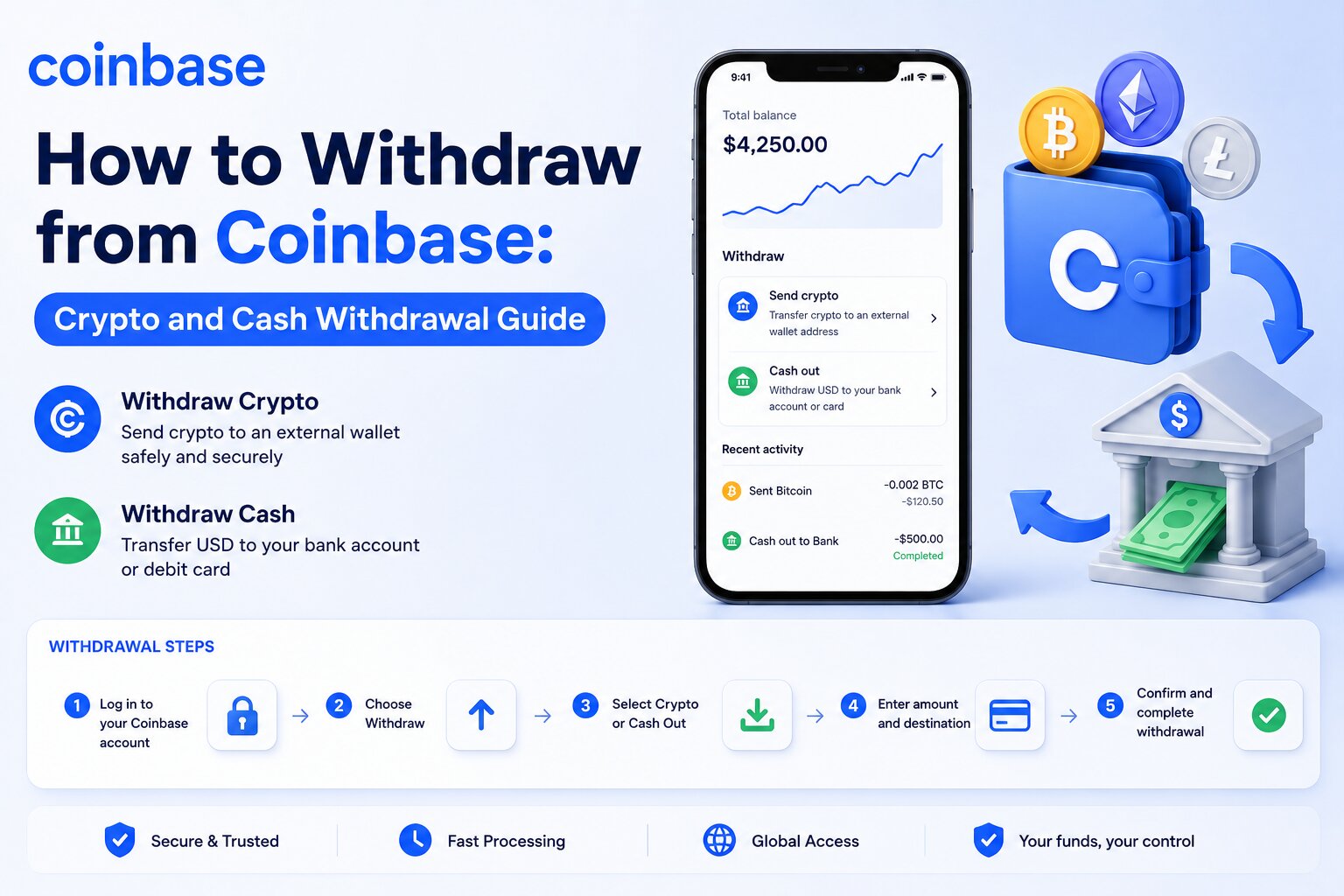
Withdrawing from Coinbase means transferring either cryptocurrency to another wallet or converting your crypto into cash and sending it to a supported payment method.
Coinbase supports multiple withdrawal options, including external crypto wallets, bank accounts, PayPal, and eligible debit cards. The processing time, withdrawal limits, and fees depend on the withdrawal method, blockchain network, account verification status, and your region.
Crypto withdrawals require a wallet address and blockchain confirmation, while cash withdrawals use traditional payment networks such as ACH, SEPA, or supported local banking systems. Understanding each withdrawal method helps you avoid unnecessary fees, delays, and transaction errors.
Whether you want to move Bitcoin to a hardware wallet or transfer your Coinbase balance to your bank account, this guide explains every step, the available withdrawal methods, common issues, and security best practices.
How Do You Withdraw Money or Crypto from Coinbase?
Coinbase allows users to withdraw both cryptocurrency and fiat currency. The withdrawal process differs depending on whether you are transferring digital assets to another wallet or cashing out to a payment method such as a bank account or PayPal.
Before starting any withdrawal, Coinbase verifies your account status, available balance, and security settings. Completing identity verification and enabling two-factor authentication (2FA) reduces the risk of delays caused by security reviews.
What Is a Coinbase Withdrawal?
A Coinbase withdrawal transfers assets from your Coinbase account to another destination.
A Withdrawal Can Involve
Sending cryptocurrency to an external wallet
Cashing out cryptocurrency into fiat currency
Transferring cash to a linked bank account
Sending funds to PayPal or an eligible debit card where supported
Each withdrawal type follows different processing rules. Cryptocurrency withdrawals depend on blockchain confirmations, while cash withdrawals depend on banking networks and payment providers.
What Can You Withdraw From Coinbase?
Coinbase supports several asset types for withdrawal.
Cryptocurrency
You can withdraw supported cryptocurrencies such as:
Bitcoin (BTC)
Ethereum (ETH)
Solana (SOL)
Litecoin (LTC)
XRP
USDC
Other supported digital assets
The destination can be:
Coinbase Wallet
Hardware wallet
Software wallet
Another cryptocurrency exchange
Any compatible external wallet
Cash Balance
You can convert cryptocurrency into your local fiat currency and withdraw the available cash balance.
Supported currencies vary by country and may include:
US Dollar (USD)
Euro (EUR)
British Pound (GBP)
Canadian Dollar (CAD)
Availability depends on your location and supported payment methods.
Rewards
Some users receive staking rewards or promotional rewards. Rewards become available for withdrawal after Coinbase credits them to your available balance. Certain assets may have holding periods before they become transferable.
What You Need Before Withdrawing
Preparing your account before initiating a withdrawal reduces the chance of failed transactions or security holds.
Available Balance
Only your available balance can be withdrawn.
Funds may become temporarily unavailable because of:
Recent bank deposits
Pending cryptocurrency purchases
Security holds
Unsettled transactions
Check Before You Start: Check your available balance before starting a withdrawal.
Identity Verification
Coinbase requires identity verification to comply with financial regulations.
Depending on your region, verification may require:
Government-issued identification
Personal information
Address verification
Selfie verification
Verified accounts usually receive higher withdrawal limits.
Two-Factor Authentication (2FA)
Two-factor authentication protects your account from unauthorized withdrawals.
Coinbase Supports
Authenticator apps
Security keys
SMS verification in supported regions
Authenticator applications generally provide stronger protection than SMS verification.
Verified Payment Method
Cash withdrawals require a verified payment method.
Supported options may include:
Bank account
PayPal
Eligible debit card
Local payment services
Avoid Delays: Verify your payment method before requesting a withdrawal to avoid delays.
How to Withdraw Cryptocurrency From Coinbase
Sending cryptocurrency from Coinbase is straightforward when you use the correct wallet address and blockchain network.
Every crypto withdrawal creates a blockchain transaction. Once Coinbase broadcasts the transaction to the network, it usually cannot be reversed.
Step-by-Step Process
1
Sign In to Coinbase
Log in to your Coinbase account through the official website or mobile application. Complete any required two-factor authentication before continuing.
2
Select Send
Navigate to your asset portfolio. Choose the cryptocurrency you want to transfer, then select Send.
3
Choose the Cryptocurrency
Select the digital asset you want to withdraw, such as Bitcoin, Ethereum, Solana, or USDC. Ensure the receiving wallet supports the selected cryptocurrency.
4
Enter the Wallet Address
Paste the recipient’s wallet address carefully. Many wallets also allow you to scan a QR code instead of manually entering the address.
5
Verify the Blockchain Network
Choose the correct blockchain network before sending funds. Sending cryptocurrency through the wrong blockchain network may result in permanent loss of funds.
6
Review Network Fees
Coinbase displays the estimated blockchain network fee before confirmation. Network fees are paid to blockchain validators or miners, not directly to Coinbase.
7
Confirm the Transaction
Review the wallet address, cryptocurrency, amount, network, and estimated fee. After confirming, Coinbase broadcasts the transaction to the blockchain and you will receive a Transaction ID (TxID).
Never Type Long Addresses Manually: Use copy-paste or QR code scanning unless absolutely necessary to avoid address errors.
How to Choose the Correct Blockchain Network
Selecting the correct blockchain network is one of the most important steps in any crypto withdrawal.
Always confirm that:
The receiving wallet supports the selected network
The cryptocurrency matches the destination wallet
Both sender and recipient use the same blockchain where required
Cryptocurrency
Common Networks
Bitcoin
Bitcoin
Ethereum
Ethereum
USDC
Ethereum, Base, Solana, Polygon
USDT
Ethereum, Tron, Solana, Polygon
Polygon
Polygon
Always Verify: Confirm network compatibility with the receiving wallet before confirming the withdrawal.
How to Verify a Wallet Address
A wallet address identifies the destination for your cryptocurrency.
Before sending funds:
Verification Checklist
Copy the address directly from the recipient
Compare the first and last characters after pasting
Scan for clipboard malware that may replace copied addresses
Send a small test transaction before transferring a large amount
Confirm the address supports the selected cryptocurrency
Hardware wallets and trusted wallet applications often display the destination address for additional verification.
How to Track a Crypto Withdrawal Using the Transaction ID
Every blockchain withdrawal receives a unique transaction ID (TxID). You can use this identifier to monitor your transaction on a blockchain explorer.
A blockchain explorer displays:
Transaction status
Number of confirmations
Block height
Network fee
Sender address
Recipient address
Timestamp
If Coinbase marks the withdrawal as completed but the recipient has not received the funds, the TxID helps determine whether the blockchain is still processing confirmations or whether the receiving platform is waiting for additional confirmations before crediting the balance.
How to Withdraw Cash From Coinbase
Cash withdrawals allow you to convert cryptocurrency into fiat currency and transfer the available balance to a supported payment method. Coinbase supports several withdrawal options, including bank accounts, PayPal, eligible debit cards, and local payment networks in selected countries.
Before requesting a cash withdrawal, sell your cryptocurrency if your balance is still held as digital assets. Only your available cash balance can be transferred to a payment method.
Withdraw to a Bank Account
A bank account is the most common withdrawal method for Coinbase users. It typically offers lower fees than instant withdrawal options, although processing times are longer.
ACH Transfer
ACH (Automated Clearing House) transfers are available to eligible customers in the United States.
Low or no withdrawal fees in many cases
Direct transfers to a linked U.S. bank account
Secure electronic bank processing
Processing times that typically range from 1 to 5 business days
SEPA Transfer
SEPA (Single Euro Payments Area) transfers allow customers in participating European countries to withdraw euros to supported bank accounts.
Transfers in EUR
Low transaction costs
High availability across Europe
Standard banking security
Most SEPA withdrawals are completed within one to two business days, although individual banks may require additional processing time.
Local Banking Options
Depending on your region, available options may include Faster Payments (United Kingdom), Interac (Canada), local bank transfer systems, and other regional banking partners.
Withdraw Using PayPal
PayPal provides a convenient withdrawal option for eligible Coinbase customers.
To withdraw using PayPal:
Open your Coinbase account
Select Assets
Choose your cash balance
Select Cash Out
Choose PayPal as the withdrawal destination
Review the amount and applicable fees
Confirm the transaction
PayPal withdrawals generally process faster than standard bank transfers. Availability varies by country.
Withdraw to an Eligible Debit Card
Eligible Visa and Mastercard debit cards support instant cash withdrawals in supported regions.
To withdraw to a debit card:
Verify your debit card
Select your cash balance
Choose Cash Out
Select your debit card
Enter the withdrawal amount
Review the estimated fee
Confirm the withdrawal
Debit card withdrawals usually complete within minutes, although some banks may require additional processing time.
How Instant Cash Out Works
Instant Cash Out sends available cash directly to an eligible debit card or linked payment method instead of using standard bank processing.
How the Process Works
Coinbase verifies your available balance
The payment network authorizes the transfer
Your bank receives the transaction
Funds usually arrive within minutes
Instant Cash Out offers convenience but usually carries higher fees than standard bank transfers.
Which Withdrawal Methods Does Coinbase Support?
Coinbase supports several withdrawal methods based on your country, local regulations, and verified payment methods. Each method differs in speed, fees, availability, and daily limits.
Bank Account
Bank transfers remain the preferred option for larger withdrawals, offering lower fees, higher withdrawal limits, direct deposits, and broad availability.
PayPal
PayPal offers faster access to funds than many traditional bank transfers. It is suitable for small withdrawals, frequent withdrawals, and users who already manage funds through PayPal.
Debit Card
Eligible debit cards provide one of the fastest withdrawal methods available on Coinbase, suitable when immediate access to cash is required. Daily limits may apply.
Coinbase Wallet vs External Wallet
Crypto withdrawals differ from cash withdrawals. Coinbase Wallet stores cryptocurrency under your control, while external wallets include hardware wallets, software wallets, and wallets provided by other exchanges.
Withdrawal Method
Availability
Typical Speed
Fees
Best For
Bank Account
Most supported countries
1–5 business days
Usually low
Large cash withdrawals
PayPal
Selected countries
Minutes to 1 day
Moderate
Fast cash access
Debit Card
Eligible regions
Minutes
Higher
Instant cash withdrawals
Coinbase Wallet
Supported cryptocurrencies
Blockchain dependent
Network fee
Self-custody
External Wallet
Supported cryptocurrencies
Blockchain dependent
Network fee
Long-term crypto storage
What Are Coinbase Withdrawal Fees?
Coinbase charges different fees depending on the withdrawal method, payment provider, and blockchain network. Some fees are collected by Coinbase, while others are charged by blockchain validators or banking partners.
Network Fees
Network fees apply only to cryptocurrency withdrawals. These fees compensate blockchain validators or miners for processing transactions and vary according to blockchain congestion, transaction size, cryptocurrency, and current network demand.
Withdrawal Fees
Coinbase may charge service fees depending on withdrawal method, country, currency, and payment provider. Fee structures may change over time, making it important to review the displayed estimate before confirming a transaction.
Bank Transfer Fees
Many standard bank withdrawals carry low or no Coinbase fee. Your bank may still charge incoming transfer fees, currency conversion fees, or international banking fees.
Instant Withdrawal Fees
Instant Cash Out typically costs more than standard withdrawals because payment networks process transactions immediately. Fees depend on withdrawal amount, region, payment method, and card issuer.
Withdrawal Type
Possible Fee
Who Charges It
Crypto Withdrawal
Blockchain network fee
Blockchain validators
Bank Transfer
Low or none
Coinbase and/or bank
PayPal
Service fee may apply
Coinbase or PayPal
Debit Card
Instant withdrawal fee
Coinbase
Currency Conversion
Exchange spread or conversion fee
Coinbase
What Are Coinbase Withdrawal Limits?
Coinbase applies withdrawal limits to protect customer accounts, reduce fraud, and comply with financial regulations. Limits differ between cryptocurrency withdrawals and fiat withdrawals. Your account dashboard displays your current withdrawal limit.
Daily Withdrawal Limits
Most verified accounts receive daily withdrawal limits. The available amount depends on verification level, account history, security settings, and region. Higher verification levels often qualify for increased limits.
Crypto Withdrawal Limits
Cryptocurrency withdrawal limits vary according to asset type, account verification, risk monitoring, and recent account activity. Some withdrawals may require additional security reviews before Coinbase broadcasts the transaction.
Cash Withdrawal Limits
Cash withdrawal limits depend on linked payment method, banking partner, country, and local regulations. Instant Cash Out limits may differ from standard bank transfer limits.
Factors That Affect Limits
Several Factors Influence Your Limit
Account Age — older accounts with consistent activity often face fewer restrictions
Identity Verification — completing verification usually unlocks higher limits
Account Security — strong 2FA and verified devices may qualify for higher limits
Region — supported methods, limits, and compliance requirements vary by location
How Long Does a Coinbase Withdrawal Take?
Coinbase withdrawal times vary depending on the withdrawal method, payment provider, blockchain network, and account verification status. Cryptocurrency withdrawals depend on blockchain confirmations, while cash withdrawals rely on banking and payment networks.
Most crypto withdrawals begin processing within minutes after Coinbase broadcasts the transaction to the blockchain. Cash withdrawals generally take longer because banks and payment providers process transactions during business hours.
Withdrawal Method
Estimated Processing Time
Cryptocurrency
A few minutes to over an hour, depending on blockchain confirmations
ACH Bank Transfer
1–5 business days
SEPA Bank Transfer
1–2 business days
PayPal
Usually within minutes to 24 hours
Eligible Debit Card (Instant Cash Out)
Usually within minutes
Keep in Mind: These are estimated timeframes. Actual processing times may vary due to network activity, banking schedules, security reviews, or regional payment processing.
Crypto Processing Times
Cryptocurrency withdrawals are processed through blockchain networks rather than traditional financial institutions. The confirmation time depends on the blockchain network used, current network congestion, transaction fee priority, and the number of confirmations required by the receiving platform.
You can monitor the progress of your withdrawal using the Transaction ID (TxID) on the appropriate blockchain explorer.
ACH Processing Times
Most ACH withdrawals arrive within 1 to 5 business days. The exact timing depends on your bank’s processing schedule, weekends and public holidays, internal banking reviews, and transaction cutoff times.
SEPA Processing Times
Most SEPA withdrawals are completed within 1 to 2 business days, although some banks may require additional processing time due to banking hours, national holidays, or verification requirements.
PayPal Withdrawal Times
Many PayPal withdrawals are completed within minutes after confirmation. However, processing may take up to 24 hours depending on account status, security checks, and regional payment processing.
Debit Card Processing Times
Most debit card withdrawals are completed within a few minutes. However, your bank or card issuer may require additional time depending on card issuer policies and fraud prevention checks.
Factors That Can Delay a Coinbase Withdrawal
Although many withdrawals are processed quickly, several factors can increase the total processing time.
Blockchain Network Congestion
Public blockchains process transactions based on network demand. During periods of heavy activity, pending transactions may wait longer before validators include them in a block, resulting in longer confirmation times and increased network fees.
Security Reviews
Coinbase continuously monitors withdrawals for suspicious activity. A transaction may be temporarily delayed if the platform detects unusual behavior such as logging in from a new device or withdrawing a significantly larger amount than usual.
Identity Verification
Incomplete identity verification can prevent Coinbase from processing certain withdrawals. Completing verification promptly helps minimize delays.
Payment Provider Processing
Banks, PayPal, and debit card issuers each operate their own payment systems. Even after Coinbase completes a withdrawal request, the receiving institution may require additional processing time.
Regional Banking Schedules
Weekends, public holidays, and local banking hours can delay cash withdrawals. Cryptocurrency networks operate continuously, but traditional financial institutions generally process payments only during business hours.
How to Check the Status of Your Withdrawal
Coinbase allows you to monitor every withdrawal directly from your account.
1
Sign In to Coinbase
Log in to your account through the official app or website.
2
Open Assets or Transaction History
Navigate to the section that lists your recent transactions.
3
Select the Withdrawal
Find the specific withdrawal you want to check.
4
Review the Current Status
View whether the withdrawal is Pending, Processing, Completed, or Failed.
Common Status Updates
Pending — Coinbase or the payment network is still processing the request
Processing — the withdrawal is moving through the payment or blockchain network
Completed — Coinbase has successfully sent the funds
Failed — the withdrawal could not be completed and may require further action
For cryptocurrency withdrawals, you can also use the Transaction ID (TxID) to track confirmations on a blockchain explorer for real-time visibility into the transaction’s progress after it leaves Coinbase.
Frequently Asked Questions
To withdraw money from Coinbase to your bank account, sell your cryptocurrency (if necessary), go to Assets, select Cash Out, choose your linked bank account, enter the amount, review the fees, and confirm the withdrawal. Processing time depends on your banking method, such as ACH or SEPA.
Sign in to Coinbase, select Send, choose the cryptocurrency, enter the recipient’s wallet address, verify the correct blockchain network, review the network fee, and confirm the transaction. Always ensure the wallet supports the selected cryptocurrency and network before sending funds.
You may be unable to withdraw funds because of a security hold, pending bank deposit, incomplete identity verification, insufficient available balance, account restrictions, or exceeding your withdrawal limit. Review your account notifications to identify the specific reason.
Withdrawal times vary by method. Cryptocurrency withdrawals usually depend on blockchain confirmations, while bank transfers can take 1–5 business days. PayPal and eligible debit card withdrawals are often completed within minutes, depending on your region and payment provider.
Yes. Coinbase may charge withdrawal fees depending on the payment method. Cryptocurrency withdrawals also require blockchain network fees, which are paid to validators or miners rather than Coinbase. The estimated fee is displayed before you confirm the transaction.
The minimum withdrawal amount depends on the cryptocurrency, fiat currency, and withdrawal method. Coinbase displays the minimum amount during the withdrawal process. Some payment providers or blockchain networks may also impose their own minimum limits.
Open your Coinbase account, navigate to Assets or Transaction History, and select the withdrawal. The status may show as Pending, Processing, Completed, or Failed. For cryptocurrency withdrawals, use the Transaction ID (TxID) to track confirmations on a blockchain explorer.
A cash withdrawal may be canceled only if Coinbase has not yet processed the request. Cryptocurrency withdrawals generally cannot be canceled once they have been broadcast to the blockchain because blockchain transactions are irreversible.
A crypto withdrawal may remain pending due to blockchain congestion, low network priority, security reviews, or the receiving platform waiting for additional confirmations. You can monitor the transaction using the blockchain Transaction ID (TxID).
No. Instant Cash Out is only available in supported countries and for eligible payment methods. Availability depends on your region, local regulations, and whether you have a supported debit card or payment provider linked to your Coinbase account.
Withdrawal limits are based on several factors, including your identity verification level, account age, security settings, payment method, transaction history, and country of residence. You can view your current limits in your Coinbase account settings.
If you send cryptocurrency to the wrong wallet address, the transaction usually cannot be reversed after it is confirmed on the blockchain. Always verify the recipient’s wallet address and blockchain network before confirming a transfer. Sending a small test transaction is recommended when transferring large amounts.
Yes. You can transfer supported cryptocurrencies from your Coinbase account to Coinbase Wallet by selecting Send, choosing the asset, and entering your Coinbase Wallet address. Make sure the selected blockchain network matches the receiving wallet.
Your total account balance may include funds that are subject to a temporary hold, pending deposits, open orders, or recently purchased cryptocurrency. Only your available balance can be withdrawn.
No. Coinbase is a centralized cryptocurrency exchange that manages your exchange account, while Coinbase Wallet is a self-custody wallet that gives you control of your private keys and digital assets.
You can reduce withdrawal costs by using standard bank transfers instead of instant withdrawals, avoiding periods of high blockchain congestion, selecting an appropriate network when supported, and reviewing the estimated fee before confirming the transaction.
Final Tip: Always double-check wallet addresses, blockchain networks, and verified payment methods before confirming any Coinbase withdrawal to avoid delays or irreversible errors.