How to Add a Network to Coinbase Wallet (2026 Guide)
Coinbase Wallet allows users to add any EVM-compatible blockchain manually using RPC configuration details. Five values are required: Network Name, RPC URL, Chain ID, Currency Symbol, and Block Explorer URL. Non-EVM blockchains such as Bitcoin and Cardano cannot be added through the Custom Network feature β only networks running the Ethereum Virtual Machine qualify.
| Required Field | Definition | Source |
| Network Name | Display label for the chain in the wallet interface | Official project docs |
| RPC URL | JSON-RPC endpoint the wallet uses to communicate with the blockchain node | Official docs or Chainlist.org |
| Chain ID | Unique numeric identifier β prevents replay attacks across EVM networks | Official docs or Chainlist.org |
| Currency Symbol | Ticker of the network’s native gas token (ETH, MATIC, BNB, etc.) | Official project docs |
| Block Explorer URL | Transaction explorer URL β enables direct on-chain verification (optional) | Official docs (e.g. etherscan.io) |
- Coinbase Wallet connects to EVM blockchains by routing JSON-RPC requests through the configured RPC URL β every balance read, gas estimate, and transaction broadcast passes through this endpoint.
- Chain IDs implement EIP-155 replay attack protection β preventing a transaction signed on Ethereum from being resubmitted on Polygon or any other EVM chain.
- Coinbase Wallet implements EIP-3085 (wallet_addEthereumChain) β the standard that allows dApps and tools like Chainlist.org to programmatically add networks with user approval.
- Custom Networks are stored locally on the device β they are not backed up in the cloud or synced across the mobile app and Browser Extension.
Key Terms for Adding Networks to Coinbase Wallet
| Term | Definition |
| EVM (Ethereum Virtual Machine) | The runtime environment used by Ethereum and all compatible chains to execute smart contracts |
| JSON-RPC | The protocol Coinbase Wallet uses to send requests to blockchain nodes β reads, writes, and gas estimates all use JSON-RPC |
| RPC URL | The endpoint address of a blockchain node β routes wallet communication to the network |
| Chain ID | Unique integer identifying an EVM network β EIP-155 uses it to prevent cross-chain replay attacks |
| Replay Attack | An attack where a transaction signed on one chain is resubmitted on another β Chain IDs prevent this |
| EIP-155 | Ethereum Improvement Proposal that adds Chain ID to transaction signatures to block replay attacks |
| EIP-3085 | Ethereum standard for wallet_addEthereumChain β enables dApps and tools to request network additions |
| Mainnet | A live production blockchain with real assets β transactions have real financial value |
| Testnet | A development blockchain with no real value β used for testing contracts without risking funds |
| Node Provider | Infrastructure company that runs blockchain nodes and exposes RPC endpoints (Alchemy, Infura, QuickNode) |
What networks does Coinbase Wallet support by default – and which require manual addition?
Coinbase Wallet pre-configures the most widely used EVM chains β users access them immediately without any setup. Less common EVM chains require manual addition via the Custom Network configuration.
Which EVM networks are pre-configured in Coinbase Wallet?
| Network | Chain ID | Native Token | Network Type |
| Ethereum | 1 | ETH | L1 β primary EVM chain |
| Base | 8453 | ETH | L2 β Coinbase-developed OP Stack rollup |
| Polygon | 137 | MATIC / POL | L2 sidechain |
| Arbitrum One | 42161 | ETH | L2 optimistic rollup |
| Optimism | 10 | ETH | L2 optimistic rollup |
| Avalanche C-Chain | 43114 | AVAX | L1 EVM-compatible |
| BNB Chain | 56 | BNB | L1 EVM-compatible |
| Gnosis Chain | 100 | xDAI | EVM sidechain |
- Base is pre-configured in Coinbase Wallet because Coinbase developed both products β the chain connection requires no manual setup.
- All pre-configured networks share the same 0x Ethereum address β Coinbase Wallet derives these from a single key using EIP-155 Chain ID differentiation.
- Pre-configured networks appear in the network selector immediately β switching between them requires one tap, no RPC URL entry needed.
Can you add any blockchain to Coinbase Wallet β or only EVM networks?
Only EVM-compatible blockchains can be added as Custom Networks. Non-EVM chains use incompatible address formats, transaction structures, and virtual machines β they cannot be configured through the EVM custom network flow.
| Blockchain | Supported as Custom Network | Reason |
| zkSync Era (Chain ID 324) | Yes β EVM-compatible zkEVM rollup | Runs Ethereum Virtual Machine |
| Scroll | Yes β EVM-compatible zkEVM | Runs Ethereum Virtual Machine |
| Linea (Chain ID 59144) | Yes β EVM-compatible | Runs Ethereum Virtual Machine |
| Celo (Chain ID 42220) | Yes β EVM-compatible L1 | Runs Ethereum Virtual Machine |
| Bitcoin native | No | UTXO model β non-EVM |
| Cardano | No | Non-EVM β separate VM architecture |
| Solana | No (natively supported, not custom) | Non-EVM |
| Starknet | No | StarkVM β not EVM-compatible |
- Solana is supported natively in Coinbase Wallet but uses a completely separate address system β it cannot be added through the EVM Custom Network flow.
- zkEVM chains (zkSync Era, Scroll, Linea) qualify as Custom Networks because they execute the Ethereum Virtual Machine despite using zero-knowledge proof technology for transaction finality.
- Does Coinbase Wallet support zkEVM chains? Yes β any chain running the EVM, including zkEVM rollups, can be added as a Custom Network using Chain ID and RPC URL.
What information do you need to add a custom network to Coinbase Wallet?
Five configuration values are required β all five are available in the official developer documentation of the network being added, or via Chainlist.org for any publicly listed EVM chain.
What is an RPC URL and where do you find it for a custom network?
An RPC URL is the JSON-RPC endpoint through which Coinbase Wallet sends all blockchain requests β reading wallet balances, estimating gas fees, and broadcasting signed transactions. Without a valid RPC URL, the self-custody wallet cannot communicate with the blockchain node.
- RPC URLs route blockchain communication from Coinbase Wallet to the network’s node infrastructure β every wallet operation depends on this connection functioning correctly.
- Official project documentation is the safest source β always source RPC endpoints directly from the protocol’s developer docs.
- Chainlist.org verifies RPC endpoints for EVM-compatible networks β it aggregates community-tested URLs alongside official endpoints.
- Third-party node providers (Alchemy, Infura, QuickNode, Ankr) offer dedicated RPC endpoints with higher reliability, rate limits, and uptime guarantees than public endpoints.
| RPC Source | Safety Level | Reliability | Best For |
| Official blockchain documentation | Highest | Good | All users β primary recommended source |
| Chainlist.org | High | Good | Quick addition of verified EVM networks |
| Alchemy / Infura / QuickNode | High | Excellent | Developers needing SLA-backed endpoints |
| Ankr | High | Good | Multi-chain coverage – 40+ networks |
| Random website, DM, or social media | High risk | Unknown | Never use – Malicious RPC vector |
What is a Chain ID and why does it matter in Coinbase Wallet?
A Chain ID is the unique integer identifier that distinguishes one EVM blockchain from all others. EIP-155 introduced Chain IDs specifically to prevent replay attacks β without Chain IDs, a transaction signed on Ethereum could be resubmitted on BNB Chain or Polygon.
- Chain IDs are embedded into every signed transaction β Coinbase Wallet includes the Chain ID when constructing the transaction signature, making that signature invalid on any other chain.
- An incorrect Chain ID causes all transactions on the Custom Network to fail β the wallet broadcasts to a different chain than intended or the transaction is rejected as invalid.
- Wrong Chain ID does not expose funds but renders the custom network configuration non-functional β the wallet appears connected but cannot execute transactions correctly.
Verified Chain IDs for commonly added EVM networks (2026):
| Network | Chain ID | RPC URL | Block Explorer |
| zkSync Era | 324 | https://mainnet.era.zksync.io | explorer.zksync.io |
| Linea | 59144 | https://rpc.linea.build | lineascan.build |
| Scroll | 534352 | https://rpc.scroll.io | scrollscan.com |
| Celo | 42220 | https://forno.celo.org | explorer.celo.org |
| Fantom | 250 | https://rpcapi.fantom.network | ftmscan.com |
| Moonbeam | 1284 | https://rpc.api.moonbeam.network | moonscan.io |
| Base Sepolia (testnet) | 84532 | https://sepolia.base.org | sepolia.basescan.org |
How do you add a custom network to Coinbase Wallet mobile app β step by step?
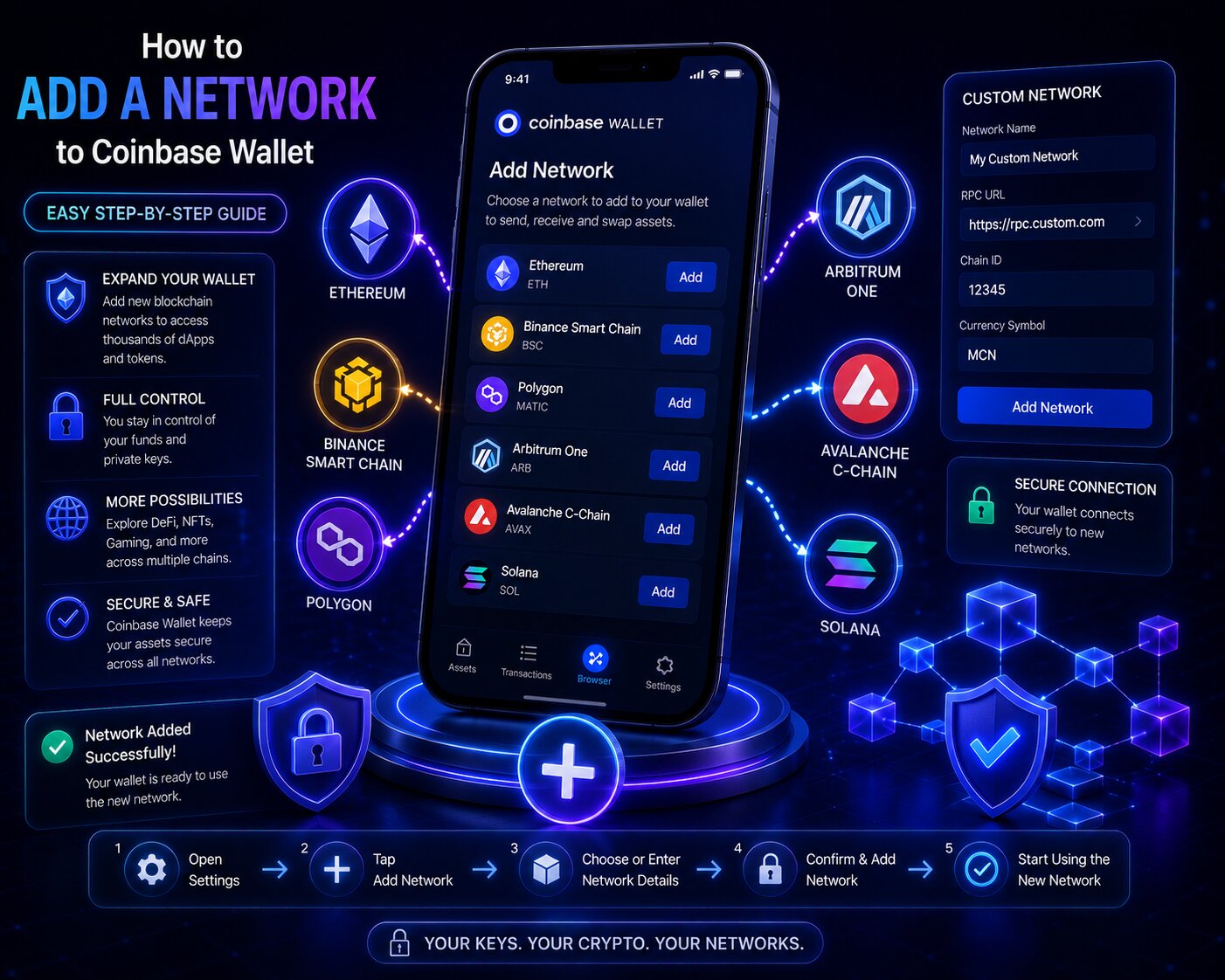
To add an EVM chain connection on the Coinbase Wallet mobile app, open Settings, navigate to Active dapp network, tap the plus icon, enter the five required fields from official documentation, and save.
Steps:
- Open the Coinbase Wallet mobile app and tap the Settings tab at the bottom of the screen.
- Scroll down and tap Active dapp network to open the network selector showing all available chains.
- Tap the ‘+’ icon in the top-right corner to open the custom network configuration form.
- Enter all five required fields β sourced from the network’s official developer documentation or Chainlist.org:
- Network Name: A descriptive label (e.g. “zkSync Era Mainnet”)
- RPC URL: The JSON-RPC endpoint (e.g. https://mainnet.era.zksync.io for zkSync Era)
- Chain ID: The exact numeric identifier (e.g. 324 for zkSync Era)
- Currency Symbol: The native gas token ticker (e.g. ETH for zkSync Era)
- Block Explorer URL: The transaction explorer (e.g. https://explorer.zksync.io)
- Tap Save β the blockchain endpoint appears in the Active dapp network list.
- Tap the new network to activate it β all dApp interactions and balance reads now route through this chain connection.
- Send a small amount of the network’s native gas token to the wallet address to verify the connection is working correctly.
The EVM wallet address remains identical across all custom networks β no new address is generated. The same 0x address that holds ETH on Ethereum holds assets on zkSync Era, Linea, Scroll, and any other EVM chain.
How do you switch between networks after adding a custom network on Coinbase Wallet mobile?
Switching between EVM chain connections in Coinbase Wallet mobile requires tapping the active network name at the top of the dApp Browser screen or inside Settings β Active dapp network.
- The active chain connection is displayed in the network selector β tapping it opens a list of all configured networks including both pre-configured and manually added ones.
- Token balances are chain-specific β switching networks displays only assets confirmed on the currently active chain.
- DeFi protocol interactions (swaps, lending, staking) execute on the active network β verify the correct chain is selected before confirming any transaction.
How do you add a custom network to Coinbase Wallet Browser Extension – step by step?
To add an EVM blockchain connection on the Browser Extension, open Settings, navigate to Networks, tap the plus icon, enter the five required fields, and save.
Steps:
- Click the Coinbase Wallet extension icon in the browser toolbar and unlock with the password.
- Click the Settings gear icon in the bottom-right corner of the extension popup.
- Scroll down and click Networks to open the list of all configured chain connections.
- Click the ‘+’ icon in the top-right corner to open the custom network form.
- Enter the five required fields β Network Name, RPC URL, Chain ID, Currency Symbol, and Block Explorer URL.
- Click Save β the network appears in the Networks list.
- Click the network name in the extension header to switch to the newly added chain connection.
How does adding a network on the Browser Extension differ from the mobile app?
| Feature | Mobile App | Browser Extension |
| Navigation path | Settings β Active dapp network β ‘+’ | Settings β Networks β ‘+’ |
| Network switching | Tap network in Active dapp network | Click network selector in extension header |
| Sync with mobile | Not synced β add separately | Not synced β add separately |
| Chainlist.org support | Via dApp Browser | Via browser connection |
| Custom network lost after reinstall | Must re-add | Must re-add |
- Custom Networks added on the Browser Extension are stored locally in the browser β uninstalling the extension removes them even if the wallet is restored from the same seed phrase.
- The same five fields are required on both platforms β always source from official documentation or Chainlist.org regardless of platform.
Manual network configuration requires entering all five fields individually. Chainlist.org automates this process using EIP-3085 wallet_addEthereumChain requests β the same standard dApps use to programmatically add networks.
How do you add a network to Coinbase Wallet using Chainlist.org – step by step?
Chainlist.org verifies RPC endpoints for EVM-compatible networks and triggers EIP-3085 wallet_addEthereumChain requests – adding networks to Coinbase Wallet in one click without manual field entry.
Steps:
- Open the Coinbase Wallet dApp Browser (mobile) or use the Browser Extension on desktop.
- Navigate to chainlist.org in the browser address bar.
- Search for the target network by name or Chain ID.
- Click Connect Wallet to link Coinbase Wallet to Chainlist.org.
- Click Add to Wallet next to the target network.
- Coinbase Wallet displays an EIP-3085 approval popup β Network Name, Chain ID, RPC URL, and Currency Symbol are pre-filled from Chainlist’s verified data.
- Tap Approve β the chain connection is saved to Coinbase Wallet automatically.
When should you use Chainlist.org instead of manually adding a network?
| Scenario | Use Chainlist.org | Use Manual Addition |
| Well-known EVM mainnet (zkSync, Scroll, Linea) | Fastest – verified, one click | Slower – 5 fields |
| Private or enterprise testnet | Not listed | Required |
| Custom node provider (Alchemy, Infura endpoint) | Lists public URLs only | Required |
| Network from unknown social media source | Verify on Chainlist first | High Malicious RPC risk |
Public RPC vs private RPC – which should you use in Coinbase Wallet?
Public RPC endpoints are free and accessible to anyone β they are suitable for occasional personal use. Private RPC endpoints from node providers (Alchemy, Infura, QuickNode, Ankr) offer higher rate limits, better uptime, and dedicated infrastructure β recommended for frequent DeFi activity or development work.
| Feature | Public RPC | Private RPC (Alchemy/Infura/QuickNode) |
| Cost | Free | Free tier available; paid for higher usage |
| Rate limits | Shared – can throttle under load | Dedicated – consistent performance |
| Uptime | Variable | SLA-backed (99.9%+) |
| Security | Standard | Standard + additional monitoring |
| Best for | Occasional personal use | Active DeFi users, developers |
Is it safe to add custom networks to Coinbase Wallet – Malicious RPC explained?
Adding a Custom Network from a legitimate source is safe β the chain connection cannot access the private key or authorize spending without user approval. A malicious RPC cannot extract private keys directly, but it can manipulate transaction requests, monitor pending transactions, and redirect users toward fraudulent addresses.
How does a Malicious RPC attack target Coinbase Wallet users?
A Malicious RPC is a fraudulent JSON-RPC endpoint operated by an attacker β it impersonates a legitimate blockchain node while intercepting and potentially manipulating wallet communication.
| Attack Stage | What the Malicious RPC Does |
| 1. Distribution | Attacker shares fake RPC URL via Discord, Telegram, Twitter DM, or cloned documentation sites |
| 2. Installation | User adds the malicious endpoint as an EVM Custom Network in Coinbase Wallet |
| 3. Interception | All JSON-RPC requests β balance reads, gas estimates, transaction broadcasts β route through the attacker’s server |
| 4. Monitoring | Attacker reads pending transactions, wallet activity, and token balances in real time |
| 5. Manipulation | Advanced Malicious RPCs can alter the transaction data shown to the user – substituting recipient addresses |
- DNS hijacking is an advanced variant where a legitimate RPC domain is compromised β the URL appears correct but resolves to an attacker’s server.
- A Malicious RPC cannot extract the private key because Coinbase Wallet signs transactions locally before broadcasting β the key never passes through the RPC connection.
- However, manipulating transaction display data (showing the user a different recipient than what gets signed) is technically possible in some Malicious RPC implementations.
Can a fake RPC steal crypto?
A fake RPC cannot directly drain the wallet, but it can create conditions where the user inadvertently approves fraudulent transactions. The risk is transaction manipulation and front-running β not direct private key extraction.
How do you verify a custom network is safe before adding it to Coinbase Wallet?
| Verification Step | Action | Protects Against |
| Source from official developer docs | Visit the blockchain’s official website – not a link from a message | Fake RPC URLs from social engineering |
| Cross-reference on Chainlist.org | Search the Chain ID – verify the RPC URL matches | Impersonated or altered endpoints |
| Confirm Chain ID from two sources | Check official docs and Chainlist independently | Wrong Chain ID causing transaction failures |
| Test with a minimal gas amount | Send the smallest possible amount first | Unknown network behavior |
| Verify Block Explorer resolves correctly | Open the Block Explorer URL and confirm it shows the correct network | Fake networks with no real blockchain |
- Never add an RPC URL received via Discord, Telegram, Twitter DM, or any unsolicited message β social engineering is the primary distribution method for Malicious RPCs.
- Coinbase’s official guidance states: source custom network information only from the protocol’s official developer documentation.
Can you add testnets to Coinbase Wallet?
Yes. Testnets are EVM networks with no real financial value β they use the same RPC URL and Chain ID format as mainnets but operate on test blockchain infrastructure. Coinbase Wallet supports testnet addition through the same Custom Network flow.
Testnet vs mainnet in Coinbase Wallet β what is the difference?
| Feature | Mainnet | Testnet |
| Asset value | Real β financial risk applies | None β test tokens only |
| Chain ID | Production ID (e.g. Base: 8453) | Test ID (e.g. Base Sepolia: 84532) |
| RPC URL | Production endpoint | Test endpoint |
| Block Explorer | Production explorer | Test explorer |
| Use case | Real transactions and DeFi | Smart contract testing and development |
- Base Sepolia (Chain ID 84532, RPC: https://sepolia.base.org) is the primary testnet for Base network development β accessible via Custom Network addition.
- Sending real mainnet assets to a testnet address results in permanent loss β always verify Chain ID before sending on any custom EVM network.
- Coinbase Wallet’s Developer Mode (available in Settings) displays testnet balances alongside mainnet accounts β useful for developers managing multiple environments.
Coinbase Wallet vs MetaMask for adding custom networks
Both Coinbase Wallet and MetaMask support EVM Custom Network addition via the same EIP-3085 standard. The configuration fields and process are nearly identical β the primary difference is the navigation path and sync behavior.
| Feature | Coinbase Wallet | MetaMask |
| EIP-3085 support | Yes | Yes |
| Chainlist.org compatibility | Yes | Yes |
| Network sync across devices | Not synced | Not synced |
| Default EVM networks pre-configured | Ethereum, Base, Polygon, Arbitrum, Optimism, Avalanche, BNB | Ethereum only (others addable) |
| Testnet support | Yes – via Custom Network | Yes – via Custom Network |
| Mobile + Extension parity | Both supported | Both supported |
| Self-custodial | Yes | Yes |
- MetaMask pre-configures only Ethereum by default β all L2s and alternative L1s require manual addition or Chainlist.org.
- Coinbase Wallet pre-configures Base, Polygon, Arbitrum, and Optimism β reducing the number of manual additions needed for common L2 activity.
- Both wallets implement EIP-3085 identically β a dApp requesting network addition works the same way in both wallets.
How do you add a custom token after adding a new network in Coinbase Wallet?
After adding a Custom Network and switching to it as the active chain, tokens on that network do not appear automatically β they require manual import using the token’s smart contract address on that specific chain.
Why do tokens not appear automatically after adding a custom network?
Coinbase Wallet maintains a default token list per supported network β tokens on newly added Custom Networks are absent from this list until they gain broad adoption. Any ERC-20 or EVM-compatible token can be added manually using its contract address.
Steps β Import custom token:
- Switch the active network to the newly added Custom Network in Settings β Active dapp network.
- Navigate to Settings β Manage assets and tap the ‘+’ icon.
- Enter the contract address of the token β copy from the token’s official project page or the network’s Block Explorer.
- Coinbase Wallet automatically reads the Currency Symbol and decimal values from the smart contract.
- Tap Save β the token balance appears in the wallet for the active Custom Network.
- Token contract addresses are unique per network β the USDC contract address on zkSync Era (0x1d17CBcF0D6D143135aE902365D2E5e2A16538D4) is different from USDC on Ethereum (0xA0b86991c6218b36c1d19D4a2e9Eb0cE3606eB48).
- Always copy contract addresses from the token’s official documentation or a verified Block Explorer entry β fake contract addresses on the same network are a common fraud vector.
- Token balances only display when the Custom Network is the active chain β switching networks refreshes the balance view to show only assets on the currently selected chain.
Why is my token balance missing after adding a network?
| Cause | Fix |
| Token not imported | Navigate to Settings β Manage assets β ‘+’ β enter contract address |
| Custom Network not set as active | Switch active network in Settings β Active dapp network |
| Wrong contract address entered | Verify contract address against Block Explorer for that specific chain |
| RPC URL not responding | Check if public RPC is temporarily unavailable – try alternative endpoint |
Why did my custom network disappear from Coinbase Wallet – troubleshooting guide?
Custom Networks are stored locally on the device β not in cloud backup or seed phrase recovery. App reinstallation, device changes, and data clearing all remove Custom Network configurations.
What causes a custom network to stop working in Coinbase Wallet?
| Cause | Symptom | Fix |
| App uninstalled / reinstalled | Network no longer listed | Re-add using original RPC URL and Chain ID |
| RPC endpoint changed by provider | Network listed but balance not loading | Update RPC URL in Settings β use Chainlist.org for updated endpoint |
| Wrong Chain ID entered | Transactions fail or go to wrong network | Edit Custom Network β correct the Chain ID |
| Public RPC endpoint down | Network listed but unresponsive | Switch to alternative RPC URL β try Alchemy or Infura endpoint |
| Device change | Network absent on new device | Custom Networks must be manually re-added on every device |
Conditional logic:
- If the custom network disappears after reinstalling the app β the seed phrase restores balances but not Custom Network settings β re-add using the original RPC URL and Chain ID from developer documentation.
- If transactions are failing on the custom network β paste the RPC URL into a browser to check if the JSON-RPC endpoint is responding β a 405 or timeout response confirms the endpoint is down.
- If the token balance is missing after switching to the custom network β confirm the Custom Network is set as active and that the token has been manually imported via Settings β Manage assets.
FAQ
How do I add a network to Coinbase Wallet?
On mobile: Settings β Active dapp network β ‘+’ β enter Network Name, RPC URL, Chain ID, Currency Symbol, and Block Explorer URL β Save. On Browser Extension: Settings β Networks β ‘+’ β same five fields β Save. For any well-known EVM network, connect Coinbase Wallet to Chainlist.org and click Add to Wallet for one-click EIP-3085 addition.
What networks does Coinbase Wallet support?
Coinbase Wallet pre-configures Ethereum (1), Base (8453), Polygon (137), Arbitrum One (42161), Optimism (10), Avalanche C-Chain (43114), BNB Chain (56), and Gnosis Chain (100). Any additional EVM-compatible network including zkSync Era (324), Linea (59144), Scroll (534352), Celo (42220), and Fantom (250) can be added as a Custom Network using RPC URL and Chain ID.
Can I add any blockchain to Coinbase Wallet?
Only EVM-compatible blockchains can be added as Custom Networks β networks running the Ethereum Virtual Machine. Non-EVM chains including Bitcoin, Cardano, XRP Ledger, and Tron cannot be added. Solana is supported natively but is not configurable as a Custom Network. zkEVM chains (zkSync Era, Scroll, Linea) qualify because they execute the Ethereum Virtual Machine.
How do I add Base network to Coinbase Wallet?
Base (Chain ID 8453) is pre-configured in Coinbase Wallet β no manual addition is required. Open the network selector and Base appears in the default list. If it is missing, add it manually: RPC URL https://mainnet.base.org, Chain ID 8453, Currency Symbol ETH, Block Explorer URL https://basescan.org. Base Sepolia testnet uses Chain ID 84532 and RPC URL https://sepolia.base.org.
What is an RPC URL in Coinbase Wallet?
An RPC URL is the JSON-RPC endpoint Coinbase Wallet uses to communicate with a blockchain node β routing balance reads, gas estimations, and transaction broadcasts. Without a valid RPC URL, the self-custody wallet cannot connect to the network. Always source RPC URLs from official developer documentation or Chainlist.org β Malicious RPC endpoints can intercept transaction data and manipulate requests.
How do I add a custom token on a new network?
Switch to the Custom Network as the active chain, then navigate to Settings β Manage assets β tap ‘+’ β enter the token’s contract address. Coinbase Wallet automatically reads the Currency Symbol and decimal values from the smart contract. Contract addresses are unique per network β verify the correct address on the network’s Block Explorer before importing.
Is it safe to add custom networks to Coinbase Wallet?
Adding a Custom Network from official documentation or Chainlist.org is safe β the chain connection cannot access the private key or move funds without user approval. A Malicious RPC cannot extract keys directly but can intercept transaction data and potentially manipulate requests. Never add RPC URLs from social media, Discord, Telegram, or unsolicited messages β these are the primary Malicious RPC distribution vectors.
Why did my custom network disappear from Coinbase Wallet?
Custom Networks are stored locally on the device β they are not included in seed phrase recovery or synced to cloud backup. Uninstalling the app, clearing app data, or switching to a new device removes all Custom Networks. Restoring the wallet from the seed phrase recovers asset balances but not Custom Network configurations β re-add manually using the original RPC URL, Chain ID, and Network Name.