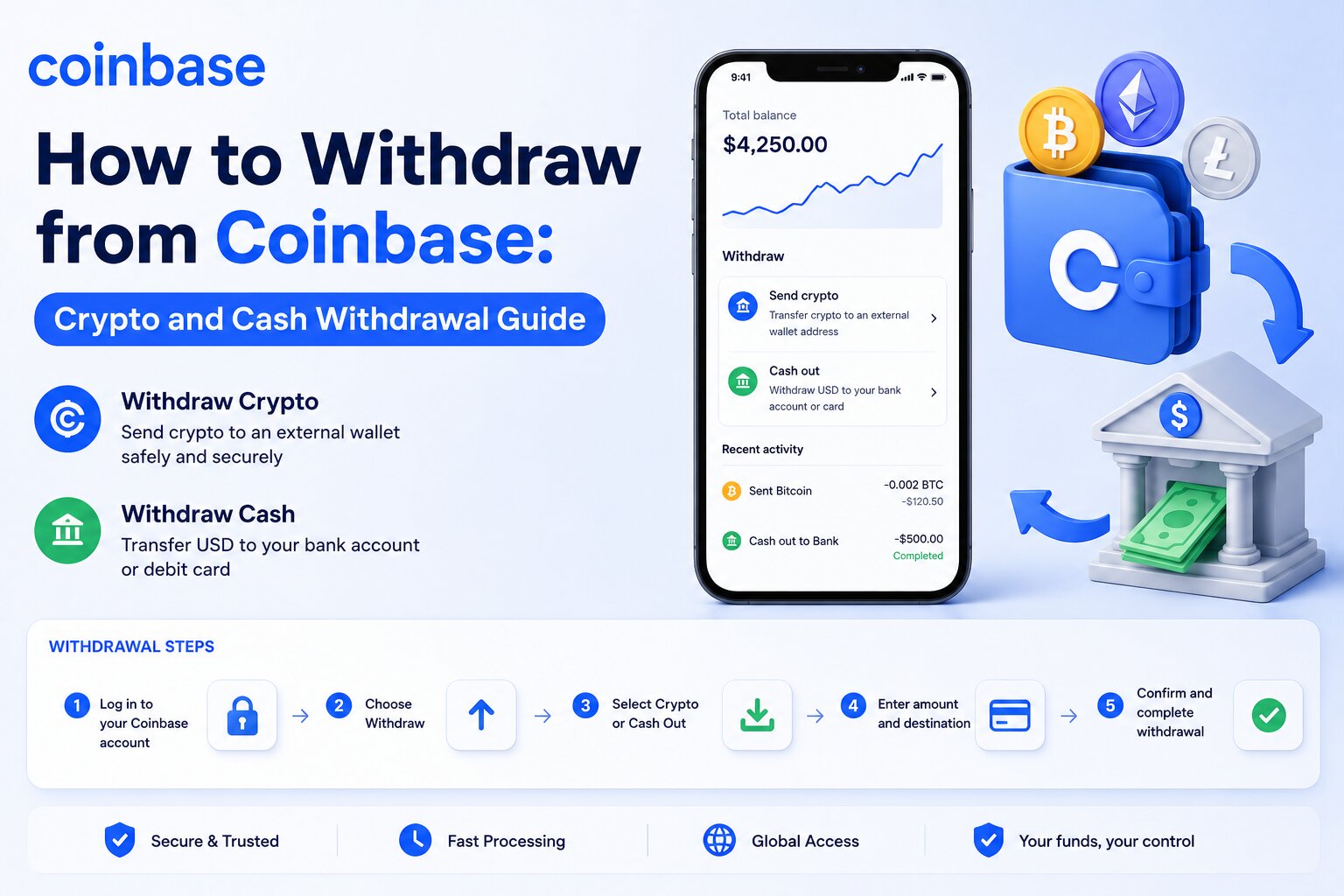
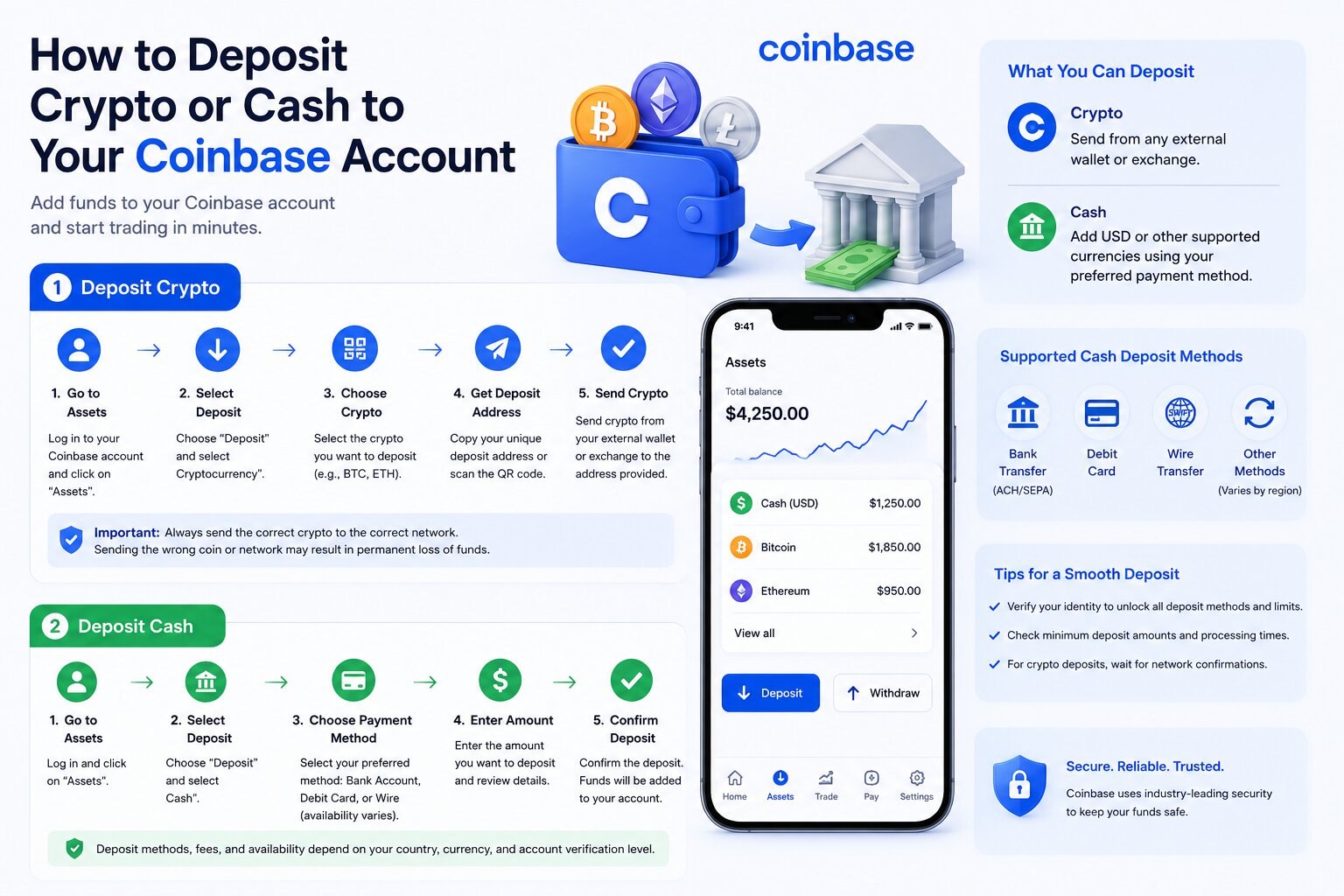
Withdrawing from Coinbase means transferring either cryptocurrency to another wallet or converting your crypto into cash and sending it to a supported payment method. Coinbase supports multiple withdrawal options, including external crypto wallets, bank accounts, PayPal, and eligible debit cards. The processing time, withdrawal limits, and fees depend on the withdrawal method, blockchain network, account verification status, and your region.
Crypto withdrawals require a wallet address and blockchain confirmation, while cash withdrawals use traditional payment networks such as ACH, SEPA, or supported local banking systems. Understanding each withdrawal method helps you avoid unnecessary fees, delays, and transaction errors.
Whether you want to move Bitcoin to a hardware wallet or transfer your Coinbase balance to your bank account, this guide explains every step, the available withdrawal methods, common issues, and security best practices.
How Do You Withdraw Money or Crypto from Coinbase?
Coinbase allows users to withdraw both cryptocurrency and fiat currency. The withdrawal process differs depending on whether you are transferring digital assets to another wallet or cashing out to a payment method such as a bank account or PayPal.
Before starting any withdrawal, Coinbase verifies your account status, available balance, and security settings. Completing identity verification and enabling two-factor authentication (2FA) reduces the risk of delays caused by security reviews.
What Is a Coinbase Withdrawal?
A Coinbase withdrawal transfers assets from your Coinbase account to another destination.
A withdrawal can involve:
Sending cryptocurrency to an external wallet.
Cashing out cryptocurrency into fiat currency.
Transferring cash to a linked bank account.
Sending funds to PayPal or an eligible debit card where supported.
Each withdrawal type follows different processing rules. Cryptocurrency withdrawals depend on blockchain confirmations, while cash withdrawals depend on banking networks and payment providers.
What Can You Withdraw From Coinbase?
Coinbase supports several asset types for withdrawal.
Cryptocurrency
You can withdraw supported cryptocurrencies such as:
Bitcoin (BTC)
Ethereum (ETH)
Solana (SOL)
Litecoin (LTC)
XRP
USDC
Other supported digital assets
The destination can be:
Coinbase Wallet
Hardware wallet
Software wallet
Another cryptocurrency exchange
Any compatible external wallet
Cash Balance
You can convert cryptocurrency into your local fiat currency and withdraw the available cash balance.
Supported currencies vary by country and may include:
US Dollar (USD)
Euro (EUR)
British Pound (GBP)
Canadian Dollar (CAD)
Availability depends on your location and supported payment methods.
Rewards
Some users receive staking rewards or promotional rewards. Rewards become available for withdrawal after Coinbase credits them to your available balance. Certain assets may have holding periods before they become transferable.
What You Need Before Withdrawing
Preparing your account before initiating a withdrawal reduces the chance of failed transactions or security holds.
Available Balance
Only your available balance can be withdrawn.
Funds may become temporarily unavailable because of:
Recent bank deposits
Pending cryptocurrency purchases
Security holds
Unsettled transactions
Check your available balance before starting a withdrawal.
Identity Verification
Coinbase requires identity verification to comply with financial regulations.
Depending on your region, verification may require:
Government-issued identification
Personal information
Address verification
Selfie verification
Verified accounts usually receive higher withdrawal limits.
Two-Factor Authentication (2FA)
Two-factor authentication protects your account from unauthorized withdrawals.
Coinbase supports:
Authenticator apps
Security keys
SMS verification in supported regions
Authenticator applications generally provide stronger protection than SMS verification.
Verified Payment Method
Cash withdrawals require a verified payment method.
Supported options may include:
Bank account
PayPal
Eligible debit card
Local payment services
Verify your payment method before requesting a withdrawal to avoid delays.
How to Withdraw Cryptocurrency From Coinbase
Sending cryptocurrency from Coinbase is straightforward when you use the correct wallet address and blockchain network.
Every crypto withdrawal creates a blockchain transaction. Once Coinbase broadcasts the transaction to the network, it usually cannot be reversed.
Step-by-Step Process
Follow these steps to withdraw cryptocurrency from Coinbase.
Step 1: Sign In to Coinbase
Log in to your Coinbase account through the official website or mobile application.
Complete any required two-factor authentication before continuing.
Step 2: Select Send
Navigate to your asset portfolio.
Choose the cryptocurrency you want to transfer, then select Send.
Step 3: Choose the Cryptocurrency
Select the digital asset you want to withdraw.
Examples include:
Bitcoin
Ethereum
Solana
USDC
Ensure the receiving wallet supports the selected cryptocurrency.
Step 4: Enter the Wallet Address
Paste the recipient’s wallet address carefully.
Many wallets also allow you to scan a QR code instead of manually entering the address.
Never type long wallet addresses manually unless necessary.
Step 5: Verify the Blockchain Network
Choose the correct blockchain network before sending funds.
For example:
USDC may exist on Ethereum, Base, Solana, Polygon, and other supported networks.
ETH should be sent over a compatible Ethereum network.
BTC should be sent only through the Bitcoin network unless the recipient specifically supports another solution.
Sending cryptocurrency through the wrong blockchain network may result in permanent loss of funds.
Step 6: Review Network Fees
Coinbase displays the estimated blockchain network fee before confirmation.
Network fees are paid to blockchain validators or miners—not directly to Coinbase.
The fee varies depending on:
Blockchain congestion
Cryptocurrency
Transaction size
Network demand
Higher network activity usually increases transaction costs.
Step 7: Confirm the Transaction
Review all transaction details carefully.
Verify:
Wallet address
Cryptocurrency
Amount
Network
Estimated fee
After confirming, Coinbase broadcasts the transaction to the blockchain.
You will receive a transaction ID (TxID) once the transfer has been submitted.
How to Choose the Correct Blockchain Network
Selecting the correct blockchain network is one of the most important steps in any crypto withdrawal.
Always confirm that:
The receiving wallet supports the selected network.
The cryptocurrency matches the destination wallet.
Both sender and recipient use the same blockchain where required.
For example:
Cryptocurrency
Common Networks
Bitcoin
Bitcoin
Ethereum
Ethereum
USDC
Ethereum, Base, Solana, Polygon
USDT
Ethereum, Tron, Solana, Polygon
Polygon
Polygon
Always verify network compatibility with the receiving wallet before confirming the withdrawal.
How to Verify a Wallet Address
A wallet address identifies the destination for your cryptocurrency.
Before sending funds:
Copy the address directly from the recipient.
Compare the first and last characters after pasting.
Scan for clipboard malware that may replace copied addresses.
Send a small test transaction before transferring a large amount.
Confirm the address supports the selected cryptocurrency.
Hardware wallets and trusted wallet applications often display the destination address for additional verification.
How to Track a Crypto Withdrawal Using the Transaction ID
Every blockchain withdrawal receives a unique transaction ID (TxID).
You can use this identifier to monitor your transaction on a blockchain explorer.
A blockchain explorer displays:
Transaction status
Number of confirmations
Block height
Network fee
Sender address
Recipient address
Timestamp
If Coinbase marks the withdrawal as completed but the recipient has not received the funds, the TxID helps determine whether the blockchain is still processing confirmations or whether the receiving platform is waiting for additional confirmations before crediting the balance.
The next section explains how to withdraw cash from Coinbase, including bank transfers, PayPal withdrawals, eligible debit cards, and Instant Cash Out.
How to Withdraw Cash From Coinbase
Cash withdrawals allow you to convert cryptocurrency into fiat currency and transfer the available balance to a supported payment method. Coinbase supports several withdrawal options, including bank accounts, PayPal, eligible debit cards, and local payment networks in selected countries.
Before requesting a cash withdrawal, sell your cryptocurrency if your balance is still held as digital assets. Only your available cash balance can be transferred to a payment method.
Withdraw to a Bank Account
A bank account is the most common withdrawal method for Coinbase users. It typically offers lower fees than instant withdrawal options, although processing times are longer.
ACH Transfer
ACH (Automated Clearing House) transfers are available to eligible customers in the United States.
ACH transfers offer:
Low or no withdrawal fees in many cases
Direct transfers to a linked U.S. bank account
Secure electronic bank processing
Processing times that typically range from 1 to 5 business days
Banks may require additional time before funds appear in your available balance.
SEPA Transfer
SEPA (Single Euro Payments Area) transfers allow customers in participating European countries to withdraw euros to supported bank accounts.
Benefits include:
Transfers in EUR
Low transaction costs
High availability across Europe
Standard banking security
Most SEPA withdrawals are completed within one to two business days, although individual banks may require additional processing time.
Local Banking Options
Coinbase also supports local payment methods in selected countries.
Depending on your region, available options may include:
Faster Payments (United Kingdom)
Interac (Canada)
Local bank transfer systems
Other regional banking partners
Available withdrawal methods depend on your country and verified account.
Withdraw Using PayPal
PayPal provides a convenient withdrawal option for eligible Coinbase customers.
To withdraw using PayPal:
Open your Coinbase account.
Select Assets.
Choose your cash balance.
Select Cash Out.
Choose PayPal as the withdrawal destination.
Review the amount and applicable fees.
Confirm the transaction.
PayPal withdrawals generally process faster than standard bank transfers. Availability varies by country.
Withdraw to an Eligible Debit Card
Eligible Visa and Mastercard debit cards support instant cash withdrawals in supported regions.
To withdraw to a debit card:
Verify your debit card.
Select your cash balance.
Choose Cash Out.
Select your debit card.
Enter the withdrawal amount.
Review the estimated fee.
Confirm the withdrawal.
Debit card withdrawals usually complete within minutes, although some banks may require additional processing time.
How Instant Cash Out Works
Instant Cash Out sends available cash directly to an eligible debit card or linked payment method instead of using standard bank processing.
The process works as follows:
Coinbase verifies your available balance.
The payment network authorizes the transfer.
Your bank receives the transaction.
Funds usually arrive within minutes.
Instant Cash Out offers convenience but usually carries higher fees than standard bank transfers.
Which Withdrawal Methods Does Coinbase Support?
Coinbase supports several withdrawal methods based on your country, local regulations, and verified payment methods.
Each method differs in speed, fees, availability, and daily limits.
Bank Account
Bank transfers remain the preferred option for larger withdrawals.
Advantages include:
Lower fees
Higher withdrawal limits
Direct deposits
Broad availability
Standard processing times vary according to the banking network.
PayPal
PayPal offers faster access to funds than many traditional bank transfers.
It is suitable for:
Small withdrawals
Frequent withdrawals
Users who already manage funds through PayPal
PayPal availability depends on your country.
Debit Card
Eligible debit cards provide one of the fastest withdrawal methods available on Coinbase.
This option is suitable when:
Immediate access to cash is required.
Supported by your issuing bank.
Higher convenience outweighs the additional fee.
Daily limits may apply.
Coinbase Wallet vs External Wallet
Crypto withdrawals differ from cash withdrawals.
Coinbase Wallet stores cryptocurrency under your control, while external wallets include hardware wallets, software wallets, and wallets provided by other exchanges.
Withdrawal Method
Availability
Typical Speed
Fees
Best For
Bank Account
Most supported countries
1–5 business days
Usually low
Large cash withdrawals
PayPal
Selected countries
Minutes to 1 day
Moderate
Fast cash access
Debit Card
Eligible regions
Minutes
Higher
Instant cash withdrawals
Coinbase Wallet
Supported cryptocurrencies
Blockchain dependent
Network fee
Self-custody
External Wallet
Supported cryptocurrencies
Blockchain dependent
Network fee
Long-term crypto storage
What Are Coinbase Withdrawal Fees?
Coinbase charges different fees depending on the withdrawal method, payment provider, and blockchain network.
Some fees are collected by Coinbase, while others are charged by blockchain validators or banking partners.
Always review the fee estimate before confirming a withdrawal.
Network Fees
Network fees apply only to cryptocurrency withdrawals.
These fees compensate blockchain validators or miners for processing transactions.
Network fees vary according to:
Blockchain congestion
Transaction size
Cryptocurrency
Current network demand
Coinbase does not control blockchain network fees.
Withdrawal Fees
Coinbase may charge service fees depending on:
Withdrawal method
Country
Currency
Payment provider
Fee structures may change over time, making it important to review the displayed estimate before confirming a transaction.
Bank Transfer Fees
Many standard bank withdrawals carry low or no Coinbase fee.
Your bank may still charge:
Incoming transfer fees
Currency conversion fees
International banking fees
Always check your financial institution’s fee schedule.
Instant Withdrawal Fees
Instant Cash Out typically costs more than standard withdrawals because payment networks process transactions immediately.
Fees depend on:
Withdrawal amount
Region
Payment method
Card issuer
The applicable fee appears before you authorize the withdrawal.
Withdrawal Type
Possible Fee
Who Charges It
Crypto Withdrawal
Blockchain network fee
Blockchain validators
Bank Transfer
Low or none
Coinbase and/or bank
PayPal
Service fee may apply
Coinbase or PayPal
Debit Card
Instant withdrawal fee
Coinbase
Currency Conversion
Exchange spread or conversion fee
Coinbase
What Are Coinbase Withdrawal Limits?
Coinbase applies withdrawal limits to protect customer accounts, reduce fraud, and comply with financial regulations.
Limits differ between cryptocurrency withdrawals and fiat withdrawals.
Your account dashboard displays your current withdrawal limit.
Daily Withdrawal Limits
Most verified accounts receive daily withdrawal limits.
The available amount depends on:
Verification level
Account history
Security settings
Region
Higher verification levels often qualify for increased limits.
Crypto Withdrawal Limits
Cryptocurrency withdrawal limits vary according to:
Asset type
Account verification
Risk monitoring
Recent account activity
Some withdrawals may require additional security reviews before Coinbase broadcasts the transaction.
Cash Withdrawal Limits
Cash withdrawal limits depend on:
Linked payment method
Banking partner
Country
Local regulations
Instant Cash Out limits may differ from standard bank transfer limits.
Factors That Affect Limits
Several factors influence how much you can withdraw from Coinbase.
Account Age
Older accounts with consistent activity often experience fewer restrictions than newly created accounts.
Identity Verification
Completing identity verification increases trust and usually unlocks higher withdrawal limits.
Account Security
Accounts protected with strong security measures such as two-factor authentication and verified devices may qualify for higher limits and fewer security reviews.
Region
Financial regulations differ between countries.
As a result, supported withdrawal methods, daily limits, payment providers, and compliance requirements vary depending on your location.
The next section explains how long Coinbase withdrawals take, why transactions remain pending, and how to troubleshoot delayed transfers.
How Long Does a Coinbase Withdrawal Take?
Coinbase withdrawal times vary depending on the withdrawal method, payment provider, blockchain network, and account verification status. Cryptocurrency withdrawals depend on blockchain confirmations, while cash withdrawals rely on banking and payment networks.
Most crypto withdrawals begin processing within minutes after Coinbase broadcasts the transaction to the blockchain. However, the total time until the recipient receives the funds depends on network congestion and the number of confirmations required by the receiving wallet or exchange.
Cash withdrawals generally take longer because banks and payment providers process transactions during business hours. Instant withdrawal options, such as eligible debit cards and PayPal in supported regions, can deliver funds much faster than standard bank transfers.
The table below compares the typical processing times for each withdrawal method.
Withdrawal Method
Estimated Processing Time
Cryptocurrency
A few minutes to over an hour, depending on blockchain confirmations
ACH Bank Transfer
1–5 business days
SEPA Bank Transfer
1–2 business days
PayPal
Usually within minutes to 24 hours
Eligible Debit Card (Instant Cash Out)
Usually within minutes
Keep in mind that these are estimated timeframes. Actual processing times may vary due to network activity, banking schedules, security reviews, or regional payment processing.
Crypto Processing Times
Cryptocurrency withdrawals are processed through blockchain networks rather than traditional financial institutions. Once Coinbase broadcasts the transaction, validators or miners confirm it before the funds become available in the recipient’s wallet.
The confirmation time depends on several factors, including:
The blockchain network used
Current network congestion
Transaction fee priority
The number of confirmations required by the receiving platform
For example, Bitcoin transactions may require multiple block confirmations before an exchange credits the deposit, while some newer blockchain networks can confirm transactions much faster.
You can monitor the progress of your withdrawal using the Transaction ID (TxID). Enter the TxID into the appropriate blockchain explorer to view:
Transaction status
Confirmation count
Block height
Network fee
Timestamp
Sender and recipient wallet addresses
If Coinbase marks the withdrawal as completed but the receiving wallet has not credited the funds, the blockchain explorer can help determine whether additional confirmations are still required.
ACH Processing Times
ACH transfers are commonly used for U.S. dollar withdrawals to linked bank accounts in the United States.
Most ACH withdrawals arrive within 1 to 5 business days. The exact timing depends on:
Your bank’s processing schedule
Weekends and public holidays
Internal banking reviews
Transaction cutoff times
Although Coinbase may submit the transfer on the same day, banks typically process ACH transactions only during business days.
SEPA Processing Times
Customers in supported European countries can withdraw euros through the Single Euro Payments Area (SEPA).
Most SEPA withdrawals are completed within 1 to 2 business days, although some banks may require additional processing time.
Factors that affect SEPA transfer speed include:
Banking hours
National holidays
Verification requirements
Local banking procedures
International banking delays are uncommon within the SEPA network but may still occur in certain situations.
PayPal Withdrawal Times
PayPal offers one of the fastest cash withdrawal methods available on Coinbase in supported regions.
Many withdrawals are completed within minutes after confirmation. However, processing may take up to 24 hours depending on:
PayPal account status
Security checks
Regional payment processing
Temporary service interruptions
If the transfer is marked as completed in Coinbase but is not visible in PayPal, check your PayPal transaction history or contact PayPal Support for additional information.
Debit Card Processing Times
Eligible Visa and Mastercard debit cards support Instant Cash Out.
Most debit card withdrawals are completed within a few minutes. However, your bank or card issuer may require additional time before making the funds available.
Processing speed depends on:
Card issuer
Payment network availability
Fraud prevention checks
Local banking infrastructure
If an instant withdrawal takes longer than expected, verify the transaction status in Coinbase and contact your card issuer if the transfer has already been processed.
Factors That Can Delay a Coinbase Withdrawal
Although many withdrawals are processed quickly, several factors can increase the total processing time.
Blockchain Network Congestion
Public blockchains process transactions based on network demand. During periods of heavy activity, pending transactions may wait longer before validators include them in a block.
Higher network congestion often results in:
Longer confirmation times
Increased network fees
Delayed wallet deposits
Security Reviews
Coinbase continuously monitors withdrawals for suspicious activity. A transaction may be temporarily delayed if the platform detects unusual behavior, such as:
Logging in from a new device
Withdrawing a significantly larger amount than usual
Changes to security settings
Access from an unfamiliar location
These reviews help protect customer accounts from unauthorized withdrawals.
Identity Verification
Incomplete identity verification can prevent Coinbase from processing certain withdrawals.
If additional verification is required, Coinbase may request:
Banks, PayPal, and debit card issuers each operate their own payment systems. Even after Coinbase completes a withdrawal request, the receiving institution may require additional processing time before the funds become available.
Regional Banking Schedules
Weekends, public holidays, and local banking hours can delay cash withdrawals. While cryptocurrency networks operate continuously, traditional financial institutions generally process payments only during business hours.
How to Check the Status of Your Withdrawal
Coinbase allows you to monitor every withdrawal directly from your account.
To check the status:
Sign in to Coinbase.
Open Assets or Transaction History.
Select the withdrawal.
Review the current status.
Common status updates include:
Pending – Coinbase or the payment network is still processing the request.
Processing – The withdrawal has been initiated and is moving through the payment or blockchain network.
Completed – Coinbase has successfully sent the funds.
Failed – The withdrawal could not be completed and may require further action.
For cryptocurrency withdrawals, you can also use the Transaction ID (TxID) to track confirmations on a blockchain explorer. This provides real-time visibility into the transaction’s progress after it leaves Coinbase.
The next section explains why a Coinbase withdrawal may remain pending, the most common causes of delays, and the steps you can take to resolve them.
Frequently Asked Questions
How do I withdraw money from Coinbase to my bank account?
To withdraw money from Coinbase to your bank account, sell your cryptocurrency (if necessary), go to Assets, select Cash Out, choose your linked bank account, enter the amount, review the fees, and confirm the withdrawal. Processing time depends on your banking method, such as ACH or SEPA.
How do I withdraw crypto from Coinbase to another wallet?
Sign in to Coinbase, select Send, choose the cryptocurrency, enter the recipient’s wallet address, verify the correct blockchain network, review the network fee, and confirm the transaction. Always ensure the wallet supports the selected cryptocurrency and network before sending funds.
Why can’t I withdraw my funds from Coinbase?
You may be unable to withdraw funds because of a security hold, pending bank deposit, incomplete identity verification, insufficient available balance, account restrictions, or exceeding your withdrawal limit. Review your account notifications to identify the specific reason.
How long does a Coinbase withdrawal take?
Withdrawal times vary by method. Cryptocurrency withdrawals usually depend on blockchain confirmations, while bank transfers can take 1–5 business days. PayPal and eligible debit card withdrawals are often completed within minutes, depending on your region and payment provider.
Does Coinbase charge withdrawal fees?
Yes. Coinbase may charge withdrawal fees depending on the payment method. Cryptocurrency withdrawals also require blockchain network fees, which are paid to validators or miners rather than Coinbase. The estimated fee is displayed before you confirm the transaction.
What is the minimum withdrawal amount on Coinbase?
The minimum withdrawal amount depends on the cryptocurrency, fiat currency, and withdrawal method. Coinbase displays the minimum amount during the withdrawal process. Some payment providers or blockchain networks may also impose their own minimum limits.
How do I check my Coinbase withdrawal status?
Open your Coinbase account, navigate to Assets or Transaction History, and select the withdrawal. The status may show as Pending, Processing, Completed, or Failed. For cryptocurrency withdrawals, use the Transaction ID (TxID) to track confirmations on a blockchain explorer.
Can I cancel a Coinbase withdrawal?
A cash withdrawal may be canceled only if Coinbase has not yet processed the request. Cryptocurrency withdrawals generally cannot be canceled once they have been broadcast to the blockchain because blockchain transactions are irreversible.
Why is my crypto withdrawal still pending?
A crypto withdrawal may remain pending due to blockchain congestion, low network priority, security reviews, or the receiving platform waiting for additional confirmations. You can monitor the transaction using the blockchain Transaction ID (TxID).
Is Coinbase Instant Cash Out available in every country?
No. Instant Cash Out is only available in supported countries and for eligible payment methods. Availability depends on your region, local regulations, and whether you have a supported debit card or payment provider linked to your Coinbase account.
How do Coinbase withdrawal limits work?
Withdrawal limits are based on several factors, including your identity verification level, account age, security settings, payment method, transaction history, and country of residence. You can view your current limits in your Coinbase account settings.
What happens if I send crypto to the wrong wallet address?
If you send cryptocurrency to the wrong wallet address, the transaction usually cannot be reversed after it is confirmed on the blockchain. Always verify the recipient’s wallet address and blockchain network before confirming a transfer. Sending a small test transaction is recommended when transferring large amounts.
Can I withdraw cryptocurrency directly to Coinbase Wallet?
Yes. You can transfer supported cryptocurrencies from your Coinbase account to Coinbase Wallet by selecting Send, choosing the asset, and entering your Coinbase Wallet address. Make sure the selected blockchain network matches the receiving wallet.
Why is my available balance lower than my account balance?
Your total account balance may include funds that are subject to a temporary hold, pending deposits, open orders, or recently purchased cryptocurrency. Only your available balance can be withdrawn.
Is Coinbase Wallet the same as Coinbase?
No. Coinbase is a centralized cryptocurrency exchange that manages your exchange account, while Coinbase Wallet is a self-custody wallet that gives you control of your private keys and digital assets.
How can I reduce Coinbase withdrawal fees?
You can reduce withdrawal costs by using standard bank transfers instead of instant withdrawals, avoiding periods of high blockchain congestion, selecting an appropriate network when supported, and reviewing the estimated fee before confirming the transaction.